Smart Lists

Smart Lists are saved, dynamic views of your tasks and habits, filtered, sorted, and grouped exactly the way you want. Instead of manually searching through all your tasks, you define the rules once and Griply keeps the list updated in real time.
Think of a Smart List as a saved search with superpowers: combine filters across life areas, goals, tags, priority, deadline, duration, and type to create a view that always shows exactly what you need.
Smart Lists work on Desktop, web, iOS, and Android. You can create and edit them on any platform, and they sync across all of them.
Note: The free plan includes three Smart Lists. Premium removes the limit.
Creating a Smart List
To create a new Smart List:
Go to All Tasks, in the sidebar on Desktop or under To do on iOS and Android.
Open the filter panel and apply the filters you want.
Press Save as Smart List at the bottom of the filter panel.
Your Smart List now appears nested under All Tasks.
On Desktop you can also start one from the navigation directly: unfold the All Tasks menu and pick Create smart list. Press S to jump to a Smart List from anywhere.
Each Smart List shows a live task count so you always know what's waiting at a glance.
Each List Remembers How You Left It
A Smart List saves more than its filters. The grouping, the sorting, and whether Show completed tasks is switched on are all stored per list and come back the next time you open it.
That means a "Deep Work" list grouped by goal and a "Quick Wins" list sorted by duration each keep their own arrangement, instead of one overwriting the other.
Available Filters
Smart Lists support the full Griply filter set. You can combine any number of these:
Filter | What it does |
|---|---|
Life Area | Show only tasks connected to specific life areas, including tasks from goals linked to those areas |
Goal / Subgoal | Show only tasks linked to specific goals or subgoals |
Active Goals | Show tasks from goals currently in progress (start date ≤ today ≤ deadline). |
Tag | Show tasks with one or more tags |
Date | Filter by planned date. Use dynamic ranges like This Week or This Month, a custom range, or filter for tasks with no date set |
Deadline | Filter by deadline window, or find tasks with no deadline |
Priority | Filter by High, Medium, Low, or No Priority |
Duration | Filter by estimated time, e.g. under 30 min for quick wins or over 2 hours for deep work |
Type | Show tasks only, habits only, or both |
For a full breakdown of each filter type, see Filters.
Plan Your Week Using Smart Lists
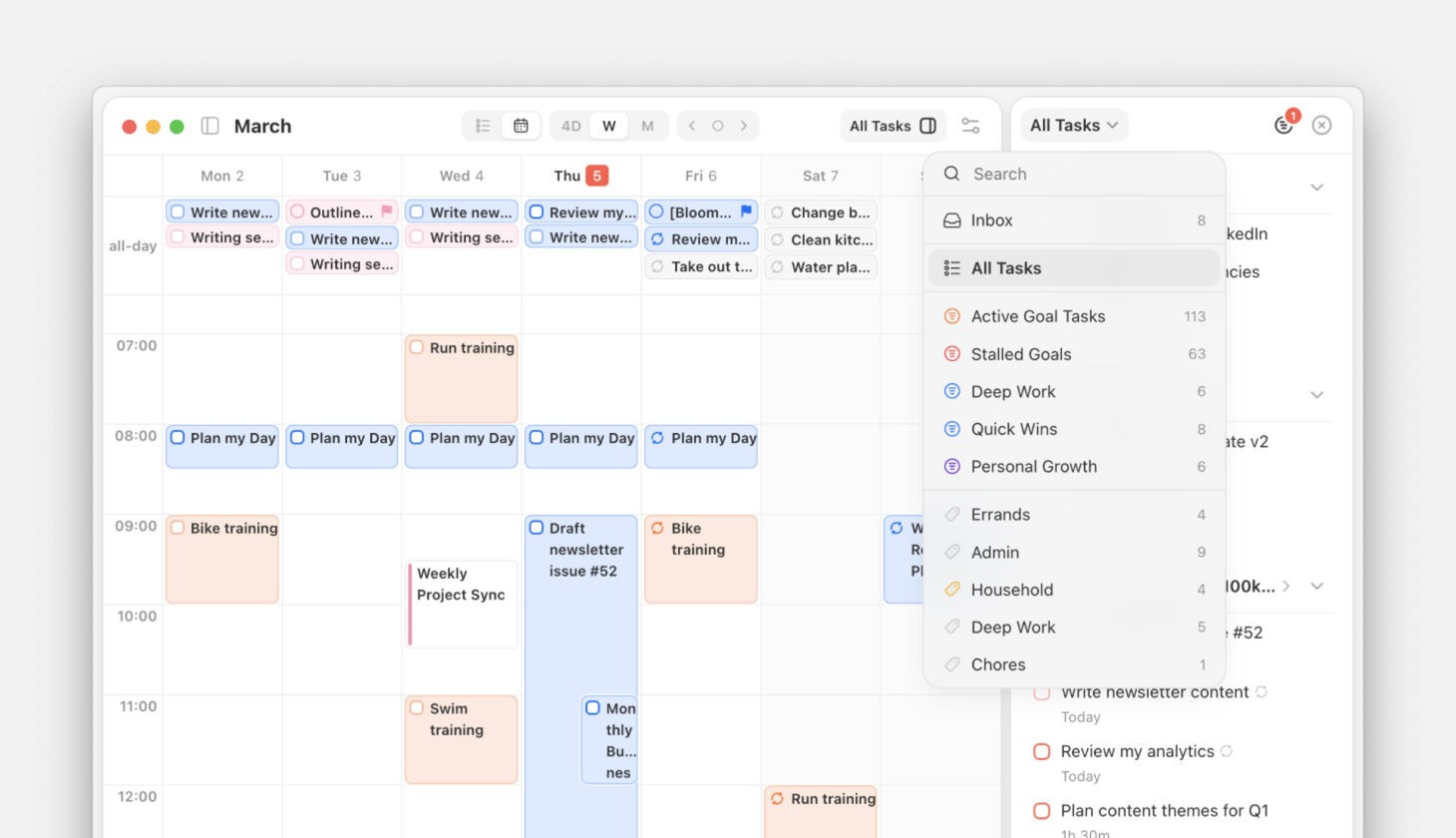
Use Smart Lists to speed up your daily and weekly planning: pull up a list like "Deep Work" or "This Week's Priorities" and drag tasks onto the Upcoming calendar with intention.
How to switch the list source:
On the Upcoming page in Calendar view, tap the list selector at the top of the right column (shows "All Tasks" by default).
Or press S to open the selector.
Choose from Inbox, All Tasks, any Smart List, any Tag, or Habits.
When you pick a Smart List as the source, the panel's own filter controls switch to that list's saved filter, sort, and grouping. The right-hand list immediately reflects the list you chose rather than keeping the previous source's setup.
This part of Smart Lists is Desktop only, since the Upcoming calendar split view is Desktop only.
Smart List to Get You Started
The real power of Smart Lists emerges when you combine filters to answer a specific question about your goals and biggest priorities. Use them to stay on top of what matters, plan with intention, and focus on what actually moves the needle.
🎯 Strategic Focus
"This Week's Priorities": What actually matters this week?
Filter:
Date: This Week+Priority: HighSort:
Date
"Active Goal Tasks": Tasks tied to goals I'm actively working on.
Filter:
Active Goals: This MonthGroup:
GoalSort:
Date
"Stalled Goals": Active goals with no tasks planned yet.
Filter:
Active Goals: This Month+Date: No DateSort:
Date
⚡ Daily Execution
"Quick Wins": Tasks under 30 minutes for filling small gaps in your day.
Filter:
Duration: < 30 min+Type: TaskSort:
Priority
"Deep Work Block": Long, high-focus tasks that need a proper time block.
Filter:
Duration: > 1 hour+Priority: High, MediumSort:
Date
"Today's Unplanned": Tasks with a deadline today or earlier that aren't yet on the calendar.
Filter:
Date: Today+Date: No DateSort:
Priority
⏰ Deadlines & Urgency
"Due This Week": Everything with a deadline in the next 7 days.
Filter:
Deadline: This WeekSort:
Deadline
"Overdue": Anything past its deadline that still needs attention.
Filter:
Deadline: OverdueSort:
Deadline
"Upcoming Deadlines": A rolling 2-week deadline radar for proactive planning.
Filter:
Deadline: Next 14 daysSort:
Deadline
🌱 Life Balance
"My Health & Energy": Habits and tasks tied to your health life area.
Filter:
Life Area: Sport & HealthSort:
Date
"Financial Moves": Tasks connected to your Money & Finance life area that are waiting to be planned.
Filter:
Life Area: Money & Finance+Date: No DateSort:
Date
"Personal Growth": Learning, reading, and self-improvement tasks, often the first to get deprioritised.
Filter:
Tag: LearningSort:
Date
🔍 Triage & Weekly Review
"Inbox & Unlinked": Tasks that haven't been connected to a goal yet. Good for your weekly review "process" pass.
Filter:
Goal: No goal+Life Area: No life areaSort:
Created Date
"High Priority, No Date": Important tasks that haven't been planned yet.
Filter:
Priority: High+Date: No DateSort:
Created Date
"This Week's Habits": All habits scheduled for this week.
Filter:
Type: Habit+Date: This WeekGroup:
Date
🧩 Context & Energy
"Short & Low Priority": Tasks for low-energy moments, like waiting rooms, commutes, or winding down.
Filter:
Duration: < 15 min+Tag: Low EnergyGroup:
Priority
"Work Sprint": All tasks linked to your Work & Career life area with a deadline this month.
Filter:
Life Area: Work & Career+Deadline: This MonthGroup:
Deadline
Best Practices
Start with 2 or 3 Smart Lists → Build lists for your most common questions first, then expand.
Use them in daily planning → Switch your Upcoming calendar column to a Smart List for more intentional time blocking.
Review and refine → During your weekly review, check if your Smart Lists still match your priorities. Adjust filters as your focus evolves.
Combine with tags → Smart Lists and tags work together. Tag tasks by context or energy, then build Smart Lists that pull in the right tasks for each moment.
Continue Reading
Didn’t find what you were looking for? We’re here to help! You can contact us anytime or ask your question in one of our communities.
