vs.
vs.
Things 3 is the Perfect Checklist. Griply is the Engine for Your Vision.
Things 3 is the Perfect Checklist. Griply is the Engine for Your Vision.
We admire Things 3. It is the gold standard for simple, polished lists.
But if you have outgrown simple checklists and need strategic depth like time blocking, real goals, and a vision that drives your daily tasks, it’s time to upgrade. Keep the simplicity you love. Gain the power you’re missing.
We admire Things 3. It is the gold standard for simple, polished lists.
But if you have outgrown simple checklists and need strategic depth like time blocking, real goals, and a vision that drives your daily tasks, it’s time to upgrade. Keep the simplicity you love. Gain the power you’re missing.
The Problem: The Glass Ceiling of Simplicity.
Things 3 is one of the most polished to-do lists available, and its focus on simplicity is admirable. But for people with long-term ambitions, that simplicity becomes a ceiling.
You are hitting two specific walls with Things 3:
Lack of Updates: Things 3 only received updates for new Apple hardware or OS features. Core workflow features users ask for, like calendar views or natural language input, are ignored.
Flat Lists: Things 3 is committed to linear lists. Without time blocking or calendar views, you can see what to do, but not when it realistically fits into your day.
High-performers often feel they lack discipline when they are overwhelmed by a messy system. But you don’t have a discipline problem, you have a tool problem. You haven't failed your list; you’ve simply outgrown it.
The Problem: The Glass Ceiling of Simplicity.
Things 3 is one of the most polished to-do lists available, and its focus on simplicity is admirable. But for people with long-term ambitions, that simplicity becomes a ceiling.
You are hitting two specific walls with Things 3:
Lack of Updates: Things 3 only received updates for new Apple hardware or OS features. Core workflow features users ask for, like calendar views or natural language input, are ignored.
Flat Lists: Things 3 is committed to linear lists. Without time blocking or calendar views, you can see what to do, but not when it realistically fits into your day.
High-performers often feel they lack discipline when they are overwhelmed by a messy system. But you don’t have a discipline problem, you have a tool problem. You haven't failed your list; you’ve simply outgrown it.
The Problem: The Glass Ceiling of Simplicity.
Things 3 is one of the most polished to-do lists available, and its focus on simplicity is admirable. But for people with long-term ambitions, that simplicity becomes a ceiling.
You are hitting two specific walls with Things 3:
Lack of Updates: Things 3 only received updates for new Apple hardware or OS features. Core workflow features users ask for, like calendar views or natural language input, are ignored.
Flat Lists: Things 3 is committed to linear lists. Without time blocking or calendar views, you can see what to do, but not when it realistically fits into your day.
High-performers often feel they lack discipline when they are overwhelmed by a messy system. But you don’t have a discipline problem, you have a tool problem. You haven't failed your list; you’ve simply outgrown it.
Flat Lists vs. Strategic Depth
Flat Lists vs. Strategic Depth
Griply is a System for Your Life's Ambitions
Griply is a System for Your Life's Ambitions
Things 3 organizes your life into folders called "Areas." Griply organizes your life into a hierarchy of purpose. We provide the strategic depth necessary to ensure your daily effort actually moves the needle on your future.
Things 3 organizes your life into folders called "Areas." Griply organizes your life into a hierarchy of purpose. We provide the strategic depth necessary to ensure your daily effort actually moves the needle on your future.
Strategic Depth
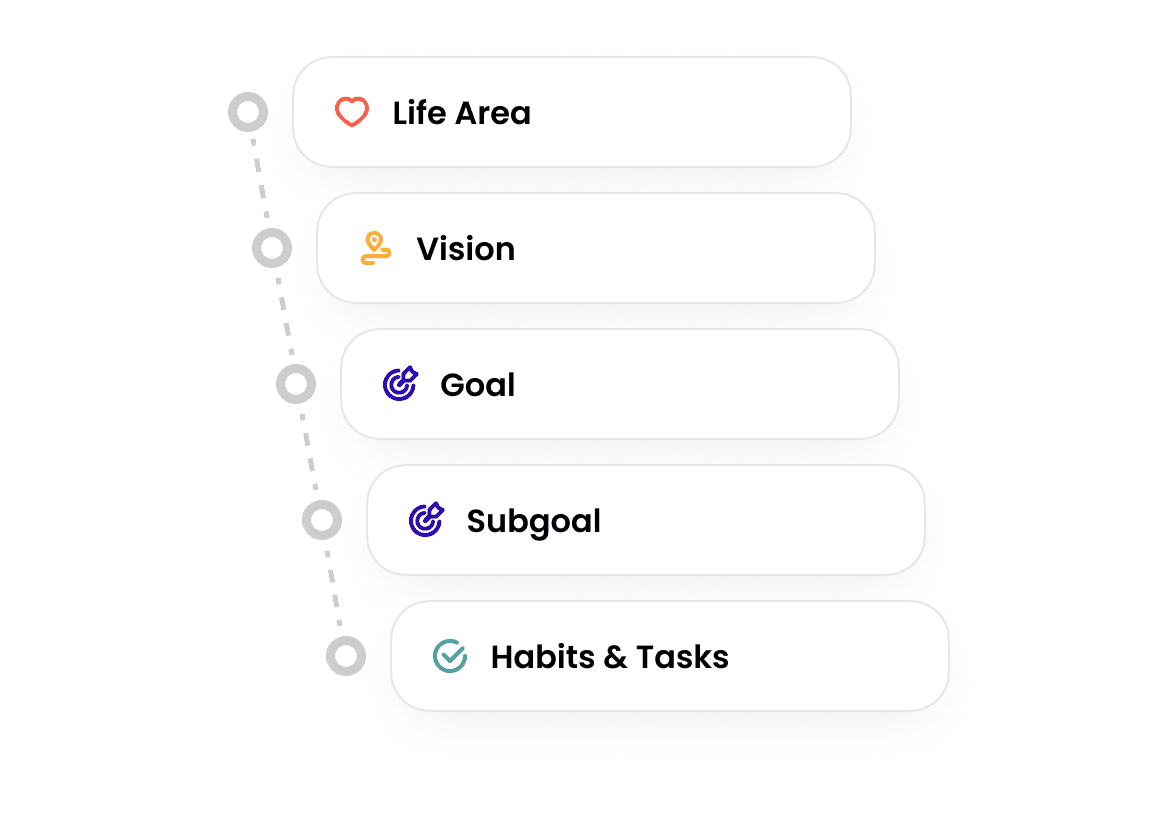
Real life is complex. Griply lets you nest Life Area > Vision > Goal > Subgoal > Task, giving you a map, not just a list.
Success Metrics
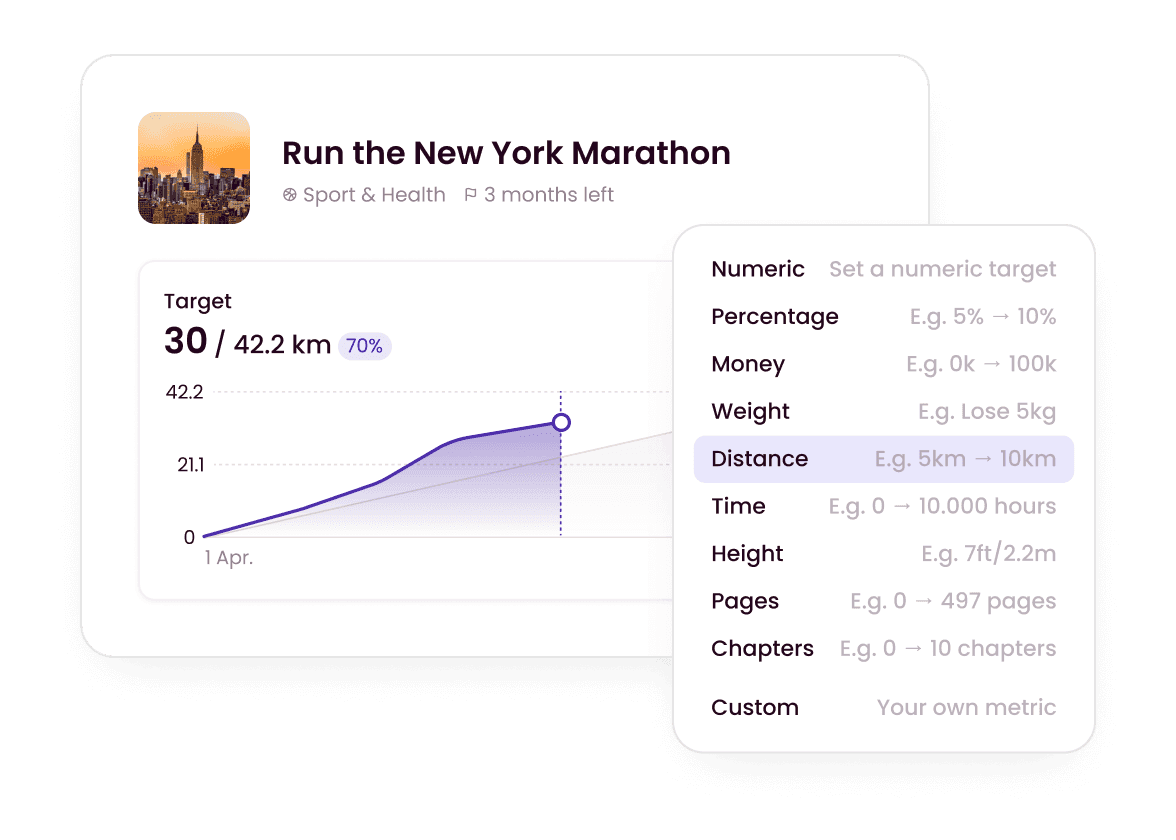
Don't just check a box. Track a number. Set a target (e.g., "$150k Revenue") and watch your progress bar fill based on outcomes.
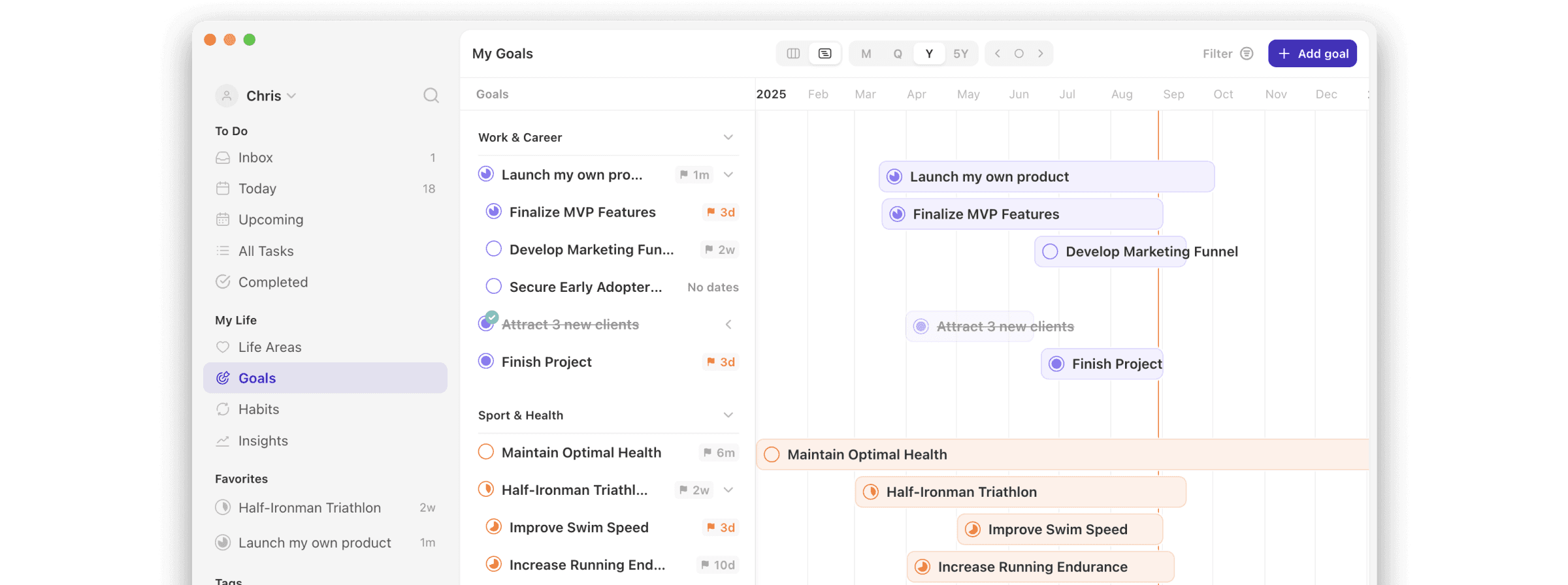
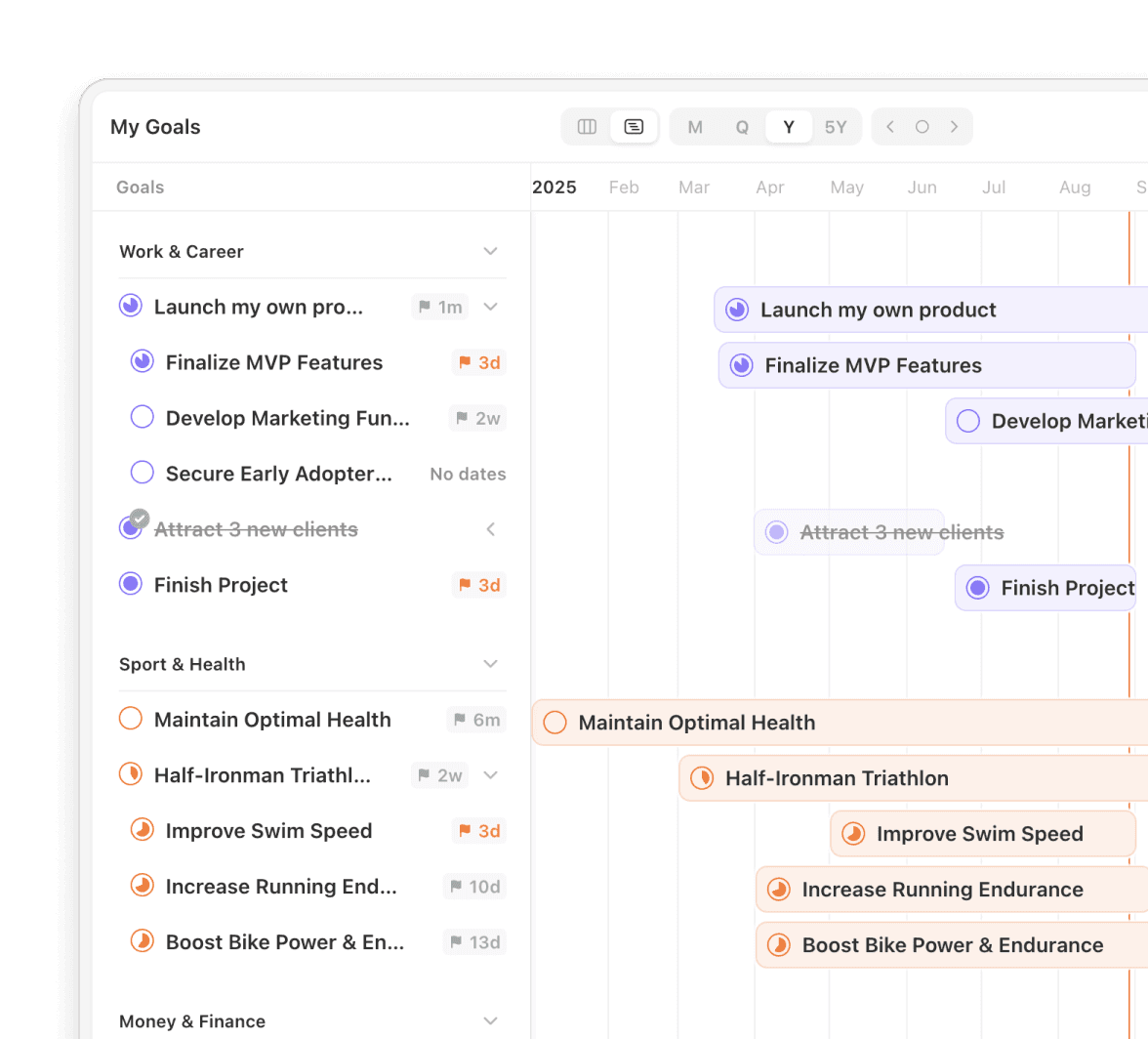
Goal Timeline
Stop guessing your capacity. Use our Goal Planner to visualize your goals on a timeline to ensure your vision is supported by a realistic roadmap.
Strategy is Nothing Without Execution
Strategy is Nothing Without Execution
Time Management
A List That Respects Time
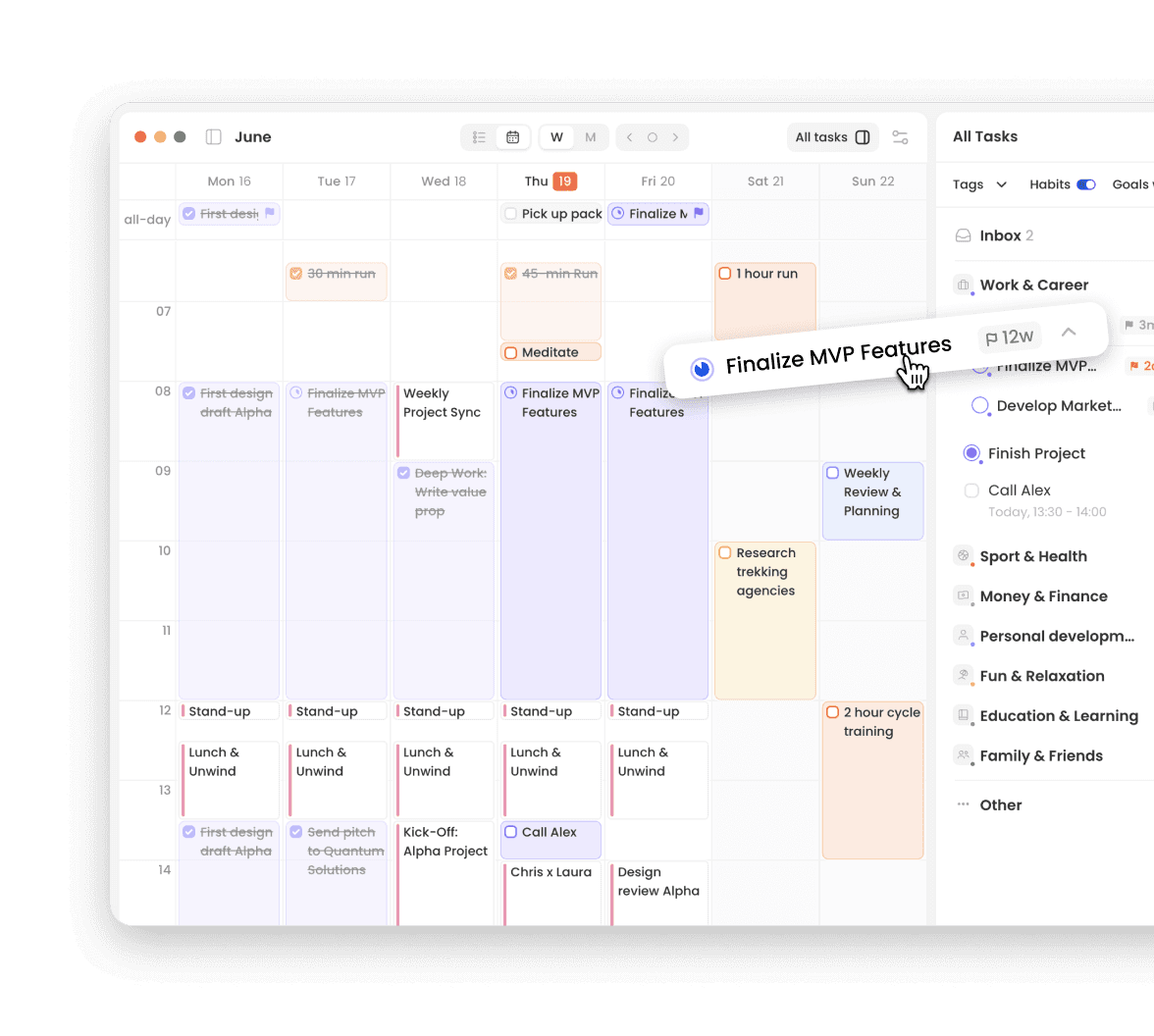
A beautiful list doesn’t protect your schedule; a strategic system does. Griply provides the tools to manage your time, not just your tasks.
Estimate Duration: See exactly how much work you’ve committed to.
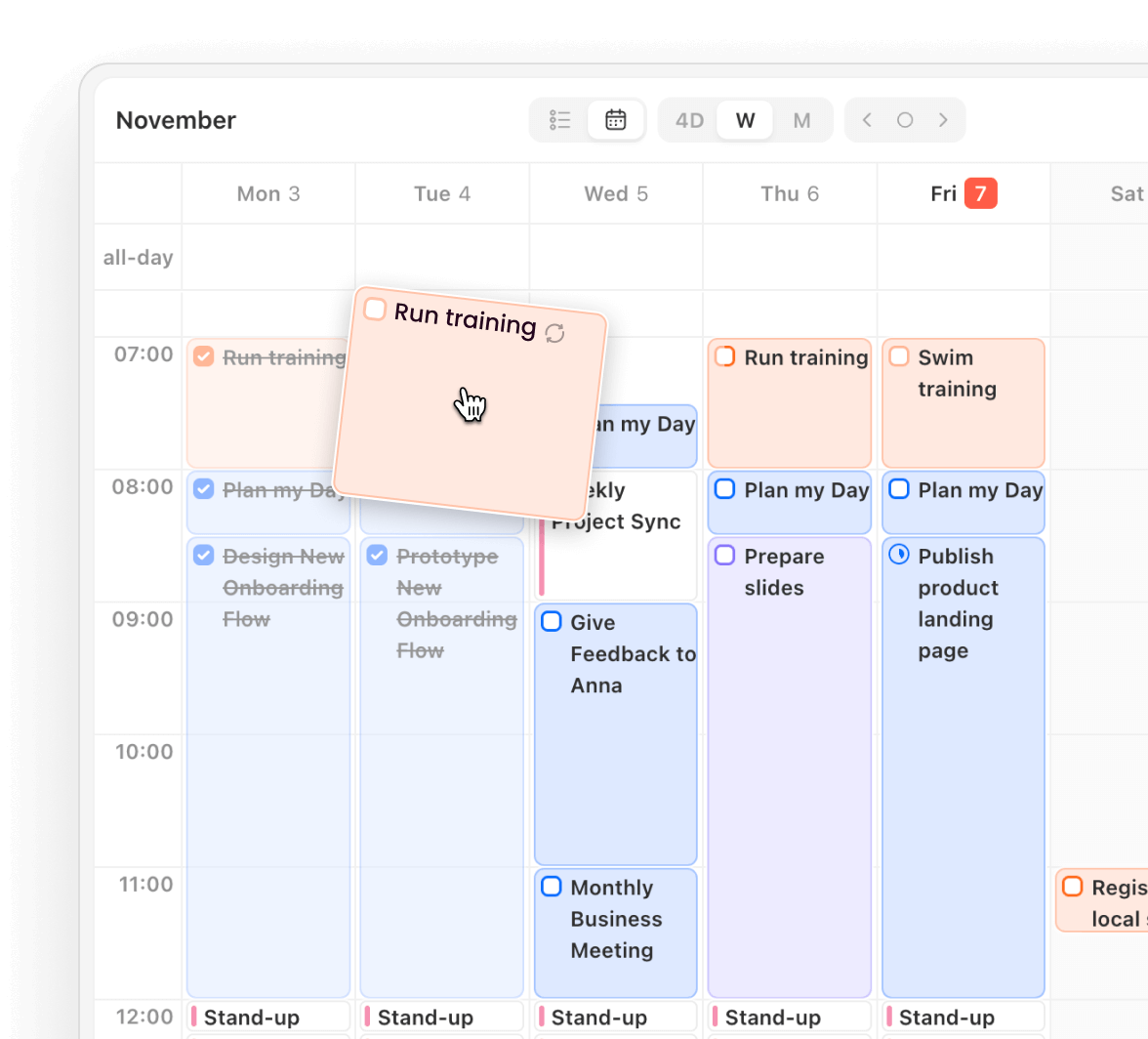
Time-Blocking: Drag tasks into the calendar view to create a realistic schedule.
Plan Within Your Limits: Build days that fit your available time, not an idealized workload.

Time Management
A List That Respects Time
A beautiful list doesn’t protect your schedule; a strategic system does. Griply provides the tools to manage your time, not just your tasks.
Estimate Duration: See exactly how much work you’ve committed to.
Time-Blocking: Drag tasks into the calendar view to create a realistic schedule.
Plan Within Your Limits: Build days that fit your available time, not an idealized workload.
Time Management
A List That Respects Time
A beautiful list doesn’t protect your schedule; a strategic system does. Griply provides the tools to manage your time, not just your tasks.
Estimate Duration: See exactly how much work you’ve committed to.
Time-Blocking: Drag tasks into the calendar view to create a realistic schedule.
Plan Within Your Limits: Build days that fit your available time, not an idealized workload.
Task Management
Slice Through the Noise
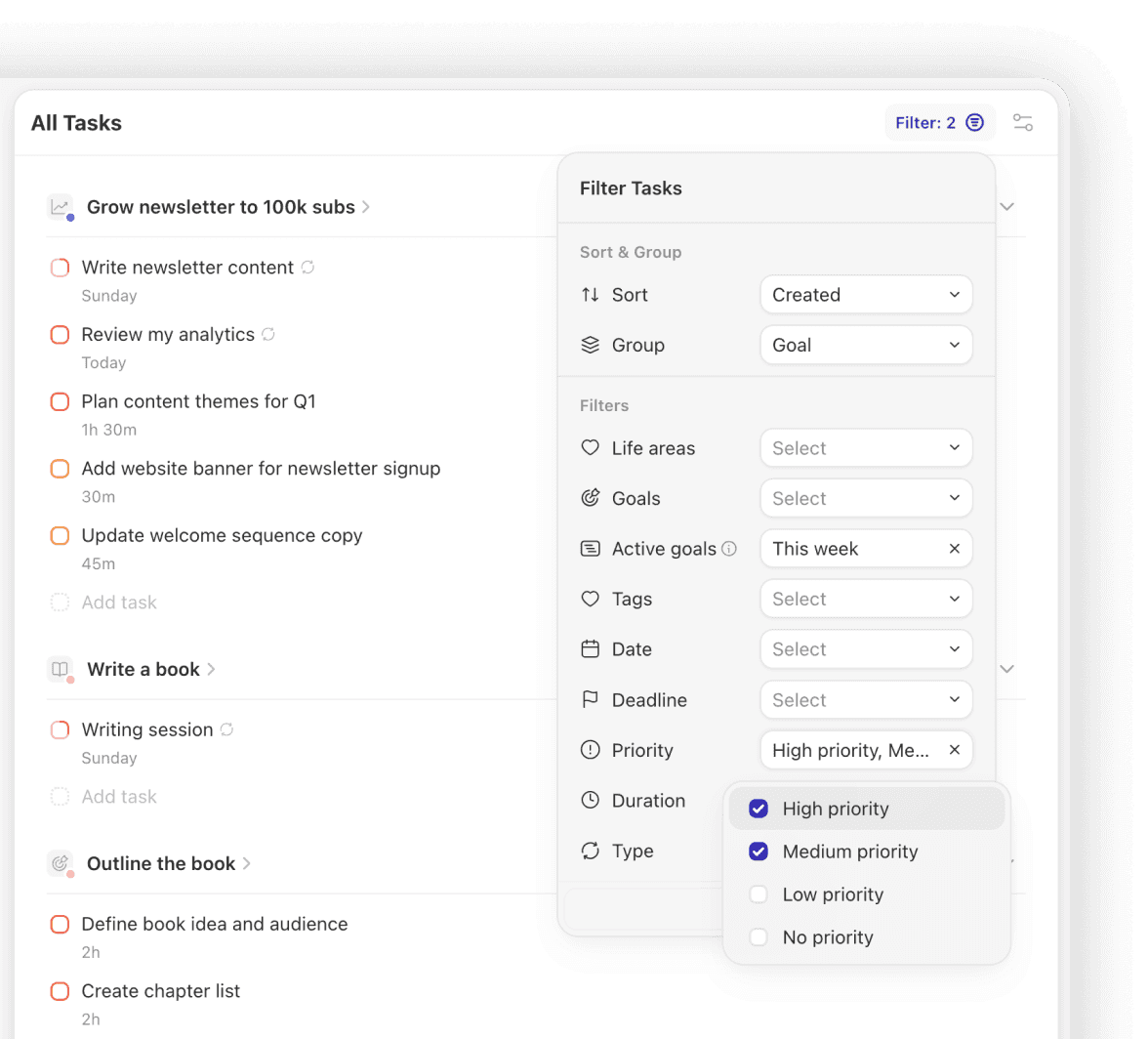
Stop managing flat task lists and start focusing on the high-impact outcomes that actually move your vision forward.
Advanced Filtering: Filter your tasks by Life Area, Goal, Duration, or Priority.
Prioritize High-Impact Work: Ensure you are always focused on strategic work.
Align Action with Purpose: Make sure daily actions connect directly to long-term outcomes.
Task Management
Slice Through the Noise
Stop managing flat task lists and start focusing on the high-impact outcomes that actually move your vision forward.
Advanced Filtering: Filter your tasks by Life Area, Goal, Duration, or Priority.
Prioritize High-Impact Work: Ensure you are always focused on strategic work.
Align Action with Purpose: Make sure daily actions connect directly to long-term outcomes.
Task Management
Slice Through the Noise
Stop managing flat task lists and start focusing on the high-impact outcomes that actually move your vision forward.
Advanced Filtering: Filter your tasks by Life Area, Goal, Duration, or Priority.
Prioritize High-Impact Work: Ensure you are always focused on strategic work.
Align Action with Purpose: Make sure daily actions connect directly to long-term outcomes.
Griply vs. Things 3: Compare Philosophy, Strategic Depth, and Time Management
Griply vs. Things 3: Compare Philosophy, Strategic Depth, and Time Management
| Feature | Griply | Things 3 |
|---|---|---|
| Philosophy | Top-Down: Focused on intent. Set your Vision and Goals first, then organize the tasks required to reach them. | Bottom-Up: Focuses on capturing everything first in a "Less is More" environment. Great for chores; overwhelming for big ambitions. |
| Strategic Depth | Goal-Driven Structure. Daily work connects to Life Areas > Vision > Goals > Subgoals > Tasks and habits. | Simple Folders. Tasks are organized into Areas and Projects, with no clear connection to long-term goals or measurable outcomes. |
| Time Management | Time Estimates: Plan based on reality. See exactly how much work you’ve committed to before your day starts. | Not Supported: Lists hide the reality of your day, making it easy to over-commit and burn out. |
| Planning View | Calendar & Timeline: Native time-blocking and roadmap planning built directly into your tasks. | List only: A linear task list with no visual sense of schedule or long-term capacity. |
| Progress Tracking | Success Metrics: Track numerical outcomes and results (e.g., revenue, running distance) to measure real progress. | Checkboxes: Completion is tracked via simple project circles and checkboxes. |
| Focus & Context | Multi-Dimensional: Filter by Goal, Life Area, Priority, and more to isolate exactly what matters. | Basic Tags: Filter by a single layer of labels. |
| Task Input | Smart Capture: High-speed Natural Language Processing (NLP) to schedule tasks as fast as you type. | Manual Entry: Relies on manual date pickers and menus for task scheduling. |
| Product Development | Continuous Updates: New features released monthly based directly on user requests. | Mostly Absent: No features driven by user requests; updates arrive only alongside new Apple OS releases. |
| Pricing | Flexible: Subscription OR Lifetime License for all devices. | One-Time: Paid per device. |
| Feature | Griply | Things 3 |
|---|---|---|
| Philosophy | Top-Down: Focused on intent. Set your Vision and Goals first, then organize the tasks required to reach them. | Bottom-Up: Focuses on capturing everything first in a "Less is More" environment. Great for chores; overwhelming for big ambitions. |
| Strategic Depth | Goal-Driven Structure. Daily work connects to Life Areas > Vision > Goals > Subgoals > Tasks and habits. | Simple Folders. Tasks are organized into Areas and Projects, with no clear connection to long-term goals or measurable outcomes. |
| Time Management | Time Estimates: Plan based on reality. See exactly how much work you’ve committed to before your day starts. | Not Supported: Lists hide the reality of your day, making it easy to over-commit and burn out. |
| Planning View | Calendar & Timeline: Native time-blocking and roadmap planning built directly into your tasks. | List only: A linear task list with no visual sense of schedule or long-term capacity. |
| Progress Tracking | Success Metrics: Track numerical outcomes and results (e.g., revenue, running distance) to measure real progress. | Checkboxes: Completion is tracked via simple project circles and checkboxes. |
| Focus & Context | Multi-Dimensional: Filter by Goal, Life Area, Priority, and more to isolate exactly what matters. | Basic Tags: Filter by a single layer of labels. |
| Task Input | Smart Capture: High-speed Natural Language Processing (NLP) to schedule tasks as fast as you type. | Manual Entry: Relies on manual date pickers and menus for task scheduling. |
| Product Development | Continuous Updates: New features released monthly based directly on user requests. | Mostly Absent: No features driven by user requests; updates arrive only alongside new Apple OS releases. |
| Pricing | Flexible: Subscription OR Lifetime License for all devices. | One-Time: Paid per device. |
| Feature | Griply | Things 3 |
|---|---|---|
| Philosophy | Top-Down: Focused on intent. Set your Vision and Goals first, then organize the tasks required to reach them. | Bottom-Up: Focuses on capturing everything first in a "Less is More" environment. Great for chores; overwhelming for big ambitions. |
| Strategic Depth | Goal-Driven Structure. Daily work connects to Life Areas > Vision > Goals > Subgoals > Tasks and habits. | Simple Folders. Tasks are organized into Areas and Projects, with no clear connection to long-term goals or measurable outcomes. |
| Time Management | Time Estimates: Plan based on reality. See exactly how much work you’ve committed to before your day starts. | Not Supported: Lists hide the reality of your day, making it easy to over-commit and burn out. |
| Planning View | Calendar & Timeline: Native time-blocking and roadmap planning built directly into your tasks. | List only: A linear task list with no visual sense of schedule or long-term capacity. |
| Progress Tracking | Success Metrics: Track numerical outcomes and results (e.g., revenue, running distance) to measure real progress. | Checkboxes: Completion is tracked via simple project circles and checkboxes. |
| Focus & Context | Multi-Dimensional: Filter by Goal, Life Area, Priority, and more to isolate exactly what matters. | Basic Tags: Filter by a single layer of labels. |
| Task Input | Smart Capture: High-speed Natural Language Processing (NLP) to schedule tasks as fast as you type. | Manual Entry: Relies on manual date pickers and menus for task scheduling. |
| Product Development | Continuous Updates: New features released monthly based directly on user requests. | Mostly Absent: No features driven by user requests; updates arrive only alongside new Apple OS releases. |
| Pricing | Flexible: Subscription OR Lifetime License for all devices. | One-Time: Paid per device. |
Impact First, Polish Second
Impact First, Polish Second
An Honest Trade-Off
An Honest Trade-Off
Things 3 sets the gold standard for UI polish; they have had 10+ years to perfect every pixel.
But we have a different mission. We are working hard to reach that same level of aesthetic perfection, but we are applying it to a system that actually helps you grow.
We've invested the majority of our engineering effort into:
Goal planning with measurable outcomes
Time management that makes plans concrete
Habit systems connected to long-term intent
Things 3 sets the gold standard for UI polish; they have had 10+ years to perfect every pixel.
But we have a different mission. We are working hard to reach that same level of aesthetic perfection, but we are applying it to a system that actually helps you grow.
We've invested the majority of our engineering effort into:
Goal planning with measurable outcomes
Time management that makes plans concrete
Habit systems connected to long-term intent
Things 3 sets the gold standard for UI polish; they have had 10+ years to perfect every pixel.
But we have a different mission. We are working hard to reach that same level of aesthetic perfection, but we are applying it to a system that actually helps you grow.
We've invested the majority of our engineering effort into:
Goal planning with measurable outcomes
Time management that makes plans concrete
Habit systems connected to long-term intent
We Build for You, Not for Apple Keynotes.
We Build for You, Not for Apple Keynotes.
While Things 3 often remains static until the next Apple keynote, Griply evolves monthly based on user feedback. In 2025 alone, we shipped 24+ major updates.
While Things 3 often remains static until the next Apple keynote, Griply evolves monthly based on user feedback. In 2025 alone, we shipped 24+ major updates.
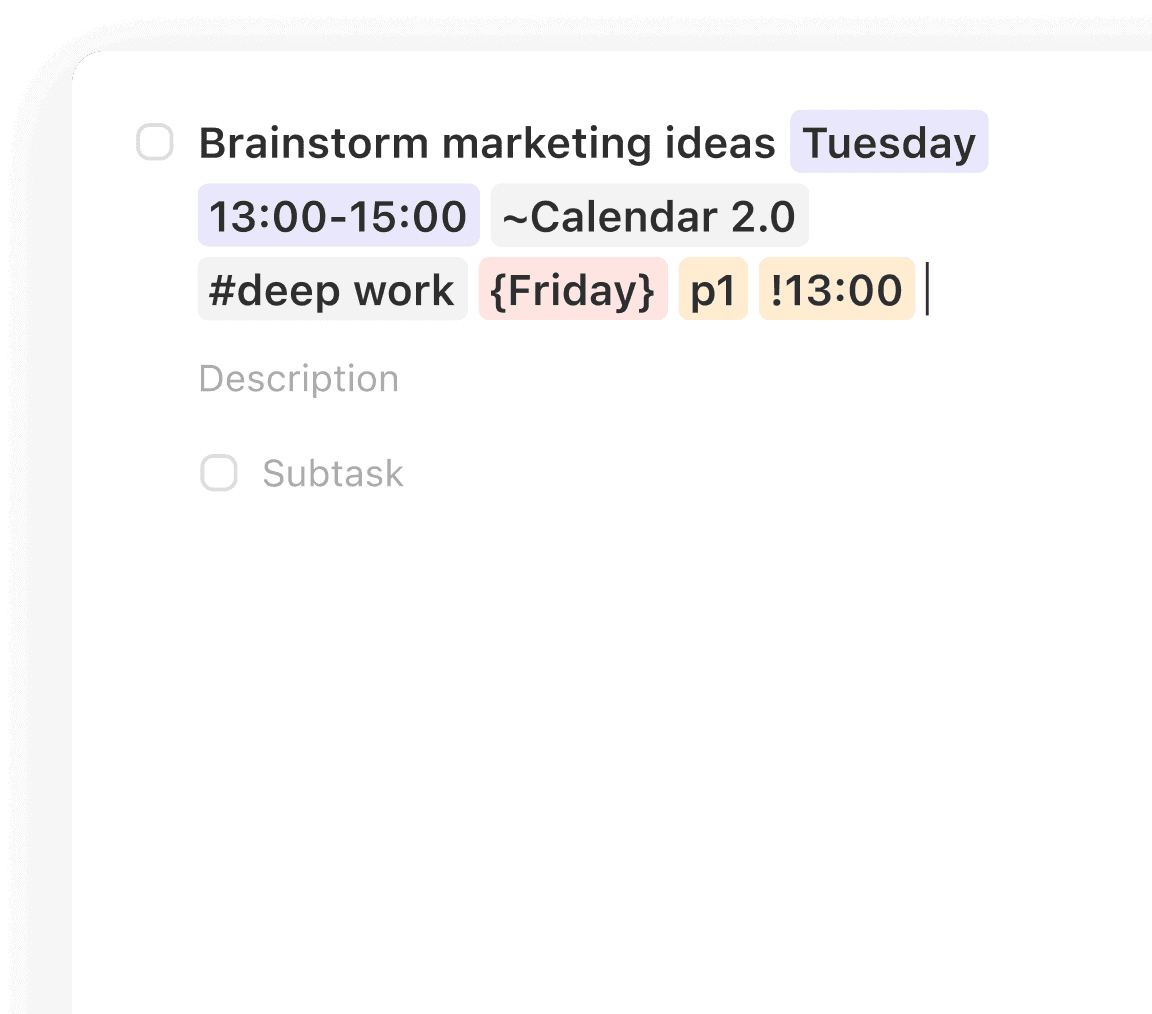
NLP & Smart Recognition. Create tasks faster using natural language and smart recognition.
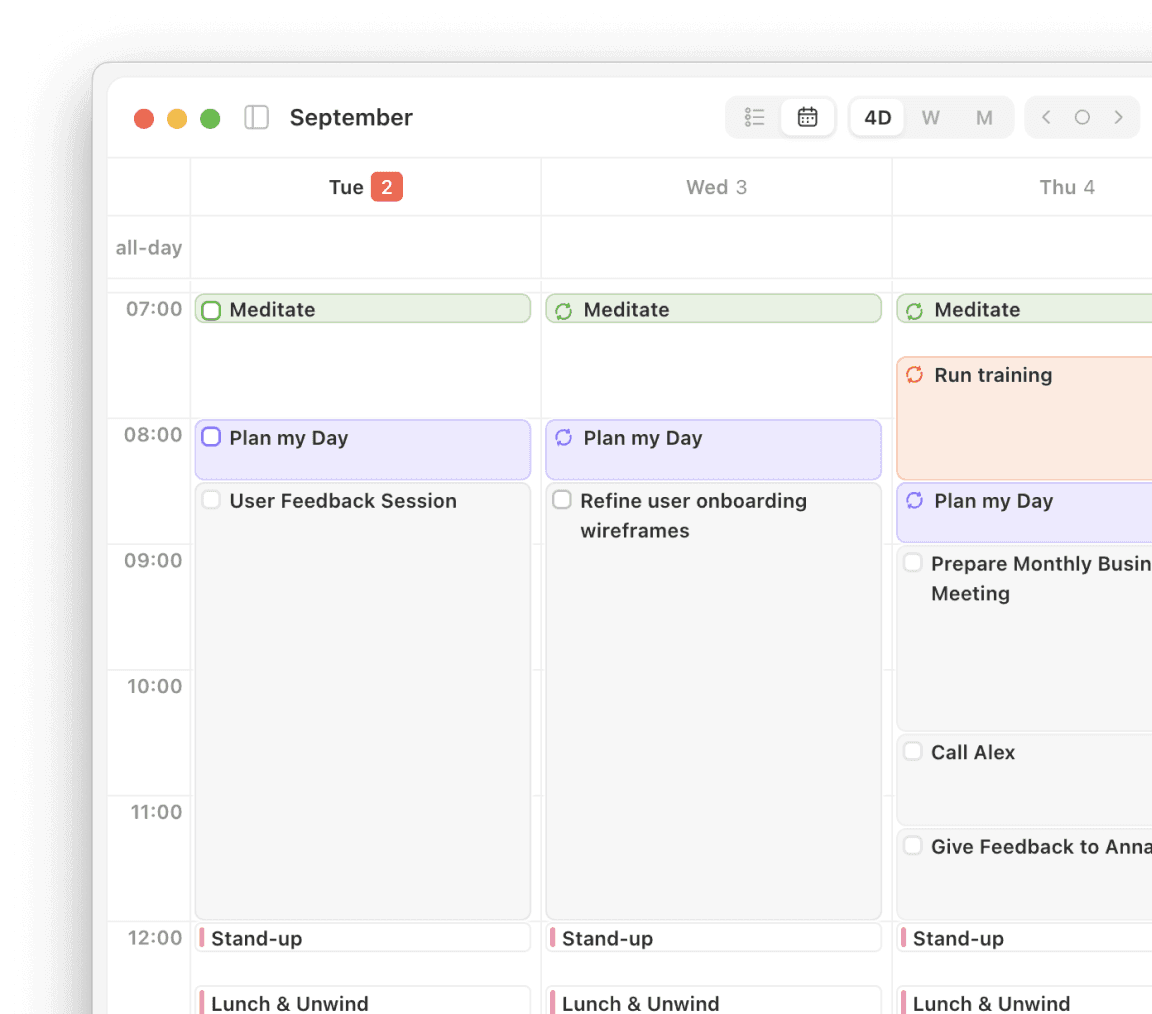
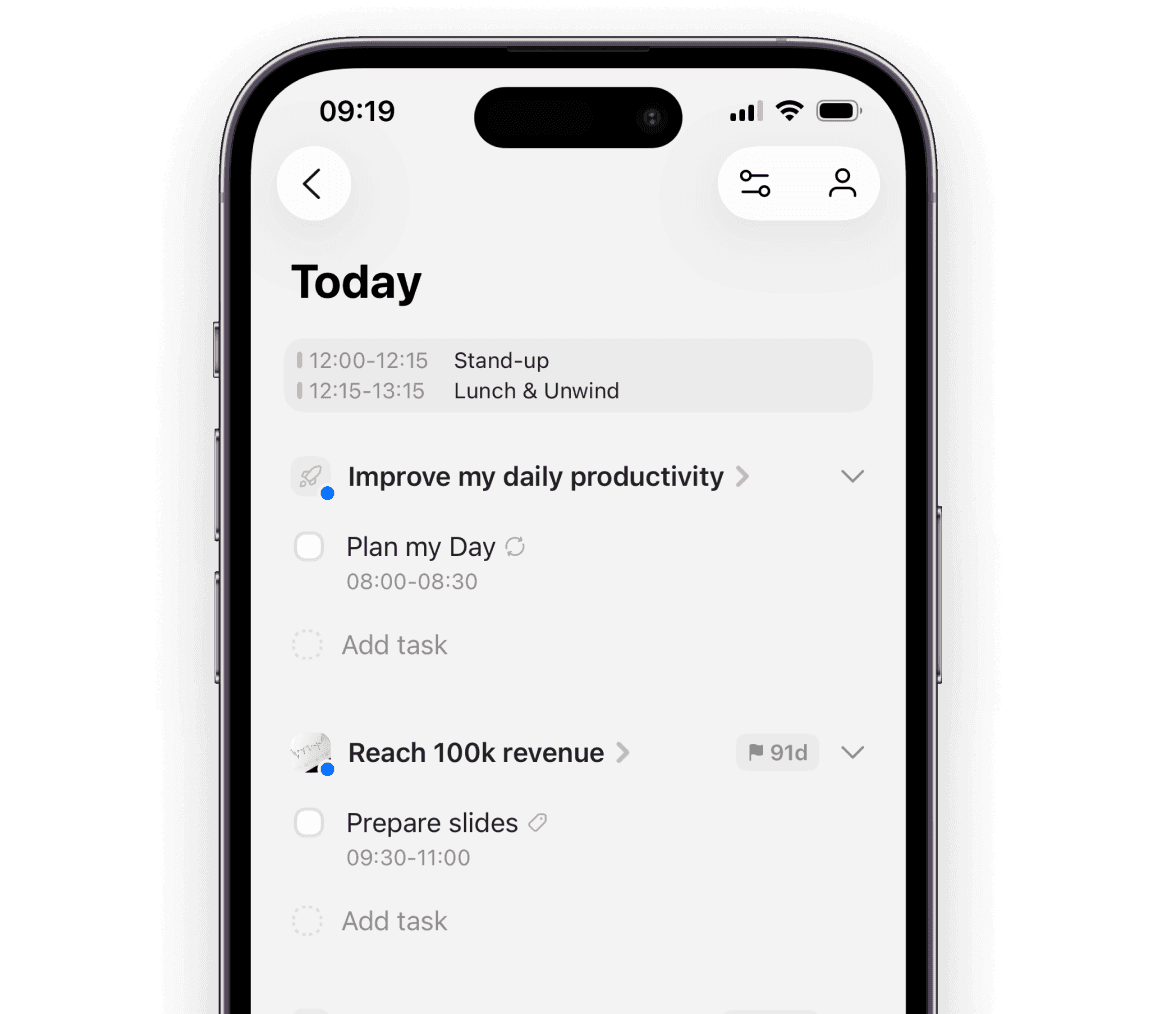
Calendar Views. Time block your tasks on a weekly and monthly calendar.
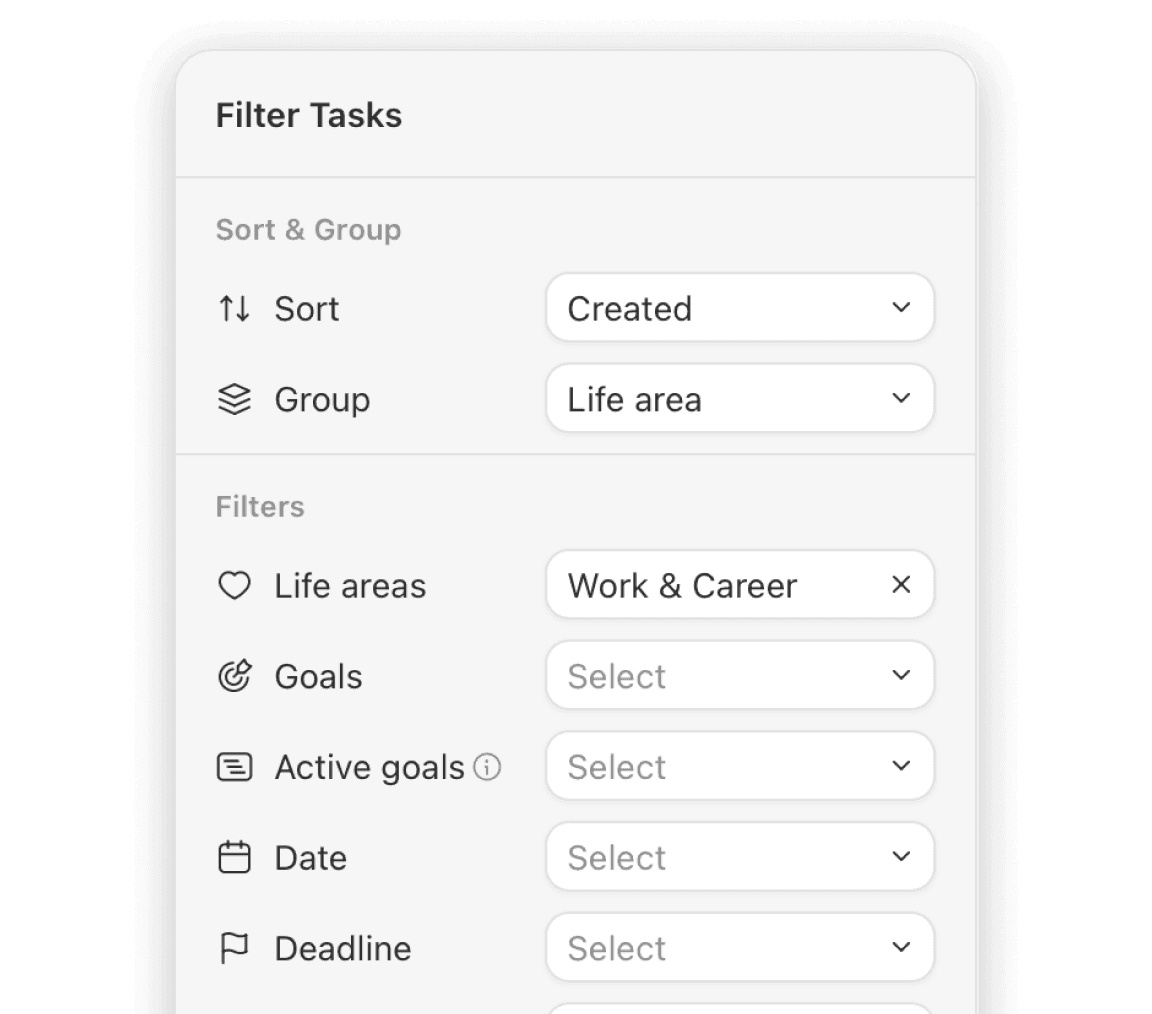
Filters. Quickly narrow down tasks using flexible filters like goal, life area, priority, or date.
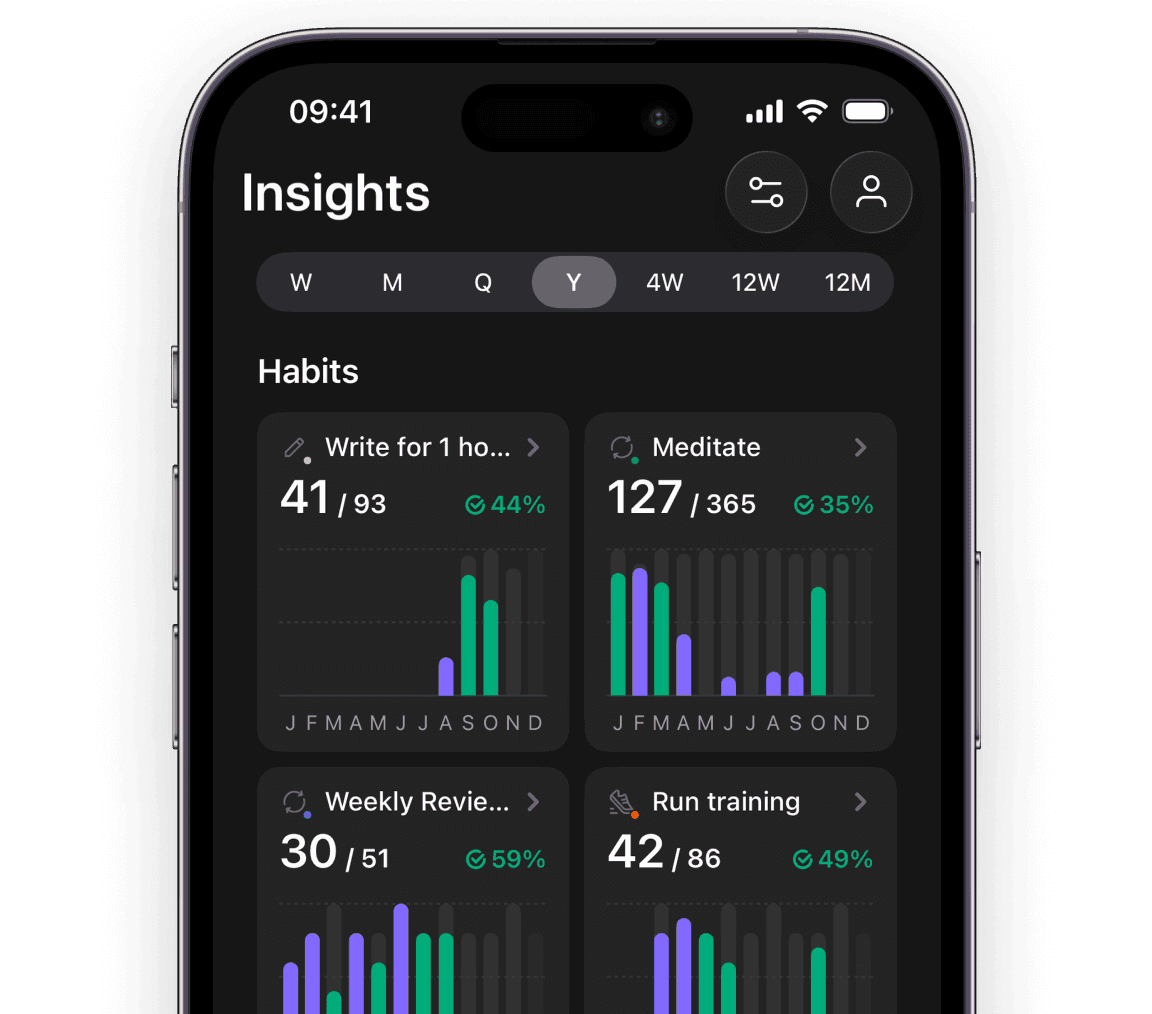
New Habit Statistics. Get deeper insights into habits.
Liquid Glass. A lighter, more fluid, and modern feel.
Explore all 24 major updates from 2025
NLP & Smart Recognition. Create tasks faster using natural language and smart recognition.
Calendar Views. Time block your tasks on a weekly and monthly calendar.
Filters. Quickly narrow down tasks using flexible filters like goal, life area, priority, or date.
New Habit Statistics. Get deeper insights into habits.
Liquid Glass. A lighter, more fluid, and modern feel.
Explore all 24 major updates from 2025
NLP & Smart Recognition. Create tasks faster using natural language and smart recognition.
Calendar Views. Time block your tasks on a weekly and monthly calendar.
Filters. Quickly narrow down tasks using flexible filters like goal, life area, priority, or date.
New Habit Statistics. Get deeper insights into habits.
Liquid Glass. A lighter, more fluid, and modern feel.
Explore all 24 major updates from 2025
When you join Griply, you aren't joining a static tool. You are joining a rocket ship.
When you join Griply, you aren't joining a static tool. You are joining a rocket ship.
Let's Build Griply Together
Things 3 is Famous for Silence. We Are Famous for Listening.
Things 3 is famous for its "boutique" identity, they work in secret and typically only release updates to support new Apple hardware. There is no roadmap. There is no discussion.
At Griply, we are doubling down on Partnership.


User-Led Roadmap
We don’t wait for Apple’s next keynote to decide what to build. Our roadmap is shaped by the workflow features you ask for.
User-Led Roadmap
We don’t wait for Apple’s next keynote to decide what to build. Our roadmap is shaped by the workflow features you ask for.
Built for Strategic Depth
Griply is built for life beyond the checklist, with vision layers, success metrics, and timelines that connect today’s actions to long-term direction.
Built for Strategic Depth
Griply is built for life beyond the checklist, with vision layers, success metrics, and timelines that connect today’s actions to long-term direction.
“I suggested a change to the Goal view in the community, and it shipped in the next update.”
- Andy
Start With A Clean Slate
Leave the “Zombie Tasks” Behind.
We intentionally do not offer an automatic Things 3 import. Most power-user accounts are graveyards of 5-year-old ideas and "Someday" lists. It shouldn't be about carrying clutter forward. It should be about resetting with clarity.
How to Move to Griply:
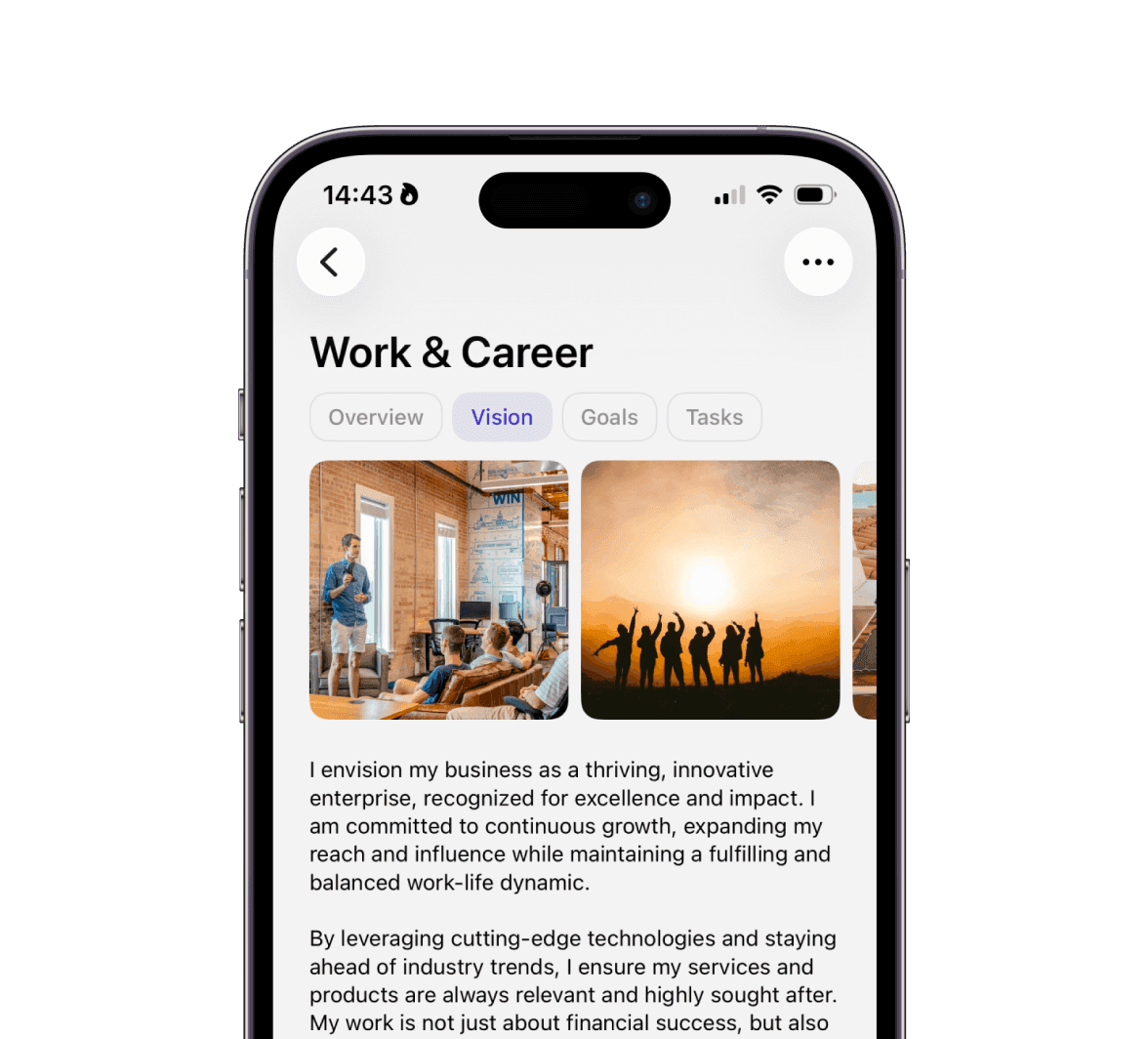
Define what matters to you first (Vision).
Set clear, measurable goals
Bring over only active, aligned tasks.
Leave everything else behind.
Start With A Clean Slate
Leave the “Zombie Tasks” Behind.
We intentionally do not offer an automatic Things 3 import. Most power-user accounts are graveyards of 5-year-old ideas and "Someday" lists. It shouldn't be about carrying clutter forward. It should be about resetting with clarity.
How to Move to Griply:
Define what matters to you first (Vision).
Set clear, measurable goals
Bring over only active, aligned tasks.
Leave everything else behind.
Start With A Clean Slate
Leave the “Zombie Tasks” Behind.
We intentionally do not offer an automatic Things 3 import. Most power-user accounts are graveyards of 5-year-old ideas and "Someday" lists. It shouldn't be about carrying clutter forward. It should be about resetting with clarity.
How to Move to Griply:
Define what matters to you first (Vision).
Set clear, measurable goals
Bring over only active, aligned tasks.
Leave everything else behind.
Frequently Asked Questions
Frequently Asked Questions
Frequently Asked Questions
Things 3 is a one-time purchase. Do you offer that?
Yes. We respect the "Buy It For Life" mentality of the Things 3 user. While we have a subscription for ongoing service, we also offer a Lifetime Deal. You can pay once and get all future updates.
I really need Time Blocking. How does Griply handle it?
This is our biggest advantage over Things 3. We have a dedicated Calendar View. You can drag a task from your list onto your calendar to create a time slot, ensuring you protect time for Deep Work. Things 3 forces you to keep these lists separate.
Things 3 has 'Areas' (like Family, Work). Does Griply?
Yes, but we give them purpose. We call them Life Areas. In Things 3, an Area is just a folder. In Griply, a Life Area is a pillar of your vision. You can track progress specifically for your "Health" or "Career" Area, ensuring you aren't neglecting any part of your life.
Things 3 lacks Natural Language Processing (NLP). Do you have it?
Yes. This is a major workflow difference. In Things 3, assigning a date often requires clicking through menus. In Griply, you just type “Review budget next Tuesday at 10am” and our Smart Recognition handles the rest. We believe speed matters.

Griply
Simplicity is Great. Until It Holds You Back.
Stop just managing tasks and start building the life you envisioned with a system designed for strategic depth.
Still deciding? Join our Community and ask the founders why they built Griply. We’re there every day.
🇳🇱 Built with 🩷 in the Netherlands
© 2026 Griply. All rights reserved.
🇳🇱 Built with 🩷 in the Netherlands
© 2026 Griply. All rights reserved.
🇳🇱 Built with 🩷 in the Netherlands
© 2026 Griply. All rights reserved.