Goal Impact, Trash Page, and Bullet Paste
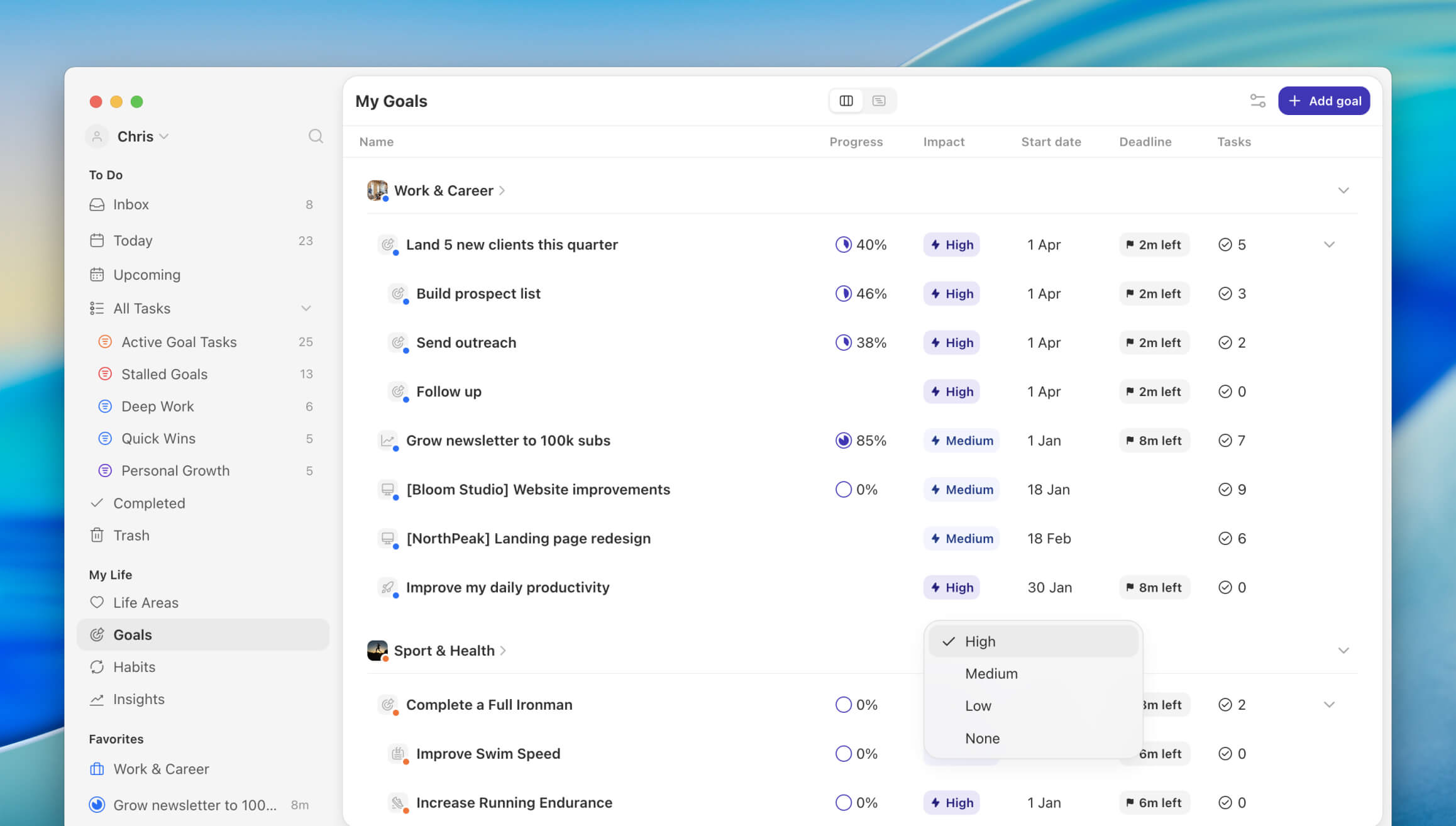
This release helps you see what really moves the needle on your goals, gives you a safety net for anything you delete, and turns a pasted list of bullets into ready-to-edit tasks in one step. You can now set an impact level per goal to show how much it contributes to your life area (or how much a subgoal contributes to its parent goal), recover deleted tasks and habits from a new Trash page, and create multiple tasks at once by pasting bullets into the inline task field.
Features
Goal Impact: Set an impact level per goal to show how much it contributes to your life area, or how much a subgoal contributes to its main goal. Use it to focus on the goals that really matter.
Unified Trash Page: Delete with confidence. The new Trash page is a dedicated space to browse and recover tasks or habits you've removed.
Better habit planning in Upcoming (Desktop only): You can now add extra repetitions for next week, or stop "repeat daily until completed" for specific weeks, right from the habit upcoming column.
Paste bullets to create multiple tasks: Paste a bulleted list into the inline task field and Griply opens a dialog with each bullet as a task. Edit them before creating, and assign goal, priority, dates, and more.
Improvements
Smarter Habit Scheduling: Habits with targets (like 2x per week) are no longer planned on the first day or two of the week. They now repeat daily until your target is met, so you can hit your goal on the days that work for you.
Simplified habit schedule menu: We merged the "repeat" and "target" options into a single menu, making it more intuitive to set up a habit schedule.
Goal Impact filter: Filter your tasks based on the new goal impact property to zoom in on high-impact work.
Individual habit entries in Completed: You now see every completed entry of a habit in the completed view, not just the last one.
New goal table (Desktop only): Edit progress, impact, start date, and deadline directly from the goal table, no need to open each goal.
Completed habit entries in the calendar: Completed habits now appear in the calendar on the day you actually completed them, not just on the day they were scheduled.
Dedicated goal metrics dialog (Desktop only): Goal metrics now have their own dialog so you can edit them separately from the rest of the goal.
Fixes
Desktop: Fixed calendar events from 21:00 to 09:00 being shown as all-day events across two days.
iOS: Fixed a goal progress bug where progress was not aligned with desktop.
iOS: Fixed not being able to set a start date when adding a new habit with "x times per month or year".
iOS: Fixed adding a description to a new habit not working.
iOS: Fixed drag and drop not working in Upcoming.
iOS: Fixed the date selection sheet being cut off when "show borders" was enabled in accessibility settings.
iOS: Fixed goal progress input being cleared when changing the date after entering progress.
iOS: Fixed duplicating sub tasks not always working.
iOS: Potential fix for the keyboard not responding correctly when entering a new goal progress update.
iOS: Fixed tasks from subgoals linked to a life area sometimes showing under "no life area".
