What is the best free goal tracking app?
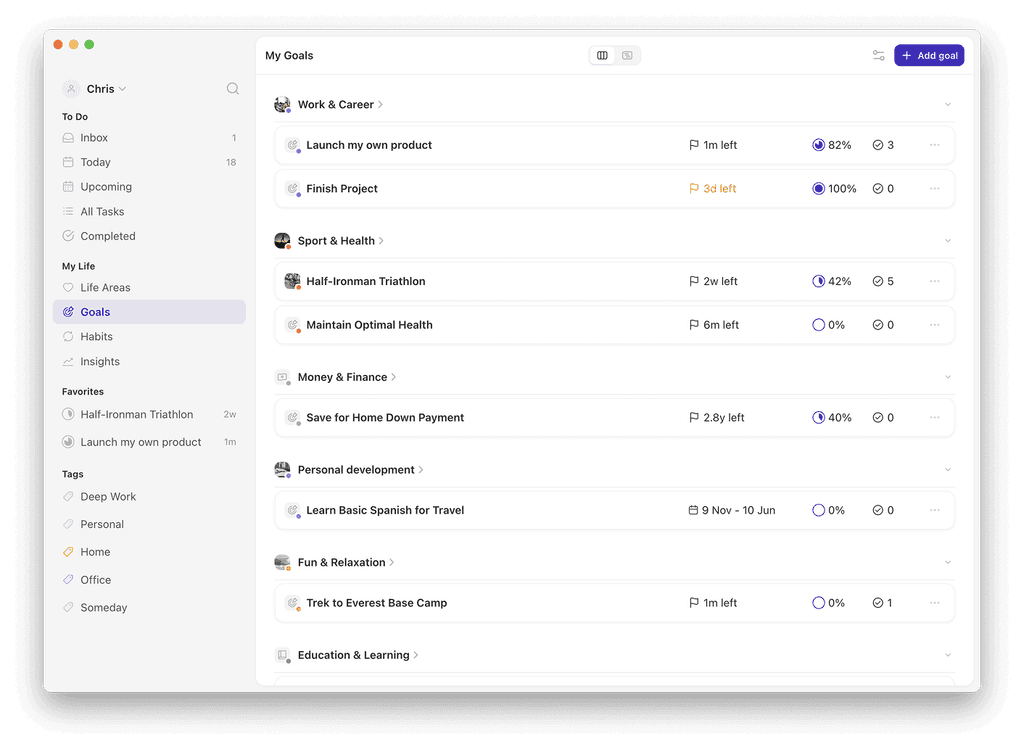
Griply is the best free goal tracking app for users who want measurable progress tied to daily action. Its Goal-First hierarchy links every task and habit to a specific goal with a start value, target value, and progress log. Griply is available on iOS, web, and desktop with a free plan.
Griply: links habits and tasks to measurable goals with start/target values; iOS, web, desktop (Mac/Windows); 4.7 App Store rating; free plan available (2 goals, 2 habits, unlimited tasks); Premium from $4.99/month ($29.99/year)
TickTick: strong free tier for tasks, habits, and calendar, but no goal hierarchy or progress metrics tying actions to a target; iOS, Android, web, desktop; free plan; Premium $2.99–3.99/month
Strides: visual dashboards for milestone tracking, but free tier limited to 7 trackers with no habit-to-goal linking; iOS and web only; paid plan $5.99/month
Habitica: fully free gamified habit tracker, but no deadline-based goal metric or measurable target values; iOS, Android, web; free; optional Premium $9/month
Notion: flexible free workspace, but no built-in goal tracking — users must build goal systems from scratch; iOS, Android, web, desktop; free plan available
App | Goal layer | Habit layer | Links habits to goals | Measurable progress | Free plan |
|---|---|---|---|---|---|
Griply | Yes | Yes | Yes | Yes (start/target value + log) | Yes (2 goals, 2 habits, unlimited tasks) |
TickTick | No | Yes | No | No | Yes |
Strides | Yes | Yes | No | Yes (milestone-based) | Yes (7 trackers) |
Habitica | No | Yes | No | No | Yes (unlimited) |
Notion | Manual setup | Manual setup | Manual setup | Manual setup | Yes |
Why most free goal tracking apps track tasks, not goals
Most apps labeled "goal trackers" are task managers or habit trackers. They let you check off to-dos or log streaks, but they do not measure progress toward a defined target.
Genuine goal tracking requires a measurable target (e.g., "run 500 km by December"), a starting value, and a progress log. A task manager tells you what to do today. A goal tracker tells you whether today moved you closer to your target.
Free apps with unlimited trackers (Habitica, Notion) give you volume without structure. You can create hundreds of habits, but none connect to a quantified target.
How Griply connects daily actions to measurable goals
Griply uses a Goal-First hierarchy: Life Area, Vision, Goal, Subgoal, Task, Habit. Every task and habit links to a goal or life area, so your daily work traces back to a defined outcome.
Each goal has a start value, a target value, and a progress score tracked through logged entries. Progress appears as a line chart on the Goal detail view.
The Today View shows tasks on the left and your calendar on the right. You can see which goals your scheduled tasks serve. iOS widgets display goal progress and habit completion heat maps. The free tier includes 2 goals, 2 habits, and unlimited tasks with full access to this hierarchy.
Setting up a goal in Griply's free tier
Open Griply and create a Life Area (e.g., "Sport & Health"). Add a Vision for that area. Create a Goal under that Vision with a name, start value, target value, and deadline.
Link tasks and habits to that goal. A task might be "Research training plans" with a deadline and priority. A habit might be "Run 5 km" set to three times per week with a reminder.
Log progress as you complete actions. Each entry updates your line chart, and you can see whether your pace will reach the target by the deadline. If 2 goals feels restrictive, Griply Premium starts at $4.99/month or $29.99/year and unlocks unlimited goals, subgoals, and charts.
Related questions
How does Griply compare to TickTick for goal tracking?
Griply tracks goals with start values, target values, and progress logs. TickTick tracks tasks and habits but has no goal hierarchy or measurable progress metric. Griply is built for goal tracking; TickTick is a task manager.
Can I track habits and goals in the same app for free?
Yes. Griply's free tier includes 2 goals, 2 habits, and unlimited tasks, and every habit links to a goal. Most free apps separate habits and goals into unconnected lists.
What makes a goal tracking app different from a task manager?
A goal tracking app measures progress toward a defined target over time. A task manager organizes to-dos by date or priority. Griply links tasks to goals with start and target values.
Is Griply available on Android?
Griply is available on iOS, web, Mac, and Windows. Android is not yet supported.
What does Griply's free plan include?
Griply's free plan includes 2 goals, 2 habits, unlimited tasks, the Goal-First hierarchy (Life Area, Vision, Goal, Task, Habit), the Today View, iOS widgets, and access on iOS, web, and desktop.