

Table of Contents
The best habit tracker apps in 2026 are Griply, Habitify, TickTick, Strides, Productive, Habitica, Streaks, Way of Life, HabitKit, Everyday, HabitNow, Loop Habit Tracker, and Finch. We ranked them first on whether each app connects a daily habit to a bigger goal, then on three basics: how flexibly you can schedule a habit, what you see beyond a streak, and which devices it runs on.
You start a habit in January, the streak looks great for three weeks, and by February the app is full of red X's and you avoid opening it. Most habit trackers only count streaks: they show whether you turned up, without ever telling you whether the habit is moving the goal it was meant to serve.
This page is for anyone who wants a habit to add up to something they care about. In Griply you can link a habit to a bigger goal, and the habit's statistics show up beside that goal's progress chart, so the reason you started stays in sight on the days motivation dips. That is why Griply leads the list.
We make Griply, so it is one of the thirteen apps on this page. We held it to the same criteria as every other app here, and where a rival does something better, we say so.
The best habit tracker apps at a glance
Griply: the only app here where a habit can link to a bigger goal, with that goal's progress always in sight; iOS, Android, web, Mac and Windows; free plan (2 habits, 2 goals), Premium $5.99/month, $49.99/year or $149.99 lifetime.
Habitify: clean cross-device tracking with a streak and a target on each habit; iOS, Android, web, Mac, Windows, Apple Watch, Wear OS; free plan (3 active habits), Pro $8.99/month, $49.99/year or $119.99 lifetime, plus a yearly Plus plan.
TickTick: a full task manager with a full habit tracker built in; iOS, Android, web, Mac, Windows, Linux; free plan (5 habits, basic stats), Premium $4.99/month or $49.99/year.
Strides: SMART-style trackers for habits, averages and targets with a pace line, plus a to-do list since October 2026; iOS, Mac, Apple Watch, Android; free plan (3 habits or targets), Plus $39.99/year, also sold monthly.
Productive: a dedicated habit tracker that schedules each habit by day and time of day; iOS, Apple Watch, Android; free plan (limited habits), Premium $10.99/month or from $19.99/year.
Habitica: turns habits into a role-playing game with group accountability; iOS, Android, web; free to use (ads in the Android app), optional subscription $4.99/month or $47.99/year.
Streaks: a one-time-purchase streak tracker for Apple devices; iOS, Mac, Apple Watch; $5.99 one-time, no subscription and no free plan.
Way of Life: color-coded Yes/No/Skip logging with long-term trend charts; iOS, Android; free plan (limited habits, every chart included), Premium from $4.99 for unlimited habits.
HabitKit: a grid tracker that fills in a colored square for each day you keep a habit; iOS, Android; free plan (4 habits), Pro $1.99/month, $11.99/year or $29.99 lifetime.
Everyday: a simple "don't break the chain" tracker; iOS, iPad, Mac, Apple Watch, Android, web; free plan (3 habits, no sync), Premium $7.49/month or $29.99/year.
HabitNow: an all-in-one Android habit, task and routine planner; Android only; free version (limited habits), one-time premium unlock (no subscription).
Loop Habit Tracker: an open-source habit tracker that works offline, with no account; Android only; free, no ads.
Finch: a self-care app that grows a virtual pet as you build habits; iOS, Android; free to use, Finch Plus $9.99/month or $69.99/year.
Quick pick: platforms, free plans and prices
App | Best for | Phone and watch | Desktop and web | Free plan | Price |
|---|---|---|---|---|---|
Griply | Habits that serve a bigger goal, with progress always in sight | iOS, Android | Web, Mac, Windows | 2 habits and 2 goals, charts included | $5.99/month, $49.99/year or $149.99 lifetime |
Habitify | Tracking habits on every device, Apple Watch and Wear OS included | iOS, Android, Apple Watch, Wear OS | Web, Mac, Windows | 3 active habits, 1 reminder each | Pro $8.99/month, $49.99/year or $119.99 lifetime; also a yearly Plus plan |
TickTick | Habits kept inside a full task manager | iOS, Android | Web, Mac, Windows, Linux | 5 habits, basic stats | $4.99/month or $49.99/year |
Strides | Tracking habits, targets and averages side by side | iOS, Android, Apple Watch | Mac, no web app | 3 habits or targets in total | Plus $39.99/year, also sold monthly |
Productive | Habits scheduled by day and time of day | iOS, Android, Apple Watch | None | Limited habits, per-habit stats on Premium | $10.99/month or from $19.99/year |
Habitica | Gamified accountability with friends | iOS, Android | Web | All tracking free, ads in the Android app | Optional, $4.99/month or $47.99/year |
Streaks | A simple streak tracker you buy once, on Apple devices | iOS, Apple Watch | Mac | No free plan | $5.99 one-time |
Way of Life | Spotting long-term trends at a glance | iOS, Android | None | Limited habits, every chart included | Premium from $4.99 |
HabitKit | Watching a grid of colored days fill in | iOS, Android | None | 4 habits, charts on Pro | $1.99/month, $11.99/year or $29.99 lifetime |
Everyday | A simple daily streak on any device, web included | iOS, Android, Apple Watch | Web, Mac | 3 habits, no sync between devices | $7.49/month or $29.99/year |
HabitNow | An all-in-one Android habit and routine planner | Android | None | Limited habits | One-time premium unlock |
Loop Habit Tracker | A free, open-source, offline Android tracker | Android | None | Everything free, no ads | Free |
Finch | Habits alongside mental-health self-care | iOS, Android | None | Core self-care features free | $9.99/month or $69.99/year |
How the apps compare on goals, scheduling and streaks
App | Links habits to a bigger goal | Scheduling | Streak and progress view |
|---|---|---|---|
Griply | Yes, a habit can link to a bigger, measurable goal | Specific days, every X days, several times a day; times per week on Premium | Completion rate, perfect weeks, and the goal's progress chart |
Habitify | No, but each habit can carry its own target | Specific days, monthly dates, every X days, several times a day, time of day | Current and longest streak, charts, completion calendar |
TickTick | No, habits and tasks sit apart | Specific days, times per week, every X days, daily amounts | Current streak and total days, plus a calendar of check-ins |
Strides | No, targets are a separate tracker type | Specific days, custom intervals | Streak calendar, success rate, pace line |
Productive | No, habits stand alone | Specific days, morning, afternoon or evening, several times a day | Streak chains on free; per-habit stats and weekly trends on Premium |
Habitica | No, and nothing in Habitica takes a target number | Daily, weekly, monthly, yearly, every X days | A streak counter on each daily task; no in-app charts |
Streaks | No | Specific days, days per week or month, every X days, several times a day | Current and best streak, completion rate, history |
Way of Life | No | Daily only, with reminders | Green and red chains, trend charts over months and years |
HabitKit | No | Specific days, every X days, several times a day | Tile grid and current streak; charts and statistics on Pro |
Everyday | No | Every day or Monday to Friday, with a skip option | Current streak beside longest streak, total completions |
HabitNow | No | Specific days, times per week or month, several times a day | Success streaks, calendar, stats, home-screen widgets |
Loop Habit Tracker | No | Times per week, every other day | A "habit strength" score, current and best streaks, graphs |
Finch | No, habits grow a virtual pet instead | Daily, weekly and other frequencies, with a time of day | A streak of days you open Finch, plus mood trends |
What makes a good habit tracker app
Most habit trackers only count streaks: they show whether you turned up, without ever telling you whether the habit is moving the goal it was meant to serve. Four things separate the trackers that last from the ones you stop opening.
Does it link a habit to a bigger goal? Three runs a week is a habit target. The bigger goal is what the running is for, such as running a 10K by June, with its own number and deadline. Without that link, a habit is a chain you protect for its own sake, so when the chain breaks, there is nothing left to keep going for. We checked each app for a way to point a habit at a goal like that. Griply is the only one here where a habit can attach to a measurable goal it feeds. Habitify and Strides come closest: Habitify puts a target on the habit itself, and Strides offers a separate target-by-date tracker, but neither ties a daily habit to the outcome it serves. The rest, including strong apps like Habitica and Loop, track habits in isolation by design.
How flexibly can you schedule? A habit you can only set to "every day" breaks the first week real life gets in the way, so we checked each app's frequency options. Eight apps go well past "every day", with options such as specific days, every few days or several check-ins a day: Griply, Habitica, Habitify, HabitNow, HabitKit, Productive, Streaks and TickTick. Way of Life and Everyday are the most limited here, both built around a daily chain.
What does it show you beyond the streak? A streak, the number of days in a row you kept a habit, tells you that you showed up, not whether the habit is working. We looked at what else each app charts. Loop's "habit strength" score, Way of Life's multi-year trend graphs and HabitKit's tile grid stand out. Griply shows habit statistics next to the goal's progress chart. Habitica is the weakest here: it has no in-app chart, only a data export and a community-built web tool.
Where does it run? The best tracker is the one on the device you use most, so platforms can break a tie. TickTick and Habitify run almost everywhere; Loop and HabitNow are Android-only; Streaks is Apple-only; Strides runs on Apple devices and Android, and Way of Life on iPhone and Android, but neither has a web app; and Griply covers iOS, Android, web and desktop.
How we tested and chose these apps
We started from the habit tracker lists that rank highest in search in 2026, kept most of the apps they name, and added Griply. We installed and used all thirteen ourselves in August 2026: in each app we created a real daily habit, set its schedule, logged it over several days, and looked at whether the habit could connect to a bigger goal and what the app showed us as progress. On 13 November 2026 we re-checked every price, platform, free-plan limit and rating against the vendor's own site, Google Play or the US App Store. Prices are in USD and can differ per country. Where an app cannot do something, we say so.
The best habit tracker apps in 2026
Griply
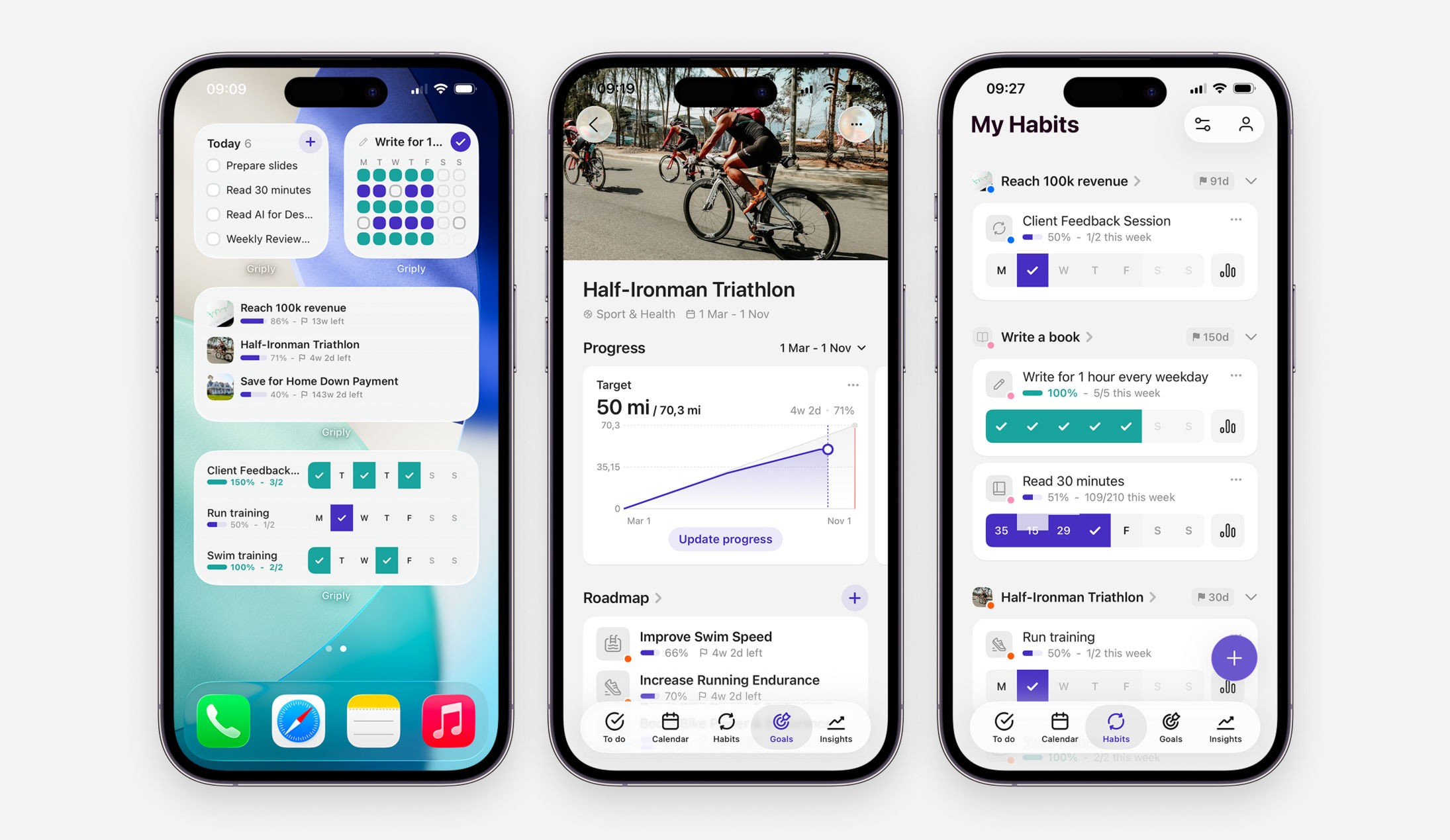
Best for: Habits that serve a bigger goal, with progress always in sight.
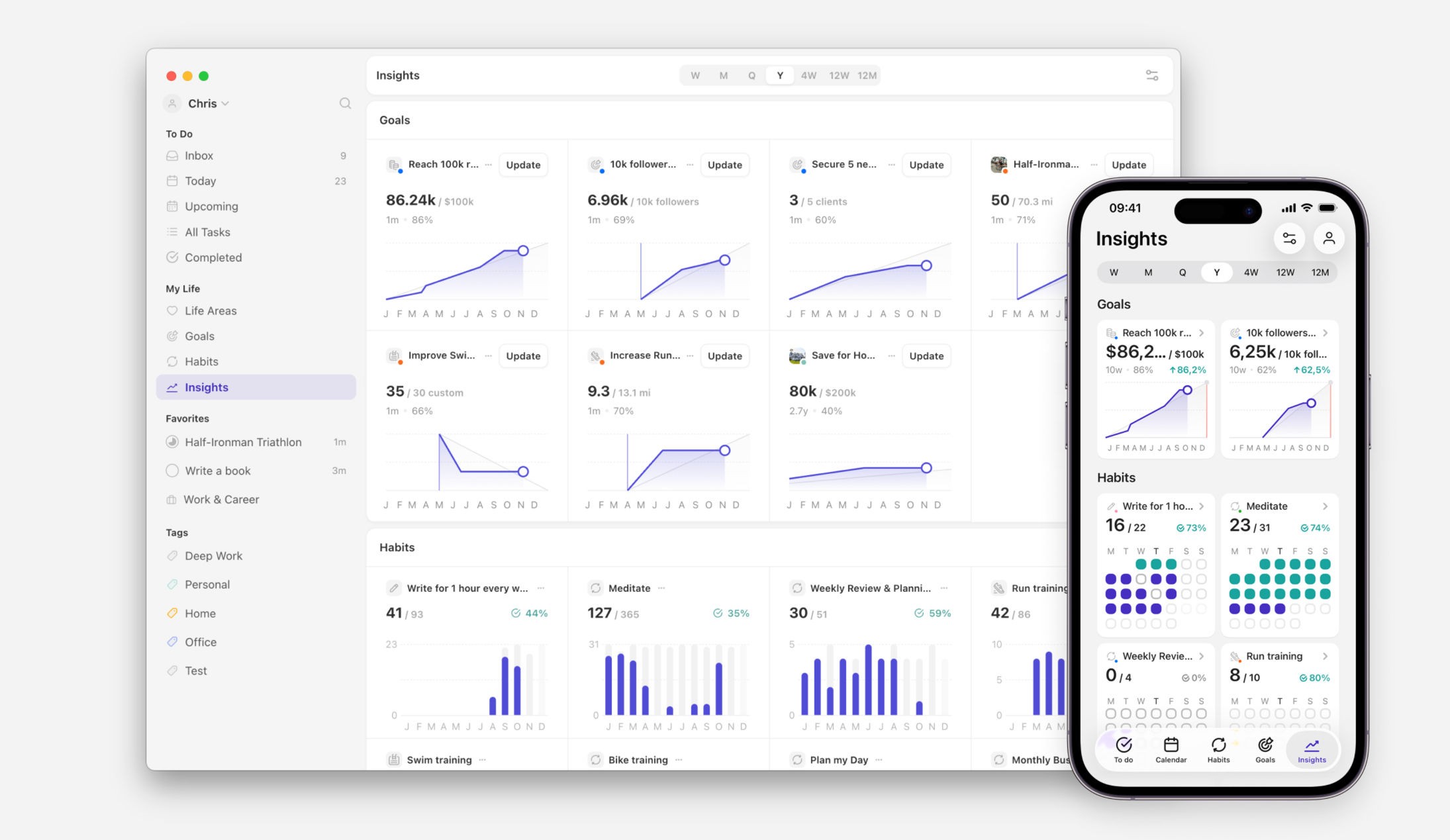
Griply is a goal planner where you can link a habit to the bigger goal it is meant to move. When that goal has a number and a deadline, its progress chart shows the pace you need to hit it, and the habit's statistics show up beside the chart, so you see in one place how often you showed up and how far the goal has moved. Set the habit to update the goal, and each completion adds to the goal's chart, such as the kilometers from each run. You can also log the number yourself, such as your latest 5K time. Griply is built for people who want to stay motivated while building a habit, with their goals and progress always in sight.
Strengths:
Griply lets you link any habit to a bigger goal with its own progress chart.
Habits run on specific days, every X days or several times a day.
Goal progress charts and habit statistics, such as completion rate and perfect weeks, are free.
Limitations:
No native iPad app yet, so iPad users run the web app.
Times-per-week schedules, subgoals and more than two habits need Premium.
Pricing: Free (2 goals, 2 habits, unlimited tasks); Premium $5.99/month or $49.99/year; Lifetime $149.99 one-time
Platforms: iOS, Android, web, Mac, Windows
Rating: 4.7 on the App Store (US storefront, 209 ratings, November 2026)
Bottom line: Pick Griply if you want your habits to feed a bigger goal you can measure and watch move. If you only want a streak counter with no goal behind it, Streaks or Habitify will suit you better.
Habitify
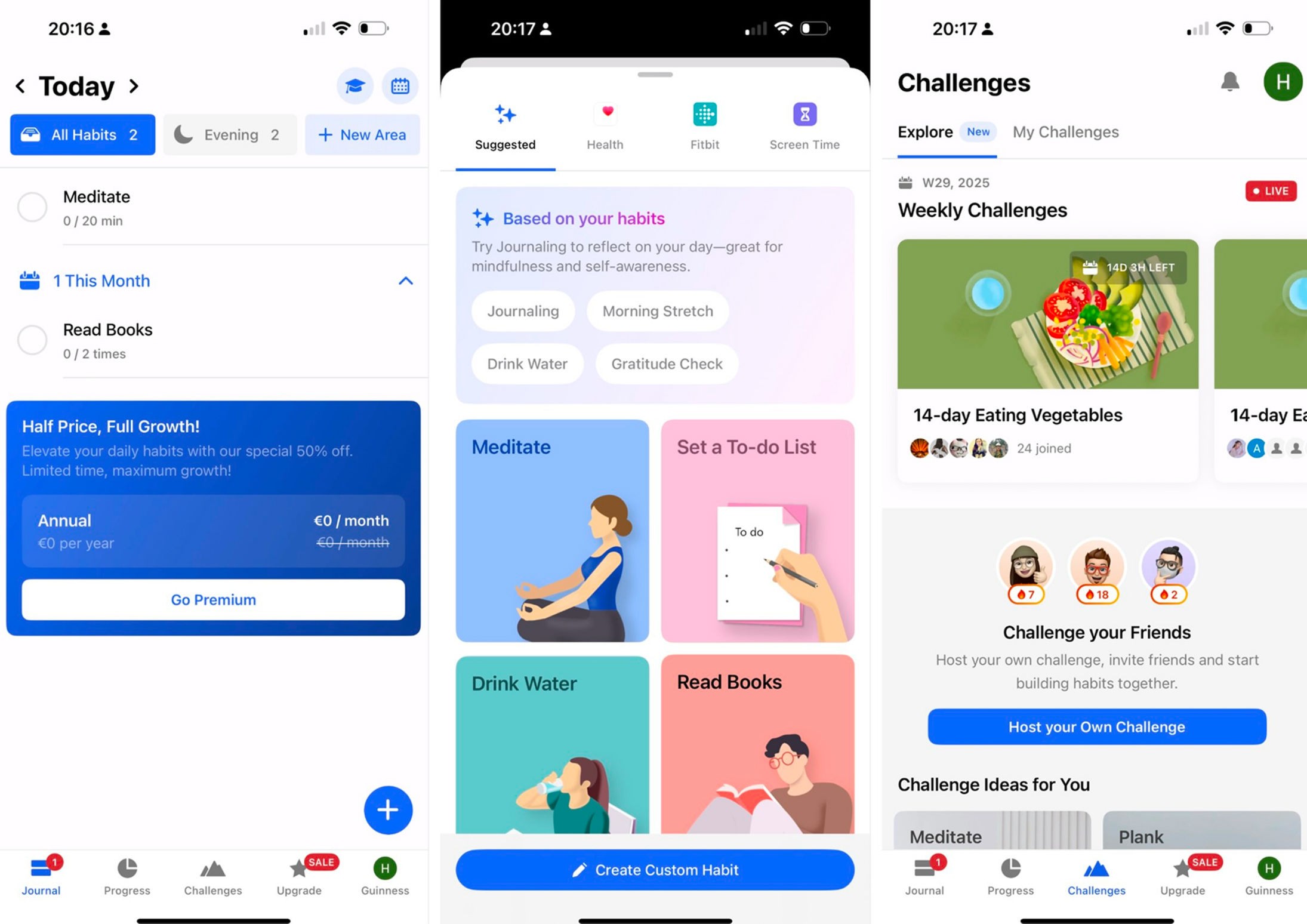
Best for: Tracking habits on every device, Apple Watch and Wear OS included.
Habitify is a minimalist cross-platform habit tracker that sorts your habits into morning, afternoon and evening slots and syncs them across your devices. Each habit can carry a measurable target, such as running 30 km a month. Habitify shows your current and longest streak, and skipping a day doesn't break it. It is the app to beat if you switch between an iPhone, a laptop and the web.
Strengths:
Habitify syncs across iOS, Android, web, Mac, Windows, Apple Watch and Wear OS.
Habitify can put a daily, weekly, monthly or yearly target on each habit.
A week view shows each habit's streak, next to charts and a completion calendar.
Limitations:
The free plan allows three active habits with one reminder each.
The target lives on the habit, so several habits cannot share one bigger goal.
Pricing: Free (3 active habits); Plus, yearly only, for unlimited habits and reminders; Pro $8.99/month, $49.99/year or $119.99 lifetime (on iPhone, the $8.99 monthly plan requires a 12-month commitment)
Platforms: iOS, Android, web, Mac, Windows, Apple Watch, Wear OS
Rating: 4.6 on the App Store (US storefront, about 7,200 ratings, November 2026)
Bottom line: Pick Habitify if you want clean, good-looking habit tracking with a streak that follows you across devices. If you want several habits to feed one bigger goal, Habitify cannot do that.
TickTick
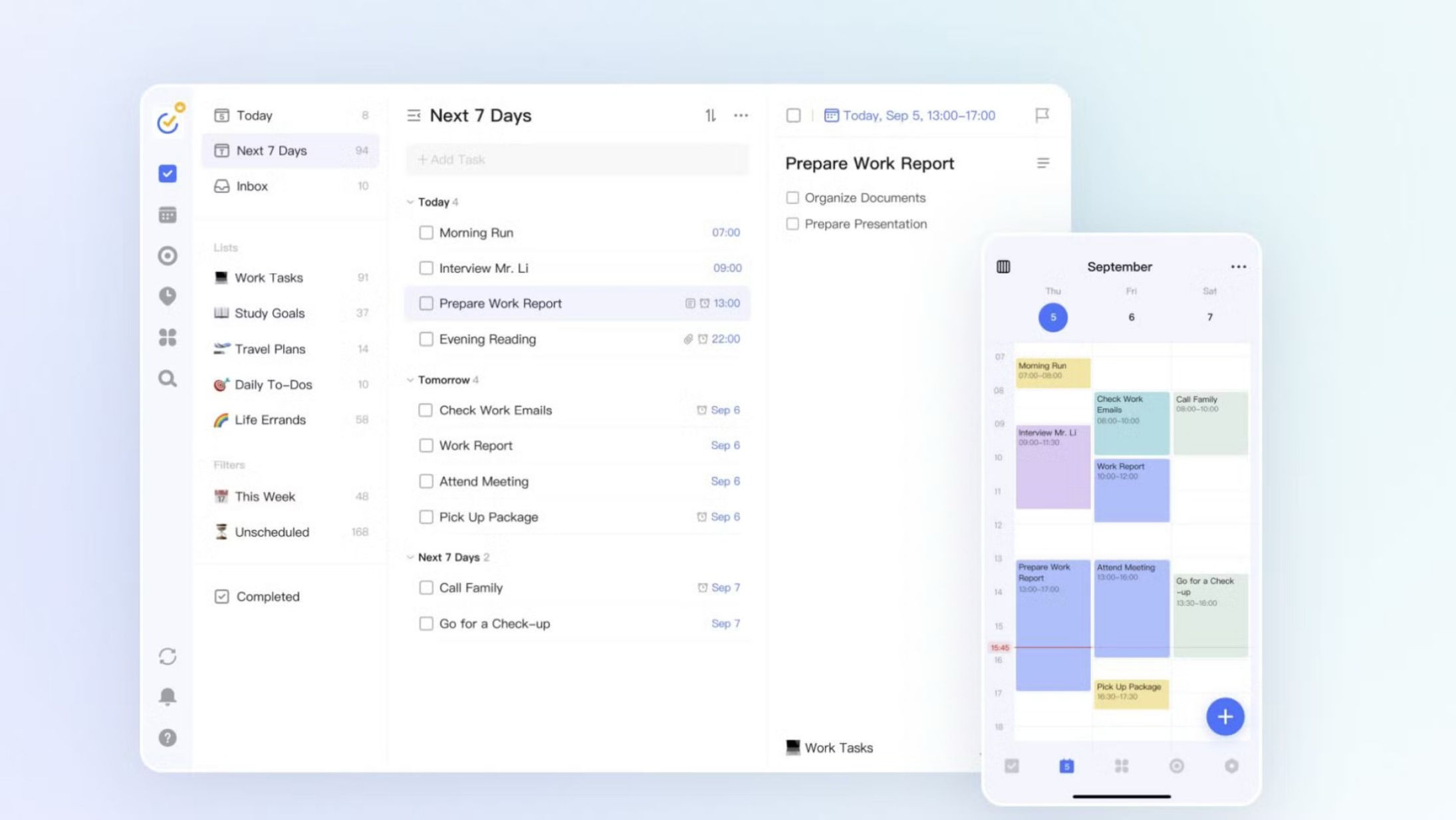
Best for: Habits kept inside a full task manager.
TickTick is a to-do list and calendar app with a full habit tracker built in, so your tasks, your schedule and your habits share one app. Each habit check-in can log a fixed amount, such as one glass of water, or a number you type in, and each habit shows your current streak and total days. It suits people who already plan their day in a to-do list.
Strengths:
TickTick runs on iOS, Android, web, Mac, Windows and Linux.
TickTick habits run on specific days, times per week or every X days, with daily amounts.
Habits live beside a capable task manager, calendar and focus timer.
Limitations:
Habits and tasks sit in separate silos, and neither links to a bigger goal.
The free plan caps you at five habits with basic statistics.
Pricing: Free (5 habits, basic statistics); Premium $4.99/month or $49.99/year
Platforms: iOS, Android, web, Mac, Windows, Linux
Rating: 4.9 on the App Store (US storefront, about 47,000 ratings, November 2026)
Bottom line: Pick TickTick if you want a strong task manager and don't mind habit tracking being one feature inside it. If the habit is the point and you want it tied to a goal, it is not built for that.
Strides
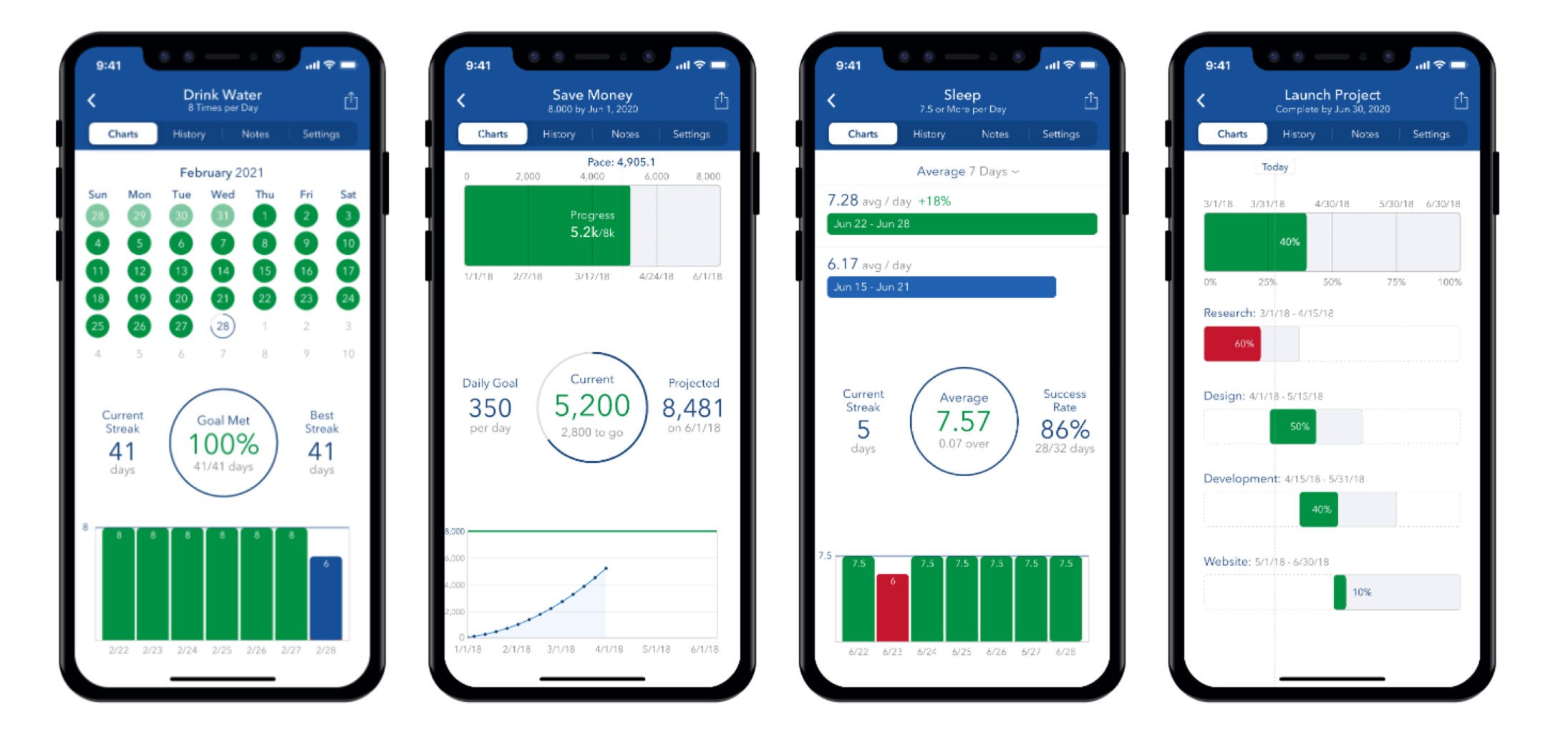
Best for: Tracking habits, targets and averages side by side.
Strides is a goal and habit tracker built around SMART goals, with four kinds of tracker: habits, targets, averages and projects. A habit is a yes/no check-in with a streak calendar, while a target tracks a number you want to hit by a date and turns green when you are on pace and red when you fall behind. Since version 20.0 in October 2026, Strides also has a to-do list, with tasks shown next to your trackers. It suits people who like to track many kinds of numbers side by side.
Strengths:
Strides tracks more than streaks, including a number you want to hit by a date.
Strides charts your streak and success rate; progress reports come with Plus.
Unlimited reminders, Apple Health integration and over 150 templates.
Limitations:
Strides has no web app, and partner sharing works on Apple devices only.
Habits and measurable targets are separate tracker types with no link between them.
Pricing: Free (3 trackers in total, habits or targets); Plus $39.99/year, also sold monthly
Platforms: iOS, Mac, Apple Watch, Android
Rating: 4.8 on the App Store (US storefront, about 19,300 ratings, November 2026)
Bottom line: Pick Strides if you want SMART targets that turn green or red with your pace, especially on Apple devices, where you also get Apple Health and partner sharing. If you need a web app, or a real link between a habit and the goal it serves, look elsewhere.
Productive
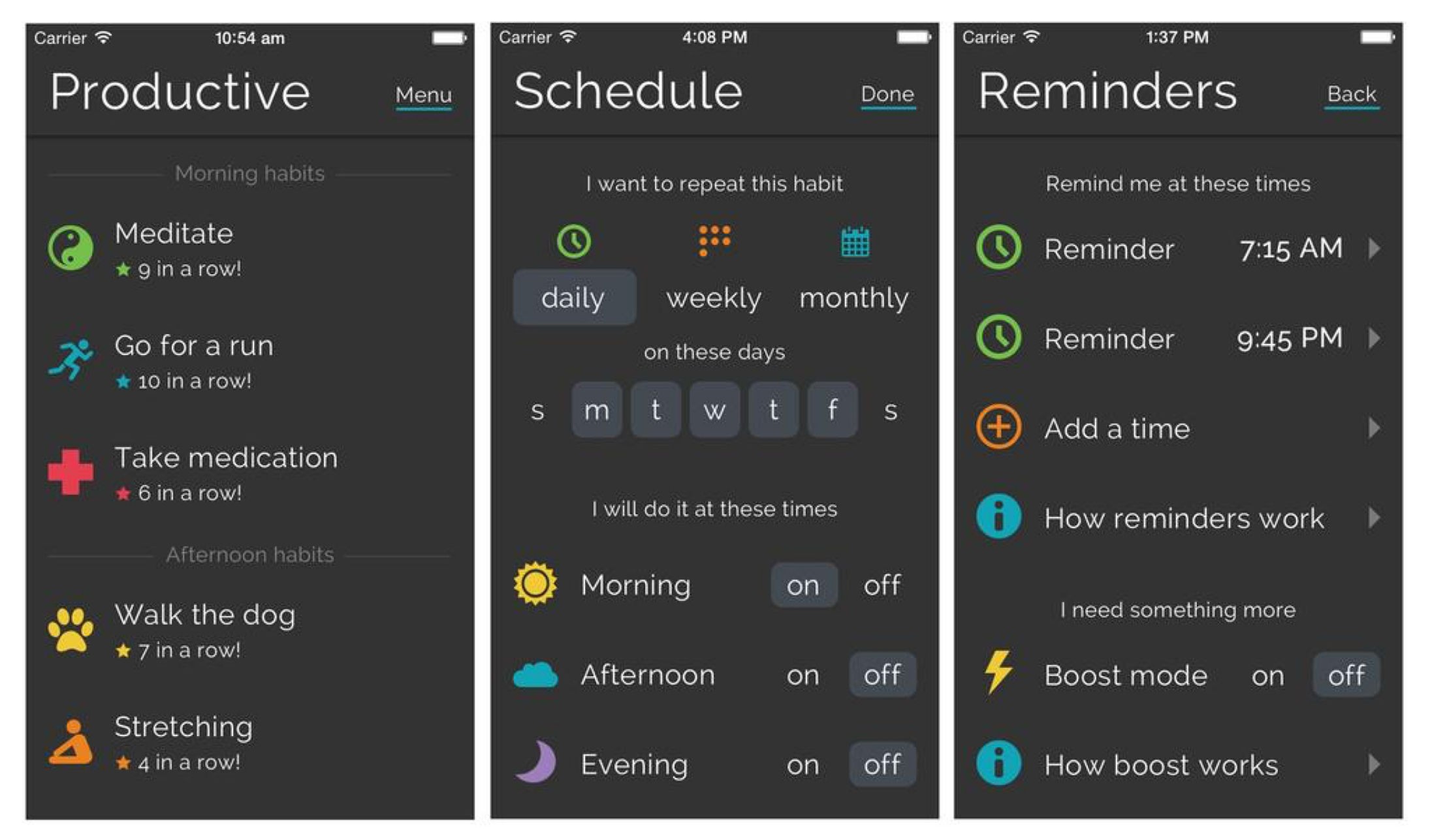
Best for: Habits scheduled by day and time of day.
Productive is a polished habit tracker built purely around scheduling daily habits, building chains of completed days and reviewing stats. You choose which days and which time of day each habit is due (morning, afternoon or evening), and checking one off is a swipe right and a tap on Done. It is a focused option for people who want habit tracking with nothing extra to set up around it.
Strengths:
Schedule specific weekdays and time-of-day slots, with several completions a day.
Productive's free plan shows your streak chains and your count of perfect days.
Runs on iPhone, iPad, Apple Watch and Android.
Limitations:
The free plan caps your habits and keeps per-habit stats and trends for Premium.
Habits are tracked in isolation, with no link to a separate measurable goal.
Pricing: Free (limited habits); Premium $10.99/month or from $19.99/year
Platforms: iOS, Apple Watch, Android
Rating: 4.6 on the App Store (US storefront, about 91,000 ratings, November 2026)
Bottom line: Pick Productive if you want each habit scheduled by day and time of day, with streak chains you can see for free. If you want your habits connected to a goal, Productive has no goal for a habit to feed.
Habitica
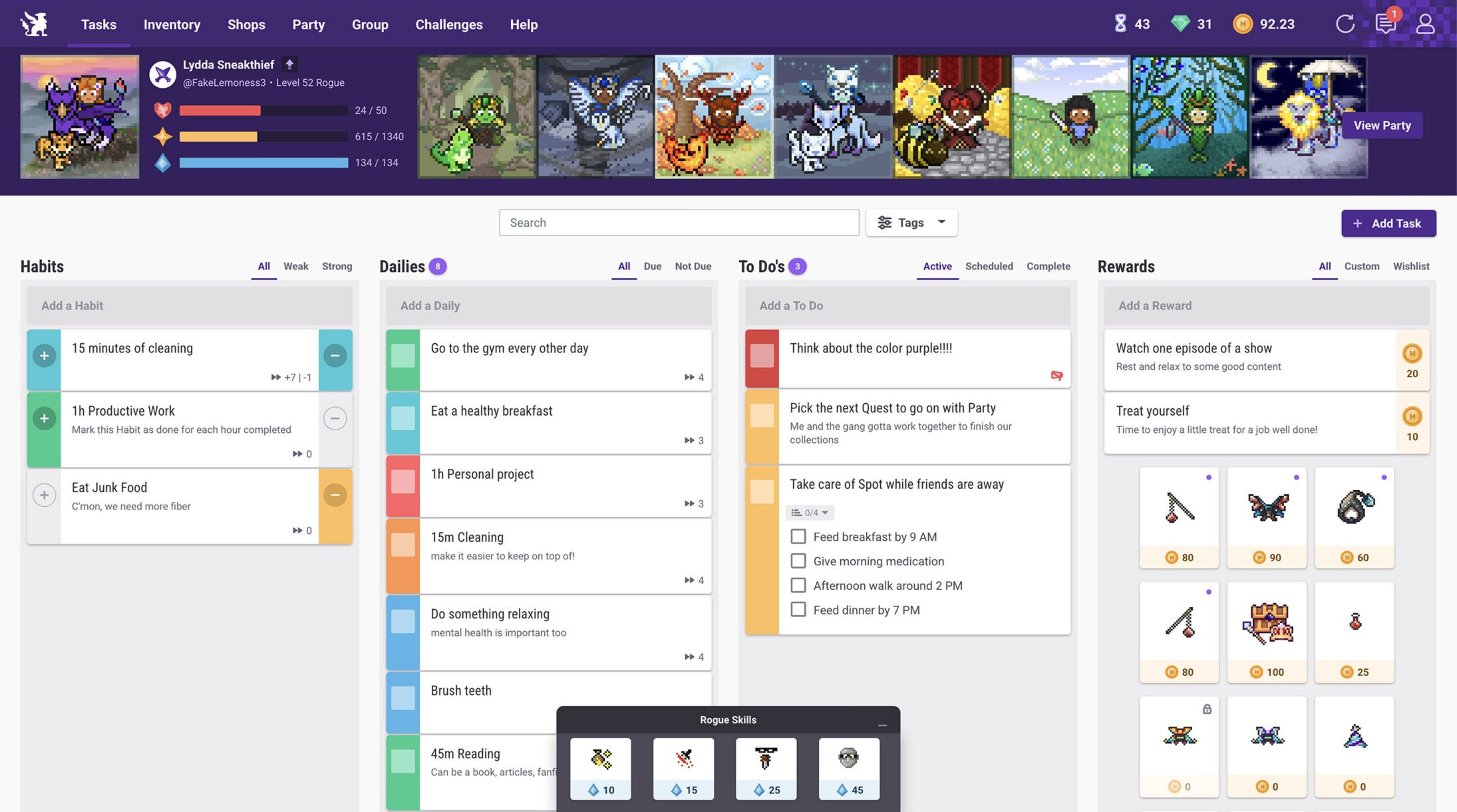
Best for: Gamified accountability with friends.
Habitica turns your habits into a retro role-playing game: you complete Habits, Dailies and To-Dos to level up a character, and each Daily carries a streak counter that resets to zero when you miss it. In a party on a quest, one member's missed Daily damages everyone. The whole tracking system is free, with an optional subscription for cosmetic and convenience perks, so Habitica suits people who are motivated by play and social pressure more than by charts.
Strengths:
Habitica is free with no habit limit, on iOS, Android and web.
Built-in social accountability through parties, challenges and guilds.
Dailies repeat daily, weekly, monthly, yearly, every X days or on chosen weekdays.
Limitations:
Habitica has no measurable goals; a To-Do takes a due date but no target number.
No in-app progress chart; trends need a data export or a community web tool.
Pricing: Free to use (the Android app shows ads); optional subscription $4.99/month or $47.99/year
Platforms: iOS, Android, web
Rating: 4.3 on the App Store (US storefront, about 3,700 ratings, November 2026)
Bottom line: Pick Habitica if game mechanics and a party keep you consistent when nothing else does. If you want measurable goals or in-app progress charts, Habitica offers neither.
Streaks
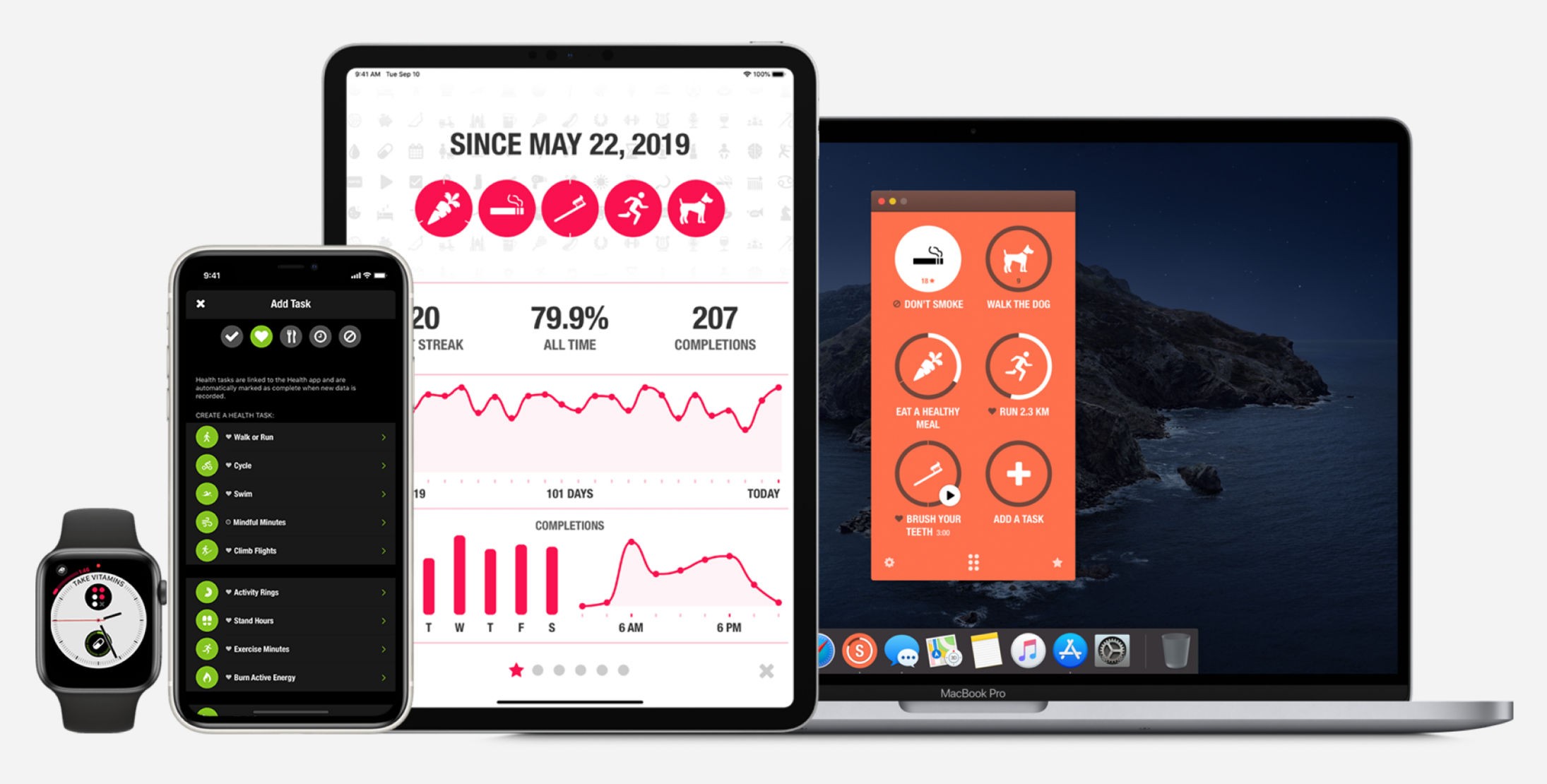
Best for: A simple streak tracker you buy once, on Apple devices.
Streaks is a habit tracker for Apple devices built around keeping an unbroken streak on each of up to 24 habits. You pay once, with no subscription and no ads, and it can mark a habit done on its own when Apple Health data comes in, such as your steps or water. Its statistics screen shows your current and best streak, your completion rate and your history for a period you pick, such as this month or all time. It suits people who want a simple tracker they pay for once, on iPhone, Mac and Apple Watch.
Strengths:
One purchase covers iPhone, iPad, Mac and Apple Watch, with no subscription.
Auto-completes habits from Apple Health, plus widgets, Watch complications and Siri Shortcuts.
Flexible schedules, from specific days to every few days or several times a day.
Limitations:
Apple-only: no Android and no web.
No measurable goal behind a habit, and a hard cap of 24 habits.
Pricing: $5.99 one-time, no subscription
Platforms: iOS, Mac, Apple Watch
Rating: 4.8 on the App Store (US storefront, about 27,000 ratings, November 2026)
Bottom line: Pick Streaks if you want a simple habit tracker on Apple devices that you pay for once. If you want Android, or a habit that feeds a measurable goal, look elsewhere.
Way of Life
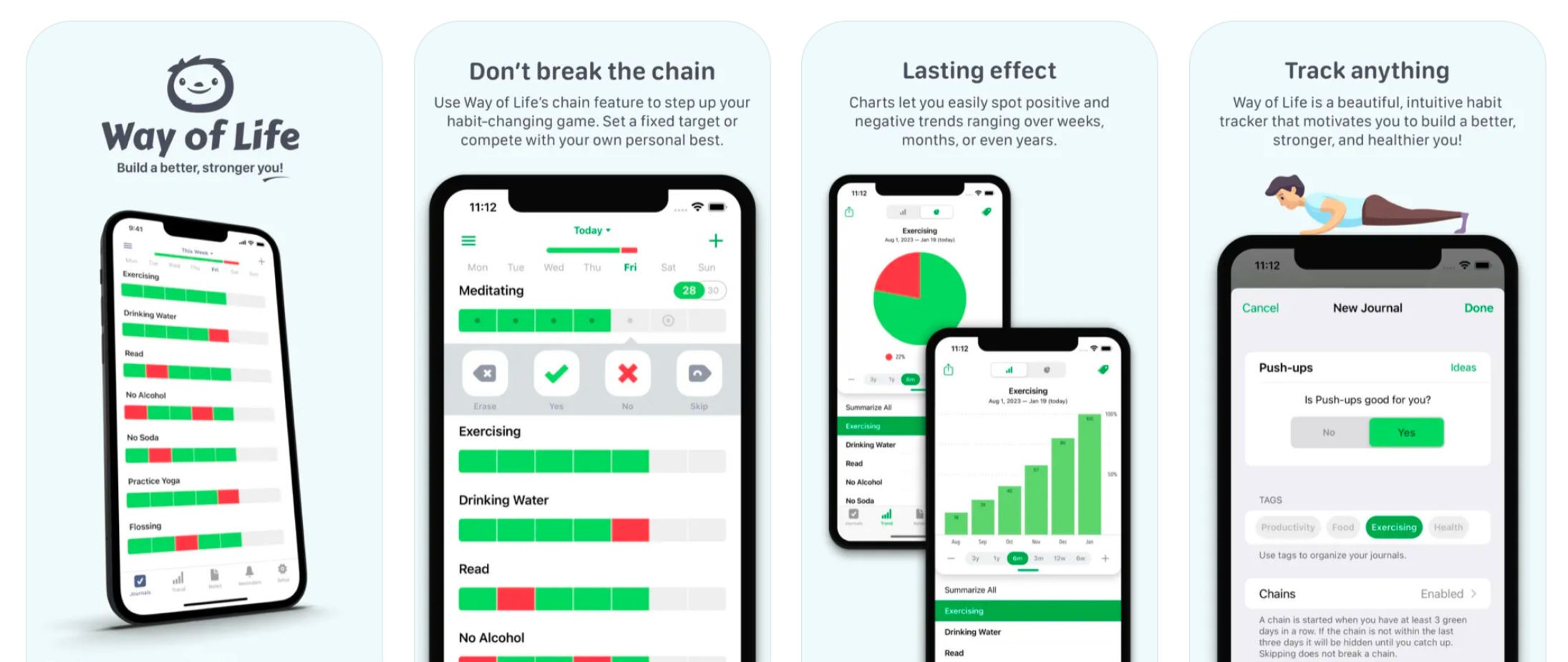
Best for: Spotting long-term trends at a glance.
Way of Life is a color-coded habit tracker where you mark each habit daily as Yes, No or Skip, and a Skip marks a planned day off so it does not count against your trend. Its strength is the long view: trend charts run over weeks, months and even years, a chart of your green and red days by day of the week shows which days slip, and journal notes explain what happened. It suits people who care less about today's streak and more about the shape of a habit over time.
Strengths:
Three-state logging, where a Skip marks a planned rest day without hurting your trend.
Trend charts spanning weeks to years, with journal notes alongside.
Exports to CSV, Excel or JSON, and backup is free on iPhone.
Limitations:
No way to link a habit to a bigger goal.
Backup is Premium on Android (free on iPhone), and there is no web or desktop version.
Pricing: Free (limited habits, every chart included; backup is Premium on Android); Premium from $4.99 unlocks unlimited habits
Platforms: iOS, Android
Rating: 4.8 on the App Store (US storefront, about 5,300 ratings, November 2026)
Bottom line: Pick Way of Life if you want to read a habit's trend over months and years at a glance. If you want your habits tied to a goal, or a web or desktop version, look elsewhere.
HabitKit
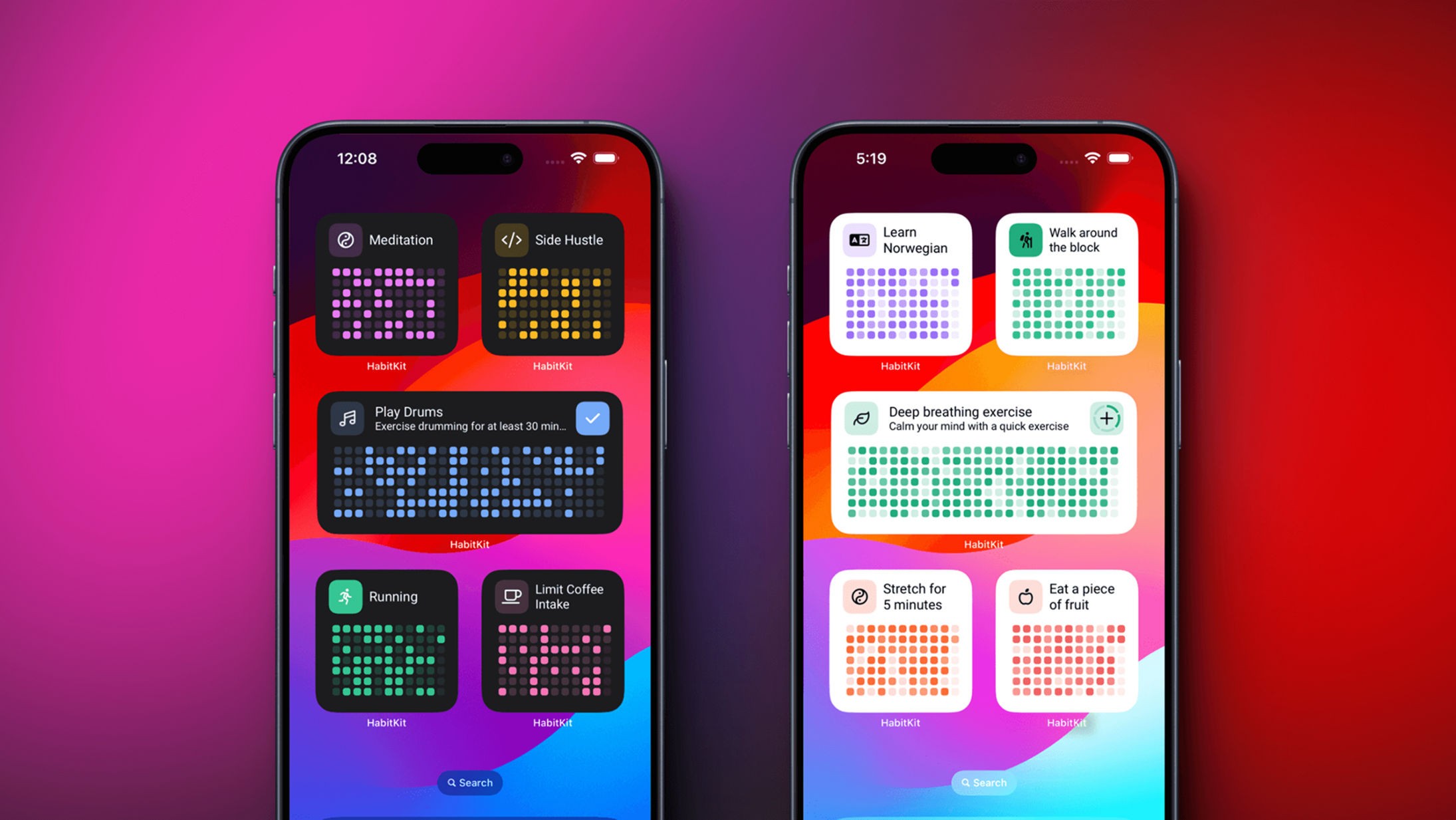
Best for: Watching a grid of colored days fill in.
HabitKit is a habit tracker built around a grid like GitHub's contribution chart: every day you keep a habit fills in another colored square, until your consistency shows up as a wall of color. One tap logs the day, your current streak shows on the habit list, and since October 2026 you can schedule a habit on specific days or every few days, with days off that never break the streak. It is the pick for people who are motivated by watching a pattern fill in.
Strengths:
The tile grid shows at a glance which days you kept a habit.
HabitKit needs no account and works fully offline, with no ads.
Handles specific days, every few days and several completions a day.
Limitations:
Habits can't link to a bigger goal; HabitKit is built around streaks and the grid.
HabitKit does not sync between devices, and charts and statistics need Pro.
Pricing: Free (4 habits); Pro $1.99/month, $11.99/year or $29.99 lifetime
Platforms: iOS, Android
Rating: 4.8 on the App Store (US storefront, about 2,600 ratings, November 2026)
Bottom line: Pick HabitKit if a grid of filled squares is what keeps you logging. If you want a habit tied to a measurable goal, HabitKit has no goal for the habit to feed.
Everyday
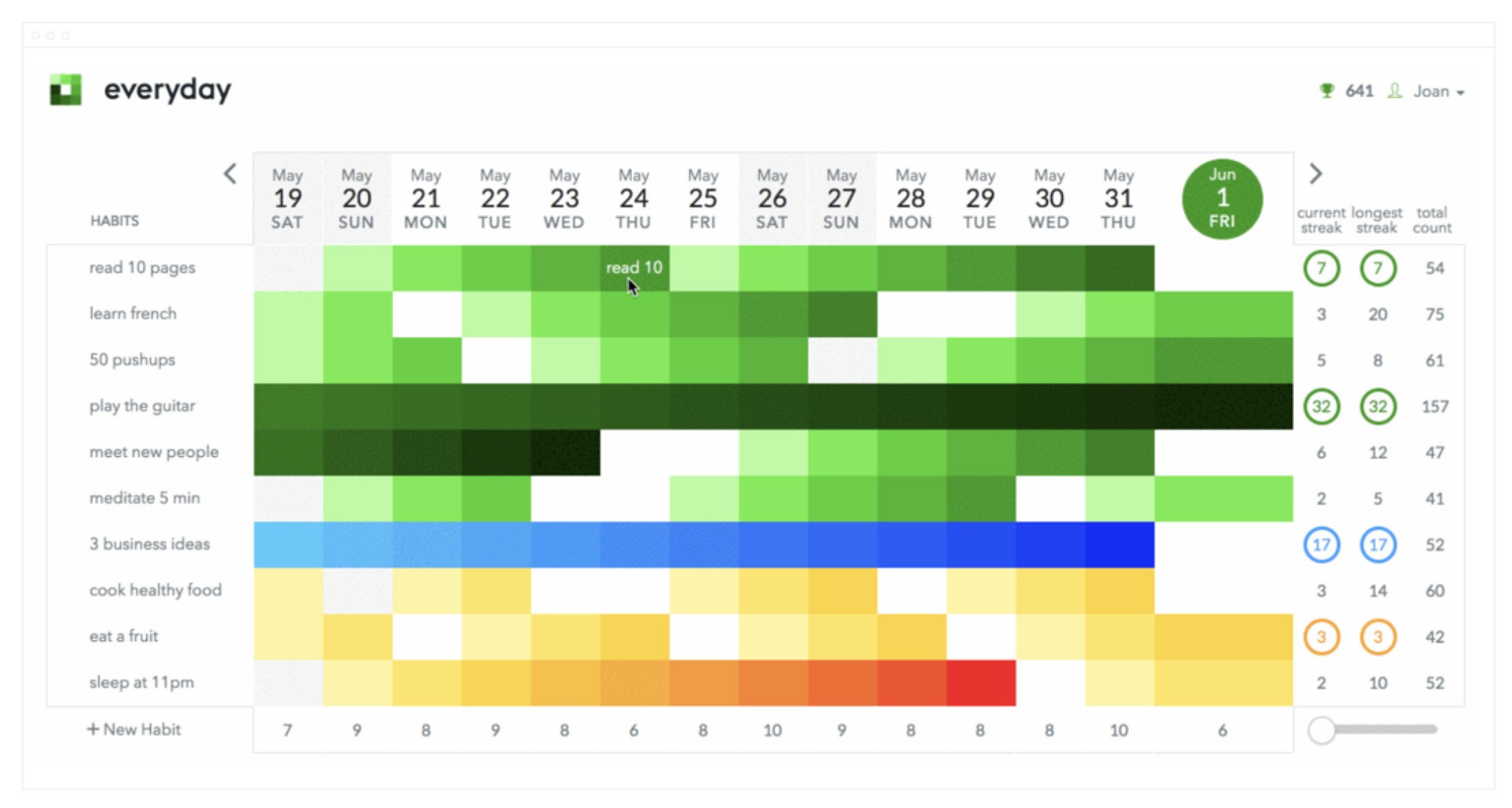
Best for: A simple daily streak on any device, web included.
Everyday is a "don't break the chain" habit tracker where you mark a habit done each day and grow an unbroken streak on a visual board. Beside each chain it shows your current streak, your longest streak and your total completions, with a slider to view them by week, month or year. It runs on more platforms than almost anything else here, from web and Android to iPhone, Mac and Apple Watch, and Premium syncs your chains across all of them.
Strengths:
Runs on web, iOS, iPad, Mac, Apple Watch and Android.
Everyday shows your current streak beside your longest one, plus total completions.
A "break habit" option shows habits you want to quit as chains in fading colors.
Limitations:
Everyday schedules habits every day or Monday to Friday only; other patterns mean skipping days by hand.
No way to tie a habit to a measurable goal; the chains stand alone.
Pricing: Free (3 habits, no sync between devices); Premium $7.49/month or $29.99/year
Platforms: iOS, iPad, Mac, Apple Watch, Android, web
Rating: 4.7 on the App Store (US storefront, about 4,500 ratings, November 2026)
Bottom line: Pick Everyday if you want a simple daily chain you can check from any device, browser included. If you need other schedules or a goal behind the habit, look elsewhere.
HabitNow
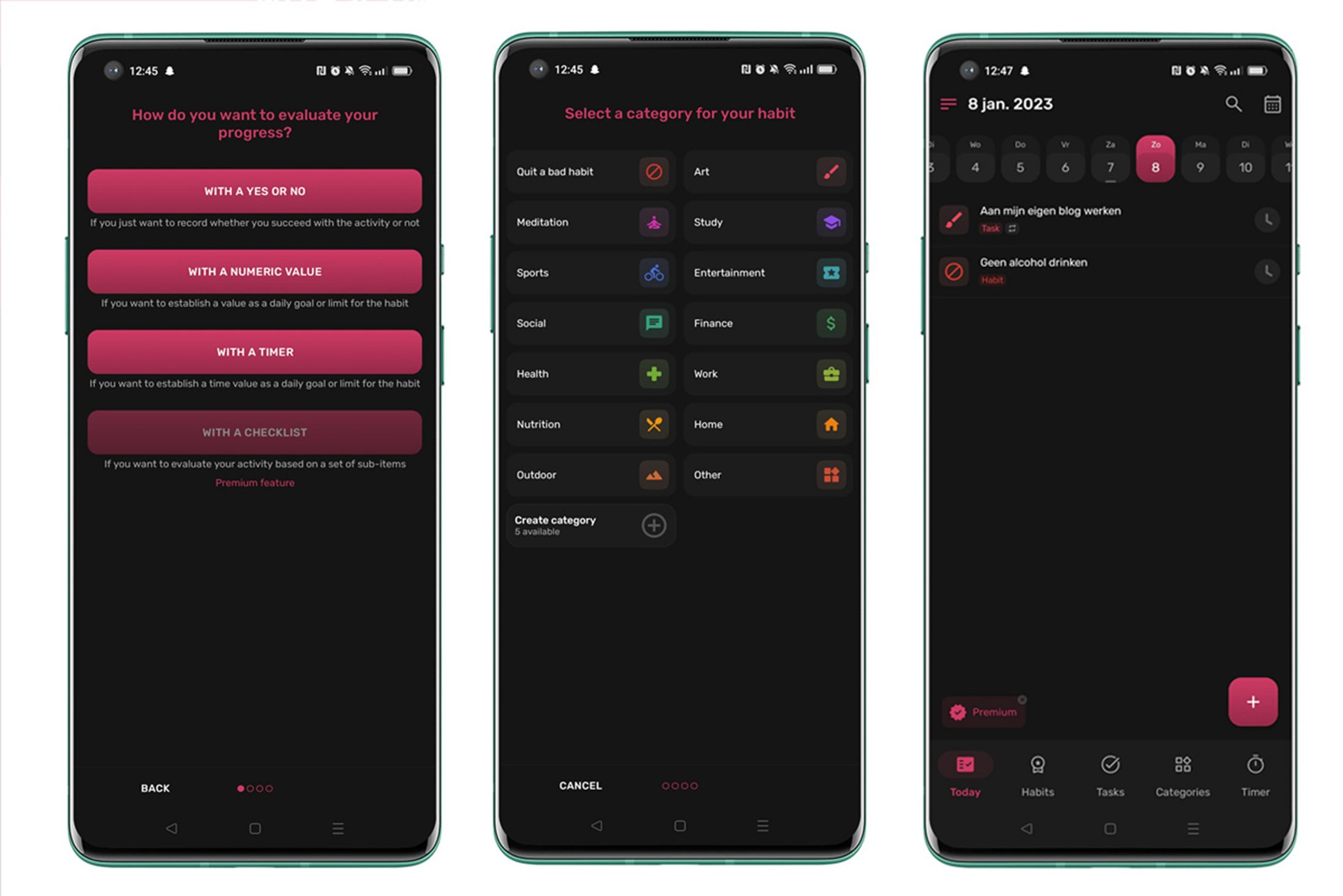
Best for: An all-in-one Android habit and routine planner.
HabitNow is an Android app that bundles habits, to-dos, reminders, timers and a calendar into one place, so your whole daily routine sits together. Habits support flexible frequencies and multiple check-ins a day, and a calendar view, success streaks, stats and home-screen widgets keep progress visible. It is a strong pick for Android users who want one app for habits and everything around them.
Strengths:
HabitNow puts habits, tasks, reminders, timers and a calendar in one Android app.
Habits run on specific days or a set number of times per week or month, several times a day if needed.
One-time premium unlock with no subscription.
Limitations:
Android only: no iOS, web or desktop.
Habits are tracked by streaks and frequency, with no link to a measurable goal.
Pricing: Free version (limited habits); one-time premium unlock, no subscription
Platforms: Android
Rating: 4.8 on Google Play (about 93,700 ratings, November 2026)
Bottom line: Pick HabitNow if you are on Android and want habits, tasks and reminders in a single planner. If you want cross-platform sync or a goal behind each habit, it is not built for that.
Loop Habit Tracker
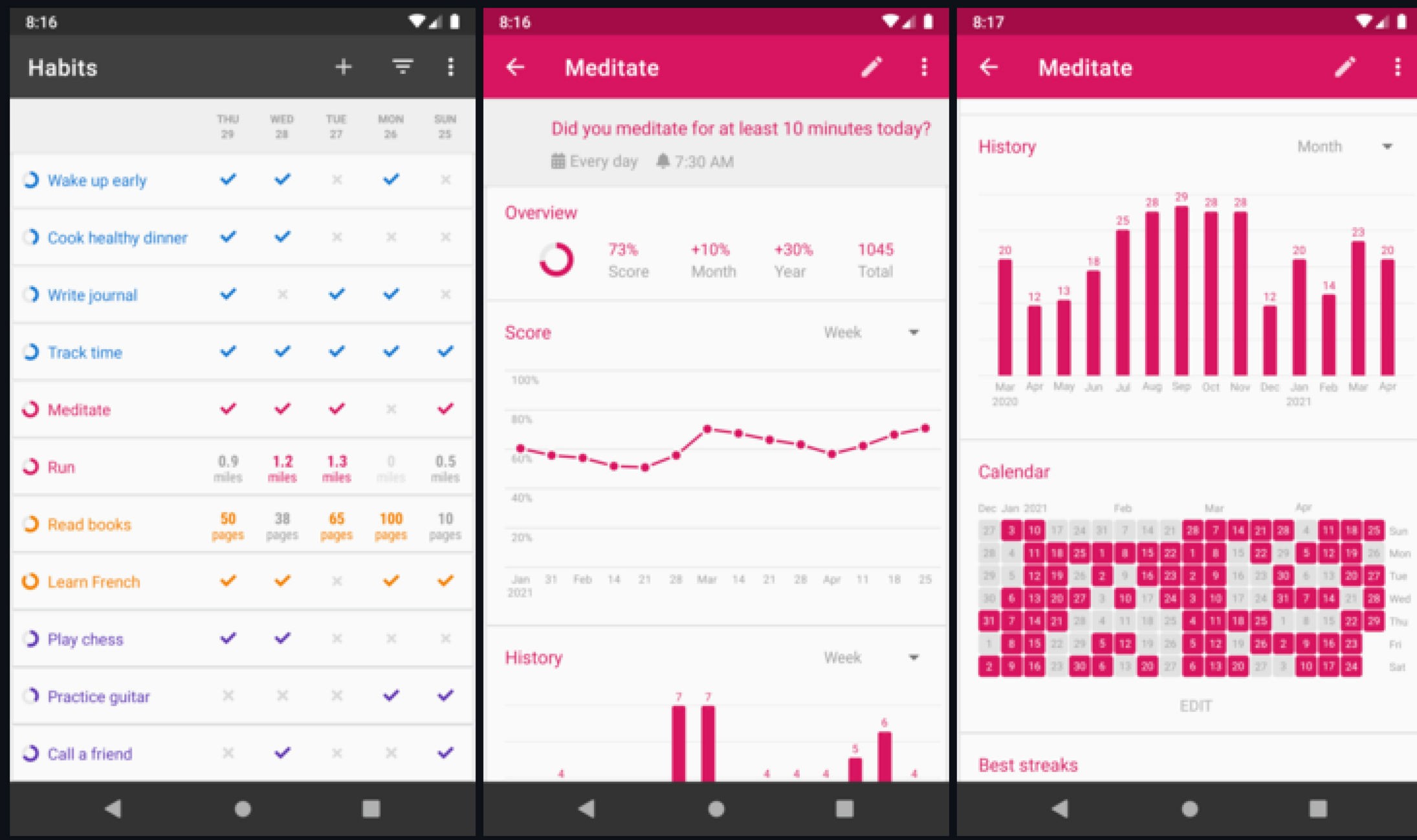
Best for: A free, open-source, offline Android tracker.
Loop Habit Tracker is a completely free, open-source Android app that works fully offline with no account and no ads. Its signature is a "habit strength" score that rises with every repetition and falls when you miss, so your consistency shows up as one number that a single missed day does not wipe out. It is the pick for Android users who want a clean, private, no-cost tracker.
Strengths:
Fully free and open-source, with no ads and no paywalled features.
A "habit strength" score plus graphs, your current streak and best streaks.
Works entirely offline with CSV and SQLite export.
Limitations:
Android only, with no cloud sync or accounts, so data stays on one device.
Habits can't link to a bigger goal you measure.
Pricing: Free and open-source, no ads
Platforms: Android
Rating: 4.7 on Google Play (about 63,700 ratings, November 2026)
Bottom line: Pick Loop if you want a free, private, open-source habit tracker on Android and value a real progress score. If you need cross-device sync or a goal behind your habits, Loop has neither.
Finch

Best for: Habits alongside mental-health self-care.
Finch is a self-care app where you raise a virtual bird by taking care of yourself. Each habit or self-care step is a "goal" in Finch, and tapping its checkmark earns energy for your bird's daily adventure. Finch also has mood tracking, guided journaling and breathing exercises, and its streak counts the days you open Finch, not the habits you complete. It is the pick for people who want encouragement and self-care more than outcome tracking.
Strengths:
Mood tracking with trends, guided journaling and breathing sit beside your habits.
Each habit gets a frequency, such as daily or weekly, and a time of day.
Rainbow Stones can repair a missed day, so one slip doesn't have to end your streak.
Limitations:
Self-care oriented, so habits do not roll up into a measurable goal.
Mobile only, with no web or desktop version.
Pricing: Free to use; Finch Plus $9.99/month or $69.99/year
Platforms: iOS, Android
Rating: 4.9 on the App Store (US storefront, about 775,000 ratings, November 2026)
Bottom line: Pick Finch if you want habit-building wrapped in mental-health self-care and gentle encouragement. If you want to track progress toward a measurable goal, Finch is the wrong pick, because it measures how you feel more than what you achieve.
How to choose
Habit trackers come in three styles. Streak counters, such as Streaks, Habitify, HabitKit and Everyday, count the days in a row you keep a habit and reward you for not breaking the chain. Gamified apps, such as Habitica and Finch, turn each check-in into gold, gear or a growing pet. Goal-linked trackers, such as Griply, connect a habit to a bigger goal you can measure, so you see the habit and the goal's progress side by side. Pick the style first, then the app.
If you want your habits tied to a bigger goal you can watch move, pick Griply. It is the only app here where a habit can attach to a goal with a target and a deadline.
If you only want a streak counter, pick Streaks on Apple devices, Habitify on any device, or HabitKit for a grid of filled-in days.
If you want the same habits on every device, pick Habitify or TickTick. Both sync across phone, web and desktop.
If you are on Android, pick HabitNow for an all-in-one planner or Loop Habit Tracker for a free, open-source option.
If you do not want a subscription, pick Streaks for a one-time Apple purchase, HabitNow for a one-time Android unlock, or Loop, which is free.
If game mechanics keep you going, pick Habitica for party accountability or Finch for gentle self-care.
If you want separate trackers for habits, averages and number-by-date targets, pick Strides.
Best free habit tracker apps
Griply is the best free habit tracker app if you want your habits tied to a goal: its free plan includes 2 habits and 2 goals, with goal progress charts and habit statistics. For unlimited free habits, pick Loop Habit Tracker on Android (no ads) or Habitica on iOS, Android and web.
Free plans differ in three ways: how many habits you can track, whether charts are included, and what you get by paying.
App | Free habit limit | Charts and stats on the free plan | What the paid plan adds |
|---|---|---|---|
Griply | 2 habits, plus 2 goals | Goal progress charts and habit statistics | Unlimited habits and goals, times-per-week schedules, subgoals |
Habitify | 3 active habits | Streaks, charts and completion calendar | Unlimited habits and reminders (Plus); calendar and health sync (Pro) |
TickTick | 5 habits | Basic habit statistics | More habits, full statistics |
Strides | 3 trackers, habits or targets | Charts, streaks and success rates | Unlimited trackers, progress reports |
Habitica | No limit | Character stats and streak counters, no charts | Cosmetic gear and perks |
HabitKit | 4 habits | Tile grid, calendar and current streak | Unlimited habits, charts and statistics, widgets |
Everyday | 3 habits | Chain board with current and longest streak | Unlimited habits, sync between devices |
Loop Habit Tracker | No limit | Every graph and the habit strength score | No paid plan |
Habitica's Android app shows ads; Loop, HabitKit and Streaks have none. Productive, Way of Life and HabitNow also have free versions that cap your habits: Way of Life includes every chart for free, while Productive keeps per-habit stats and weekly trends for Premium. Finch's core self-care features are free, and Streaks has no free plan: it is a $5.99 one-time purchase.
Why most people quit a habit by February
Most habits fail the same way. You pick one in January, the app rewards you with a streak, and the streak quietly becomes the point. But a streak is not a reason. It records that you showed up without capturing why it mattered, so the day a trip or a busy stretch finally breaks the chain, you have no reason left to start again. You restart after a broken streak only when the habit is working toward something you want. But in most apps, the reason you began, such as getting stronger, finishing a book or sleeping better, isn't in the app. It lives in your head, cut off from the daily habit meant to serve it.
You can see the gap in what each app protects. Streaks, Way of Life, HabitKit, Everyday, Loop, HabitNow, TickTick, Productive and Habitica protect the chain, and they do that well, but the habit has no bigger reason attached. Habitify and Strides get closer by putting a target number on the habit or in a separate tracker, so at least the number means something. In Griply, a habit can sit under a goal with its own number and deadline, so a missed day is one gap on the way to a number you care about. When the streak breaks, and it will, the goal is still there, and so is the reason to begin again tomorrow. If your habit started as a New Year's resolution, see the best app for New Year's resolutions.
Start building habits that move a goal
Griply is for people who want their daily habits to feed a goal they can measure, so the days they show up finally add up to something. If that is you, start free with one goal this week.
Start for free, and if you want ideas or accountability, come say hello in the Griply community.
What should I look for in a habit tracker app?
Look for flexible scheduling, a progress view that shows more than a streak, sync to the device you actually use, and, if you want habits to add up to something, a way to link each habit to a bigger goal you can measure.
What is the best free habit tracker app?
Griply is the best free habit tracker app if you want your habits tied to a goal: its free plan includes 2 habits and 2 goals with progress charts. If you want unlimited habits for free, pick Loop Habit Tracker (Android, no ads) or Habitica (iOS, Android and web).
What is the best streak habit tracker?
Streaks is the best streak habit tracker on Apple devices: current and best streaks for up to 24 habits, for a one-time $5.99. Habitify shows current and longest streaks on every device. On Android, Loop pairs its streaks with a habit strength score that one missed day won't wipe out.
Which habit tracker apps work on both iPhone and Android?
Griply, Habitify, TickTick, Strides, Productive, Habitica, Way of Life, HabitKit, Everyday and Finch all run on both. Streaks is Apple-only, and HabitNow and Loop are Android-only. Of those ten, Griply, Habitify, TickTick, Habitica and Everyday also run in a web browser.
What is the best habit tracker for Android?
HabitNow is the strongest all-in-one Android app: it puts habits, tasks and reminders in one place. Loop Habit Tracker is the best free, open-source choice. Griply, TickTick and Habitify also run on Android and sync with your other devices, and only Griply lets a habit feed a bigger goal.
Is there a habit tracker without a subscription?
Yes. Streaks is a one-time $5.99 purchase on Apple devices, Loop Habit Tracker is free on Android, and HabitNow sells a one-time premium unlock. Griply sells a $149.99 lifetime plan. HabitKit ($29.99) and Habitify Pro ($119.99) sell lifetime plans too.
What is the best gamified habit tracker?
Habitica is the most fully gamified, turning habits into a role-playing game with party accountability. Finch is the gentler option, growing a virtual pet as you complete self-care habits.
What is the difference between a habit tracker and a goal tracker?
A habit tracker records whether you completed a recurring action, usually as a streak. A goal tracker measures progress toward an outcome with a target and a deadline. Most apps do one or the other; Griply lets you link a habit to the goal it serves.
What is the best habit tracker that connects to your goals?
Griply is the only app here where a habit can attach to a bigger goal it feeds. Habitify puts a target on the habit and Strides has a separate target tracker, but neither links a habit to a bigger goal. More on the best habit tracker connected to your goals.
What is the best habit tracker app for ADHD?
The best fit depends on what keeps you engaged: Habitica and Finch use game mechanics and rewards, while Griply ties habits to a visible goal so the daily action has an obvious point. We cover this in detail on the best habit tracker for ADHD.
Do habit tracker apps really work?
They help when the habit is tied to a reason you care about and the schedule fits your life; they fail when the streak becomes the only goal. An app that keeps your reason in sight gives you something to restart for. More on whether habit tracker apps work.
Does Apple have a built-in habit tracker?
No. Apple has no dedicated habit tracker; people improvise with Reminders or the Health app. Third-party apps like Streaks, Griply or Habitify fill the gap. See whether Apple has a habit tracker.