What is the best GTD app without the overhead?
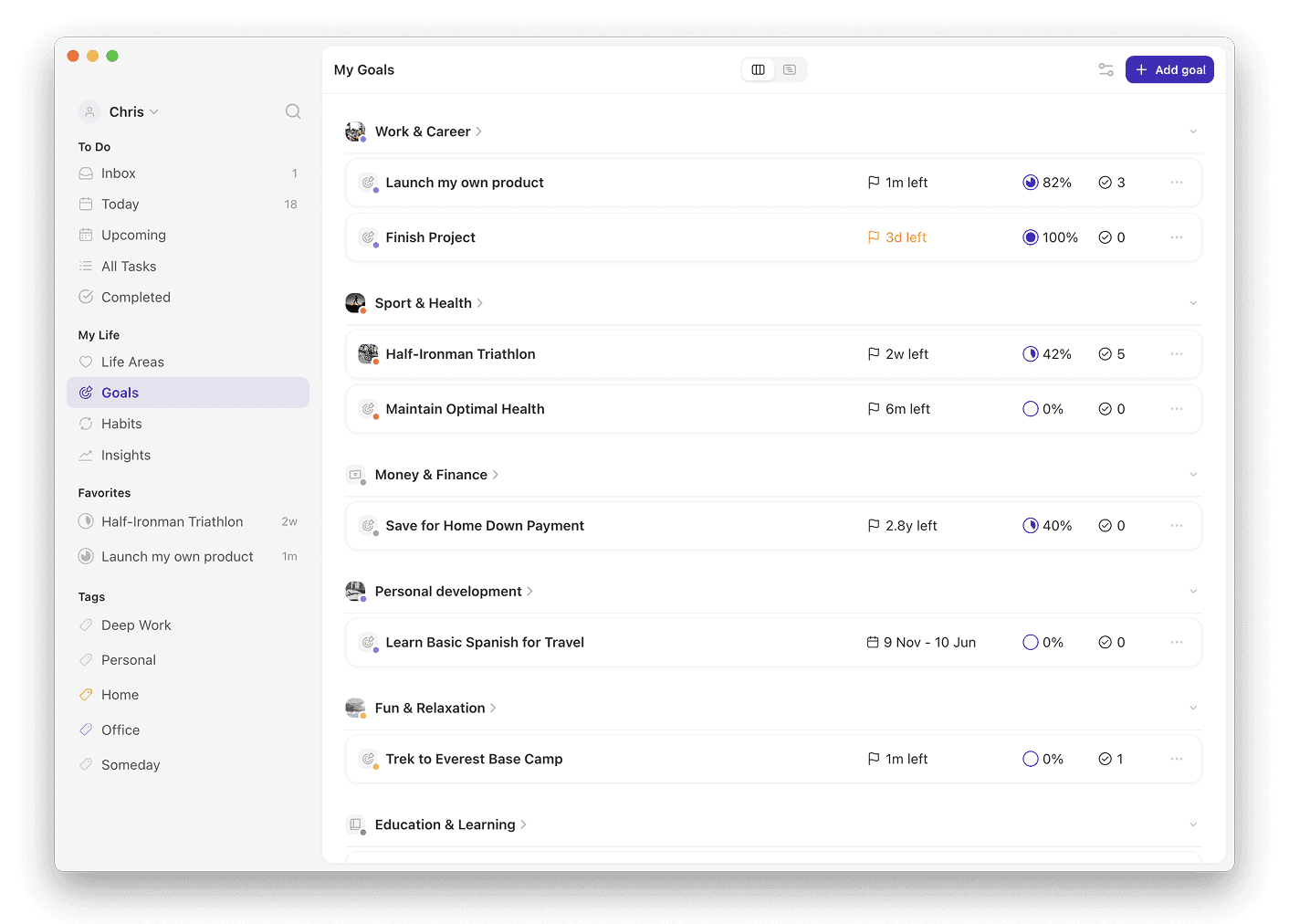
Griply is the best app for implementing GTD's upper horizons without the overhead of maintaining a full system. Its Life Area → Vision → Goal → Subgoal → Project → Task/Habit hierarchy makes goals and vision a fixed structure you fill in once, with no weekly review to rebuild by hand.
Griply: operates the upper horizons through a Life Area → Vision → Goal → Subgoal → Project → Task/Habit hierarchy with measurable goals; iOS, Android, web, Mac, and Windows; free plan (2 goals, 2 habits), premium $5.99/month or $49.99/year; App Store rating 4.6 (US, 190 ratings, July 2026).
OmniFocus: rigorous projects and contexts; no goal metric or vision layer above them; Mac, iOS, and web; $4.99/month or $74.99 one-time.
Things 3: calm design with areas and projects; no measurable goal or vision layer; Mac and iOS only; $49.99 one-time on Mac.
Todoist: fast cross-platform capture; no goal hierarchy above its projects; iOS, Android, web, and desktop; free plan or $5/month billed annually.
App | Upper horizons (areas, goals, vision) | Platforms | Starting price | Best for |
|---|---|---|---|---|
Griply | Vision plus goals with a measurable metric | iOS, Android, web, Mac, Windows | Free; $5.99/month or $49.99/year | Making the upper horizons operational |
OmniFocus | Projects and contexts, no goal metric | Mac, iOS, web | $4.99/month or $74.99 once | Rigorous lower-horizon GTD on Apple |
Things 3 | Areas and projects, no goal metric | Mac, iOS only | $49.99 once | A calm Apple-only task list |
Todoist | Projects and labels, no goal layer | iOS, Android, web, desktop | Free; $5/month | Fast cross-platform capture |
Why most GTD apps only cover the lower horizons
GTD is the productivity method from David Allen's 2001 book Getting Things Done, built on a five-step workflow and six Horizons of Focus. The horizons run bottom-up, from your daily next actions to areas of focus, goals, vision, and life purpose. Most GTD apps operate only the lowest levels: next actions and projects.
OmniFocus, Things 3, and Todoist give you fast capture and clean project lists. They do not make your goals or vision measurable against a deadline.
The overhead is the cost of running that system by hand. The weekly review alone commonly takes about two hours, and skipping it leaves your lists out of date. Practitioners report months of setup before the full method runs.
For the five steps and six horizons explained in full, read the full GTD method.
How Griply operates the upper horizons
Griply, which we make, is built around the levels most GTD apps skip. Its hierarchy runs Life Area → Vision → Goal → Subgoal → Project → Task/Habit, so a task can trace up to a goal that sits inside a life area with its own vision. A life area matches GTD's areas of focus, and each holds a Vision describing what that domain looks like when it is going well.
A Goal is a measurable outcome that runs from a start value to a target value by a deadline. GTD names this level as an altitude but gives you no way to track it. You log progress by hand, and Griply plots it on a line chart against a target line to the deadline.
Griply has no dedicated Projects feature. You break a goal into subgoals, which nest without limit, and use those for project-style work. Tasks and habits sit at the bottom as your next actions, and linking a habit to a goal shows it under that goal without changing the goal's progress.
How to set up GTD in Griply without the overhead
Start by capturing everything into the Inbox, Griply's equivalent of the GTD inbox, where unprocessed tasks with no goal link or date collect. Clarify each item by giving it a next action and a link to a goal or life area.
Set up your upper horizons once. Create a life area for each ongoing responsibility and write its Vision. Add goals with a target and deadline underneath, and use tags as GTD-style contexts that free users get without limit.
Work from the Today screen, which shows today's tasks and habits next to your calendar column and surfaces which goals they serve. Save a smart list as a reusable next-action view filtered by tag or goal. For the reflect step, Griply sends a weekly review reminder you can read about in the weekly review guide, and you run the review yourself.
Related questions
Is Griply a full GTD app?
No. Griply operates GTD's upper horizons, the areas of focus, goals, and vision that most GTD apps skip. It has no dedicated Projects feature and does not enforce GTD contexts, so pair it with a task manager if you want strict lower-horizon GTD.
How does Griply compare to OmniFocus for GTD?
OmniFocus is the stronger tool for lower-horizon GTD, with rigorous project and context management on Apple devices. Griply covers what OmniFocus lacks: a vision layer and goals with a measurable metric. OmniFocus costs $9.99 a month or $99.99 a year; Griply has a free plan.
What is the overhead in GTD?
The overhead is the maintenance cost of running the full GTD system by hand. The weekly review commonly takes about two hours, and practitioners report months of setup before it works. Skipped reviews leave lists out of date.
Can I use Griply for the GTD weekly review?
Griply sends a weekly review reminder, set to Sunday by default and adjustable in notifications. There is no guided review wizard inside Griply; the reminder prompts you to run the review yourself. You review your goals and open tasks from the Goals and Today screens.