

Table of Contents
The best Amazing Marvin alternatives in 2026 are Griply, TickTick, Sunsama, Akiflow, Motion, Todoist, Habitica, Things 3 and OmniFocus. Pick Griply if you want a full planning system without Marvin's setup: a simpler app with a progress chart for each goal and your habits and tasks in one place. Pick TickTick for tasks, habits and a focus timer at a low price, Sunsama for a guided daily planning ritual, Akiflow for time blocking, Motion if you want an AI to schedule your day, and Todoist for a simple list. Habitica turns habits into a game, and Things 3 and OmniFocus suit people who only use Apple devices.
Griply comes first because it keeps both your goals and your habits, and TickTick second because it keeps your habits and your planned day; the others each replace one part of Marvin. Reviews of Marvin on AlternativeTo, Product Hunt and the App Store keep naming the same cost: a learning curve, and a lot of options to decide on. Most Amazing Marvin alternatives are simpler planners, so switching to one usually means giving up goals and habits along with the setup. Griply is for switchers who want to keep both, in an app that is simpler to run. If other tools feel like chores to update and manage, Griply asks less of you: its goal structure is ready before you start, and each goal's chart shows whether you are on pace.
We make Griply, so it is one of the nine apps on this page. We held it to the same questions as every other app here, and where a rival answers one of them better, we say so.
The best Amazing Marvin alternatives at a glance
Griply: a simpler planner with a full goal system: a progress chart for each goal, plus habits and tasks in one app; iOS, Android, web, Mac and Windows; free plan (2 goals, 2 habits), Premium $5.99/month or $49.99/year; rated 4.7 on the US App Store (207 ratings).
TickTick: tasks, a habit tracker and a focus timer in one low-cost app; iOS, Android, Mac, Windows, Linux, web; free plan, Premium $4.99/month or $49.99/year.
Sunsama: a guided daily planning ritual that time-blocks tasks from your other tools; iOS, Android, Mac, Windows, Linux, web; no free plan, $22/month or $17/month billed yearly.
Akiflow: one inbox for tasks from 18 tools, time-blocked onto your calendar; iOS, Android, Mac, Windows, web; no free plan, $34/month or $19/month billed yearly.
Motion: an AI that schedules your tasks onto your calendar and re-plans the day; iOS, Android, Mac, Windows, web; no free plan, Pro AI from $19/month.
Todoist: a fast, simple task list with natural-language entry; iOS, Android, Mac, Windows, Linux, web; free plan, Pro $7/month or $60/year.
Habitica: habits, daily tasks and to-dos played as a role-playing game, alone or with friends; iOS, Android, web; free, optional subscription $4.99/month or $47.99/year.
Things 3: a polished Apple-only task manager with a clean Today list; iPhone, iPad, Mac; one-time purchase per platform, $9.99 iPhone, $19.99 iPad, $49.99 Mac.
OmniFocus: a deep GTD task manager with custom views and a weekly review; iPhone, iPad, Mac, web; Standard $74.99 or Pro $149.99 one-time, or $99.99/year.
Amazing Marvin alternatives compared
App | Best for | Why switchers pick it over Marvin | Goals with progress | Habits | Daily planning | Platforms | Price |
|---|---|---|---|---|---|---|---|
Griply | A progress chart for every goal, with habits and tasks | Less to set up, goal progress on your phone too, and a free plan | Yes, a chart with a pace line to your deadline | Habit tracker; habits can link to a bigger goal | Today list plus a time-blocked calendar | iOS, Android, web, Mac, Windows | Free plan; $49.99/year |
TickTick | Tasks, habits and a focus timer, at a low cost | A free plan, and about half Marvin's yearly price | No goals feature | Habit tracker, separate from tasks | Today list plus calendar time blocks | iOS, Android, Mac, Windows, Linux, web | Free plan; $49.99/year |
Sunsama | A calm, guided daily planning ritual | One guided routine, no strategies to pick | Weekly objectives only, no number to hit | Repeating tasks only | Guided daily plan with time blocks | iOS, Android, Mac, Windows, Linux, web | No free plan; $204/year |
Akiflow | Time blocking tasks from all your tools | A live inbox fed by 18 connected tools | No; "Goal" is a task priority | Repeating tasks only | Drag tasks into time slots | iOS, Android, Mac, Windows, web | No free plan; $228/year |
Motion | Letting an AI plan your day | An AI that builds and re-plans your schedule | No; project progress only | Recurring tasks, auto-scheduled | An AI schedules it for you | iOS, Android, Mac, Windows, web | No free plan; from $19/month |
Todoist | A fast, simple task list | A free plan and a much simpler list | No; its Goals beta was retired | Repeating tasks only | Today view; calendar layout on Pro | iOS, Android, Mac, Windows, Linux, web | Free plan; $60/year |
Habitica | Rewards and accountability through a game | Free, with friend groups that keep you to your daily tasks | No measurable goal | Habits and daily tasks as a game | Daily tasks and to-dos, no calendar | iOS, Android, web | Free; extras $47.99/year |
Things 3 | A polished task manager on Apple devices | One-time purchase, and a native iPad app | No; a project progress pie | Repeating to-dos only | Today and This Evening, no time slots | iPhone, iPad, Mac | One-time, from $9.99 |
OmniFocus | Deep GTD-style task management on Apple devices | A native iPad app, and a one-time license | No; projects and a weekly review | Repeating actions only | Due and planned tasks beside calendar events | iPhone, iPad, Mac, web | $74.99 one-time or $99.99/year |
Why people switch from Amazing Marvin
Amazing Marvin is one of the most flexible task managers you can buy. It calls itself the customizable task manager for ADHD and has more than 100 features, and its strategies let you switch them on and off so you only see what helps, from a Procrastination Wizard to rewards for finished tasks. It also has goals with deadlines and a habit tracker with streaks.
The reasons people give for leaving are mostly about the cost of that flexibility. Reviewers on Product Hunt describe a steep learning curve, AlternativeTo reviewers mention the learning curve too, and App Store reviews call the options a little overwhelming at first. Capterra reviewers and Marvin's own Reddit community also describe the interface as functional but dated, with a busy layout even when simplified. Every strategy is one more decision about how your system should work.
Price comes up as well, in App Store reviews and independent write-ups that compare Marvin with cheaper apps. Marvin costs $12 a month or $96 a year after a 14-day trial, and its pricing page says there is no free plan.
Older reviews also cite a weak phone app. Marvin rebuilt its iPhone and Android apps in September 2026, though its help center still lists the Goals screen, the Procrastination Wizard and redeeming rewards as web and desktop only.
How we tested and chose these apps
We started from the independent lists that rank for "Amazing Marvin alternatives", including AlternativeTo, Product Hunt, SaaSHub and Toolradar, kept the apps they name most often, and added Griply plus the planners AI assistants suggest for this question, such as OmniFocus, Motion and Akiflow. We installed and used Griply, TickTick, Sunsama, Akiflow, Motion, Todoist, Habitica and Things 3 for our daily planner and habit tracker roundups in August 2026, and in October re-checked all nine against their own documentation, pricing pages and store listings for what Marvin users look for: goals with visible progress, habits, how the day gets planned, and the phone app. Prices are in USD, read from each vendor's page or the US App Store in October 2026, and can differ per country. We left out team project tools like ClickUp, Asana and Trello and build-it-yourself workspaces like Notion, because they bring back the setup most people leave Marvin to escape, and plain to-do lists like Remember The Milk and Any.do, which Todoist and TickTick cover with more.
The best Amazing Marvin alternatives in 2026
Griply

Best for: A full planning system that is simple to run, with a progress chart for every goal.
Griply is a goal-first planner: you set a goal you can measure, give it a deadline, and plan the tasks and habits that move it forward. Each goal's chart draws the pace you need as a line and every update as a point, so you see at a glance whether you are on track. The structure goes deep, Life Area → Vision → Goal → Subgoal → Project → Task/Habit, yet it comes set up with nine life areas, so there are no strategies to choose before you start planning. Marvin's Goals screen works only on web and desktop, while Griply's goal planner shows goal progress on your phone too, and Griply also has a free plan.

Strengths:
Griply charts each goal's progress against the pace needed to hit its deadline.
The structure is ready from the start: nine life areas set up, nothing to configure.
A habit can link to a bigger goal, and its stats show on that goal.
The iPhone and Android apps are the full app, not a desktop companion.
Limitations:
Griply has no rewards, game mechanics or AI scheduling; you plan your own day.
No native iPad app yet, and no importer for Marvin data.
Subgoals and the Timeline need Premium.
Pricing: Free (2 goals, 2 habits, 5 projects, unlimited tasks); Premium $5.99/month or $49.99/year
Platforms: iOS, Android, web, Mac, Windows
Rating: 4.7 on the App Store (US storefront, 207 ratings, October 2026)
Bottom line: Pick Griply if you want to see your daily work adding up to goals you chose, without building the system first. If Marvin's strategies, rewards or Procrastination Wizard are what keep you going, Griply does not replace them.
TickTick
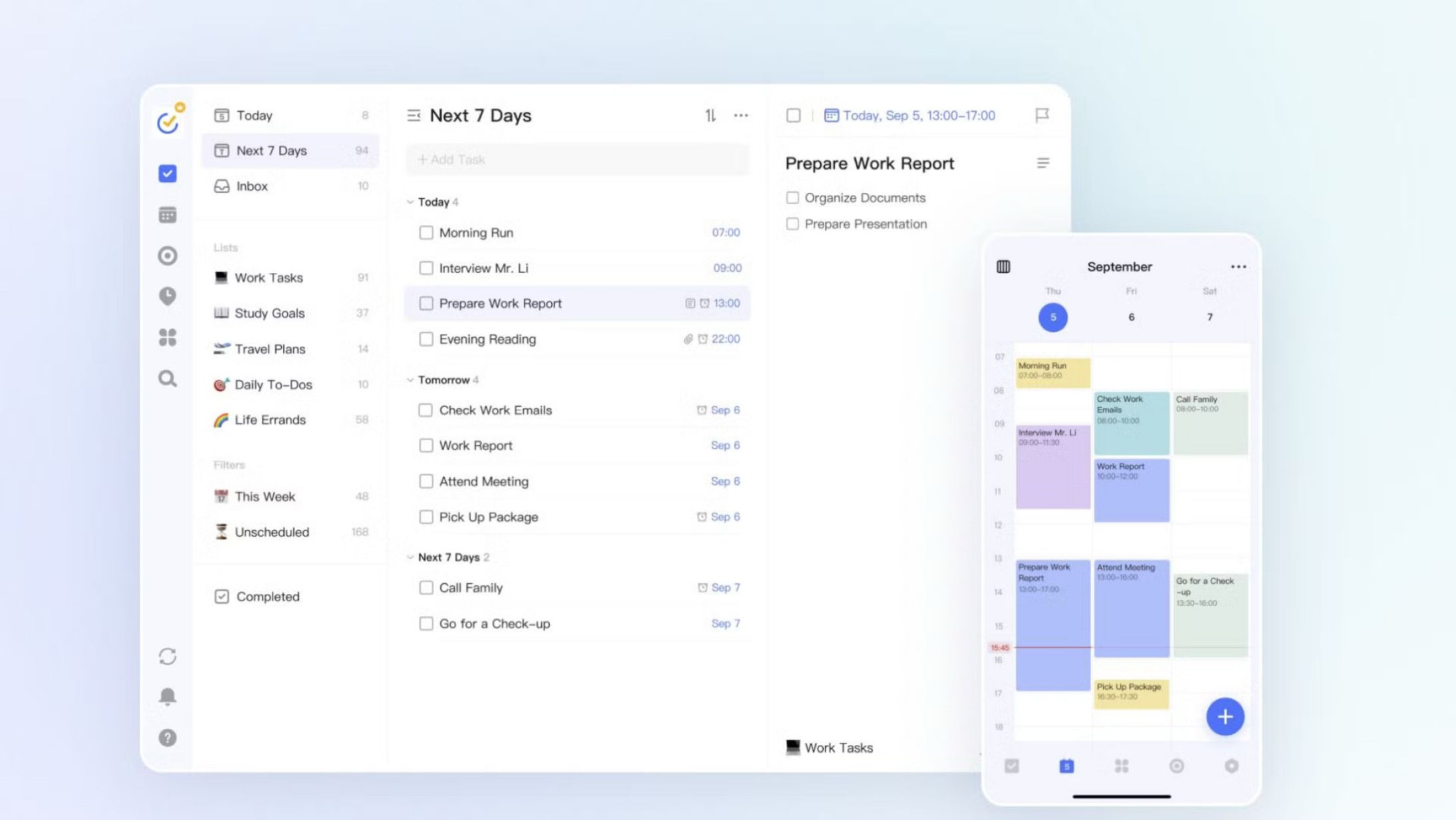
Best for: Tasks, habits and a focus timer in one low-cost app.
TickTick is a to-do list and calendar app with a habit tracker and a Pomodoro focus timer built in, so your tasks, schedule and habits share one app. It runs on almost every device, including Linux and smartwatches, and its habit tracker records amounts as well as check-ins, with streaks and a yearly heat map. Unlike Marvin, TickTick has a free plan, and Premium costs about half as much a year ($49.99 against $96).
Strengths:
TickTick's habit tracker logs amounts and shows streaks and a yearly heat map.
Each focus session is saved to a task or habit, with statistics.
Two-way sync with Google Calendar, plus Outlook, iCloud and CalDAV connections.
Limitations:
TickTick has no goals feature, and its habits sit apart from tasks.
Task durations on the calendar, filters and AI planning need Premium.
Pricing: Free (9 lists, 99 tasks per list, 5 habits); Premium $4.99/month or $49.99/year
Platforms: iOS, Android, Mac, Windows, Linux, web
Rating: 4.9 on the App Store (US storefront, about 46,000 ratings, October 2026)
Bottom line: Pick TickTick if you want tasks, habits and a focus timer in one cheap app on any device. If you want your habits and tasks to add up to a goal you can track, TickTick has no goals to link them to.
Sunsama
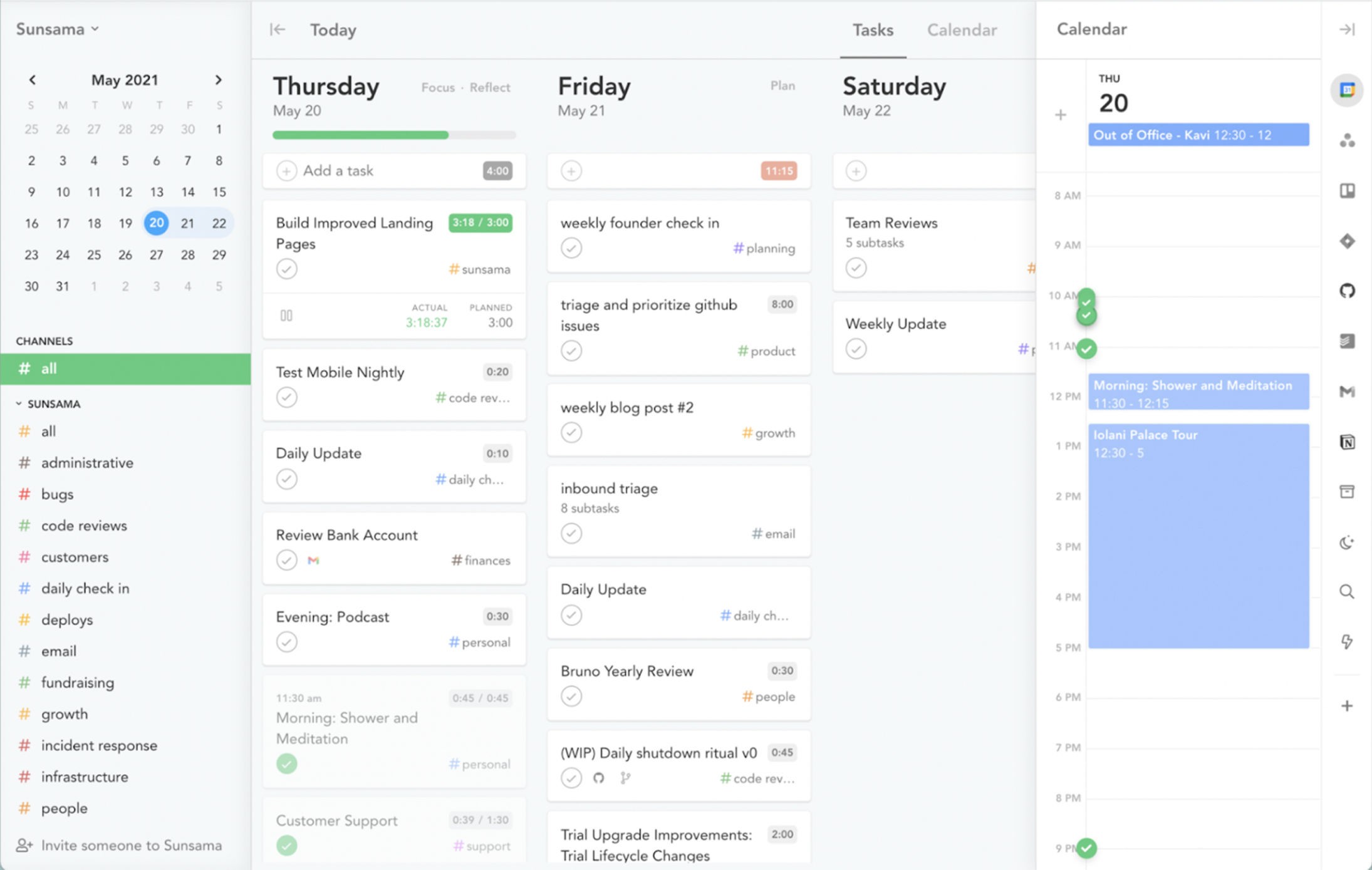
Best for: A calm, guided daily planning ritual.
Sunsama walks you through planning each day: you pull in tasks from your other tools, decide what can wait, and time-block the rest onto a calendar that syncs both ways with Google and Outlook. It closes the day with a shutdown and reflection, and a weekly review shows the time you spent on your weekly objectives. Where Marvin asks you to choose which strategies to switch on, Sunsama walks every new user through the same guided routine for their first few days.
Strengths:
Sunsama guides a daily plan and shutdown, plus a weekly review.
Tasks come in from tools like Asana, Jira, Notion, Todoist and Gmail.
Overlapping tasks are rescheduled around your meetings automatically.
Limitations:
Sunsama's only goals are weekly objectives, with no target to hit.
No habit tracker or free plan, and the phone app is a desktop companion.
Pricing: No free plan (14-day trial); $22/month or $17/month billed yearly
Platforms: iOS, Android, Mac, Windows, Linux, web
Rating: 4.5 on the App Store (US storefront, 510 ratings, October 2026)
Bottom line: Pick Sunsama if a slow, deliberate planning ritual is what helps you follow through. If you want goals that reach past this week, habits, or a free plan, Sunsama has none of those.
Akiflow
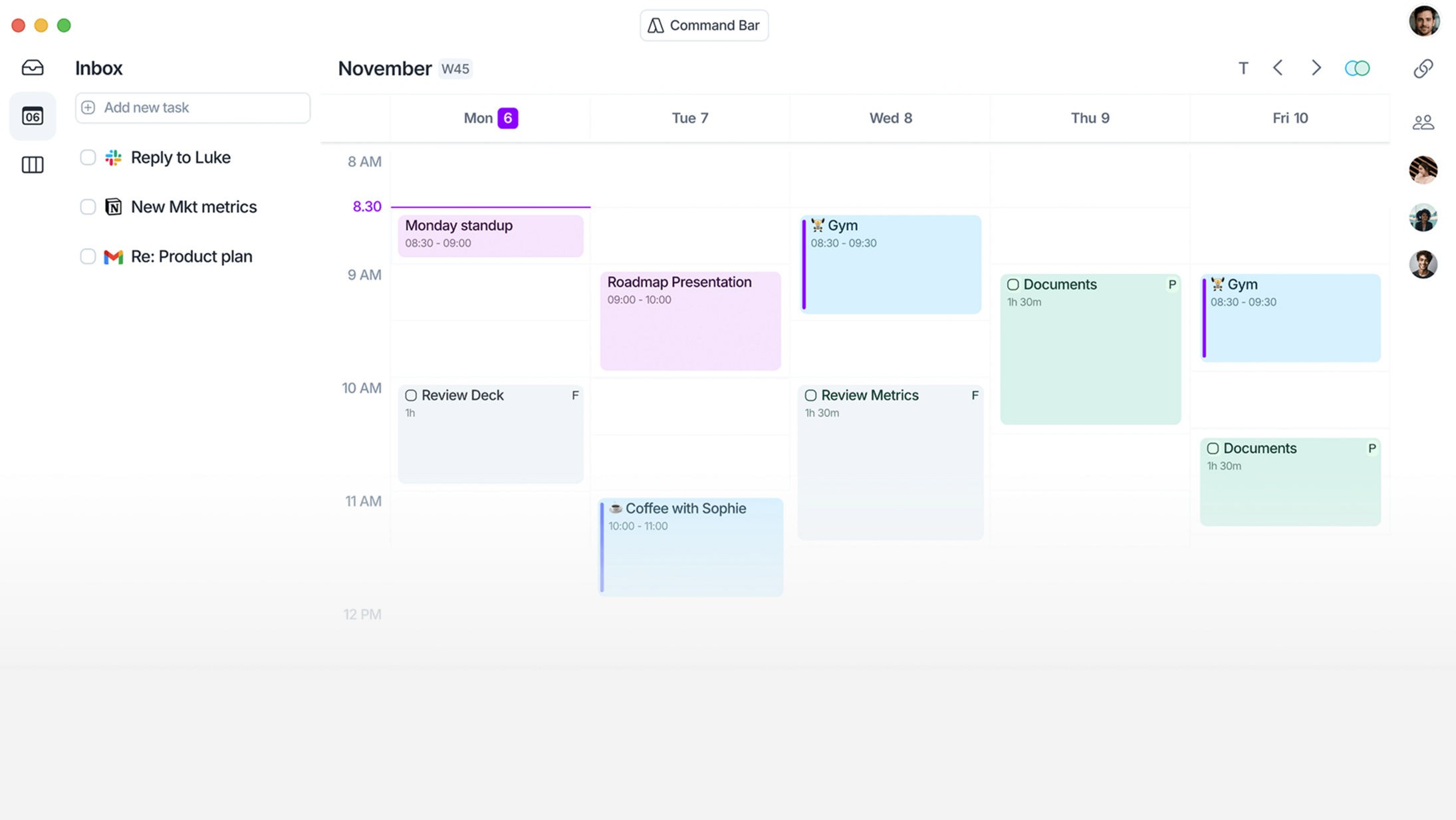
Best for: Time blocking tasks from all your tools.
Akiflow gathers tasks from Slack, Gmail, Notion, Asana, Jira and other tools into one inbox, then lets you drag them into time slots on your Google, Outlook or iCloud calendar. Daily and weekly planning rituals walk you through the plan, and its AI assistant, Aki, can reschedule tasks when you ask. Marvin brings tasks in by import, email, Zapier or its API, while Akiflow connects natively to 18 tools and keeps pulling in new tasks as they arrive.
Strengths:
Akiflow fills one inbox from 18 native integrations, including Zapier and IFTTT.
Tasks go into time slots beside your Google, Outlook or iCloud events.
Booking links share your free calendar slots with guests.
Limitations:
Akiflow's "Goal" is a task priority, with no progress tracking and no habit tracker.
No free plan, the trial needs a card, and accounts are created on the web only.
Pricing: No free plan (7-day trial); $34/month or $19/month billed yearly
Platforms: iOS, Android, Mac, Windows, web
Rating: 4.2 on the App Store (US storefront, 189 ratings, October 2026)
Bottom line: Pick Akiflow if your tasks arrive from many tools and you want them time-blocked in one fast view. If you want goals, habits or a lower price, Akiflow is the wrong fit.
Motion
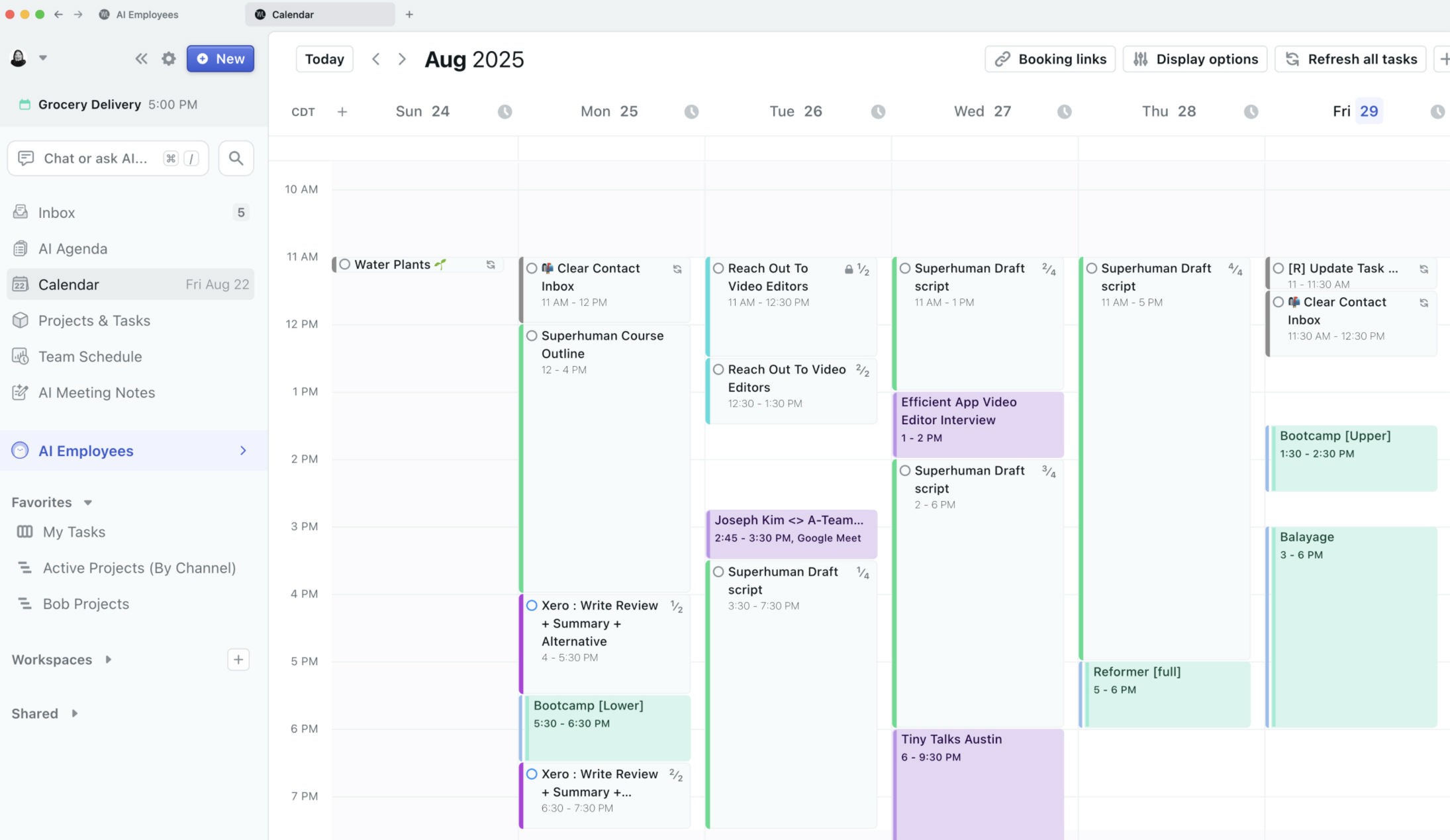
Best for: Letting an AI plan your day.
Motion takes your tasks, deadlines, priorities and working hours and schedules them onto your calendar automatically, then re-plans when a meeting moves or a task runs late. It also bundles projects, booking links, docs and an AI meeting notetaker. Motion builds your schedule for you, which neither Marvin nor Griply does.
Strengths:
Motion auto-schedules tasks around meetings, working hours and deadlines.
The day is re-planned when conflicts or overdue tasks appear.
Projects, booking links, docs and meeting notes sit in one app.
Limitations:
Motion has no goals or habit tracker; recurring tasks become scheduled time blocks.
No free plan, and the phone app is called a companion, not a standalone app.
Pricing: No free plan (7-day trial); Pro AI from $19/month on Motion's site, $44.99/month in the iPhone app
Platforms: iOS, Android, Mac, Windows, web
Rating: 4.1 on the App Store (US storefront, about 1,900 ratings, October 2026)
Bottom line: Pick Motion if you want to stop deciding the order of your day and let Motion fit your tasks around your meetings. If you want to plan your own day, or connect it to goals, Motion works against that.
Todoist
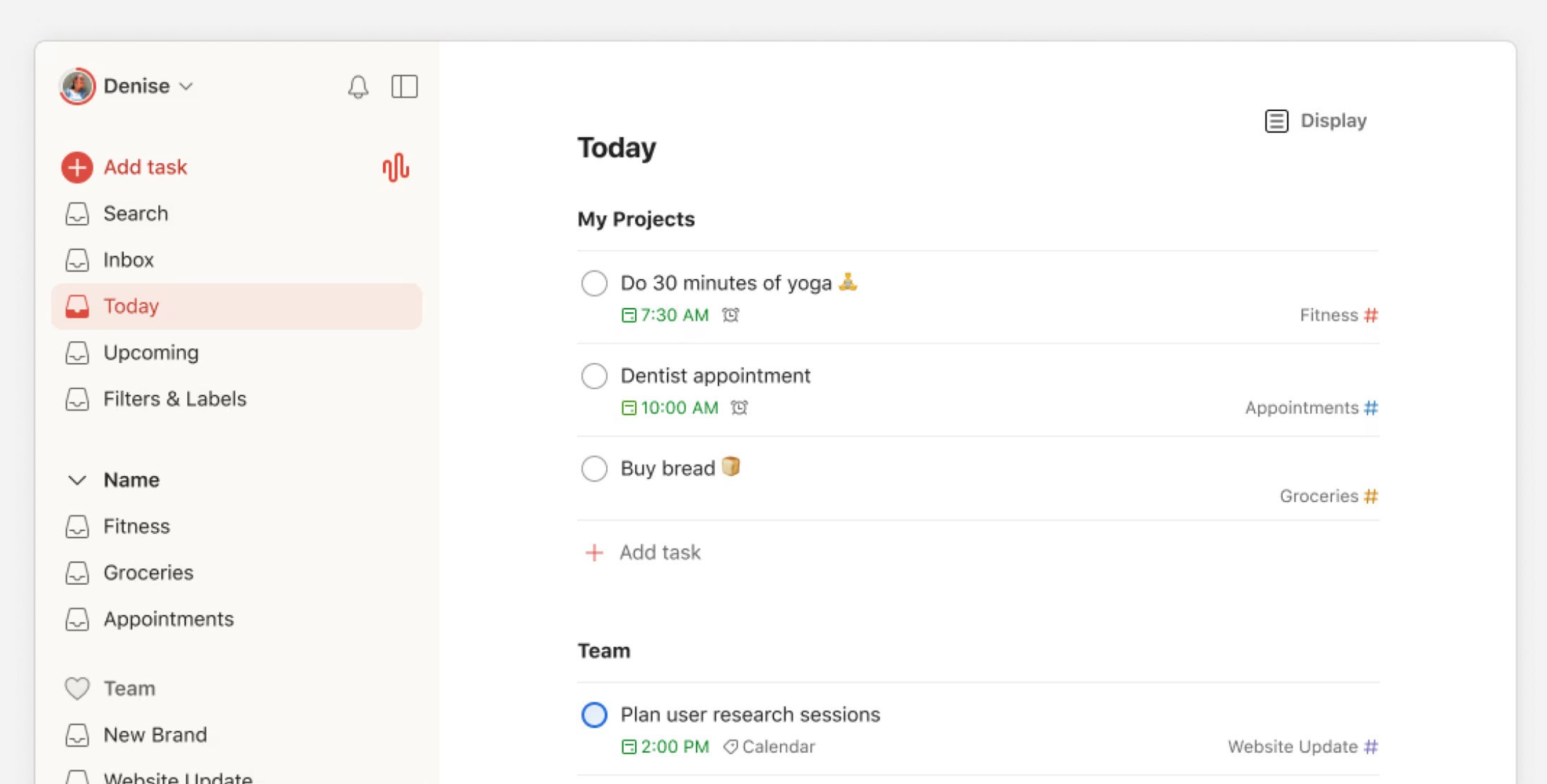
Best for: A fast, simple task list.
Todoist is a clean task manager built around quick capture: you type a task in plain language, like "call Sam every Friday", and it lands with the right date and repeat. Today and Upcoming views show your day and week, a calendar layout lets you time-block on Pro, and it runs on more devices than almost any app on this list, from Linux to Wear OS. Unlike Marvin, Todoist has a free plan that covers the core list on every device.
Strengths:
Todoist's Quick Add turns typed phrases into dated, repeating tasks.
Tasks sync two ways with Google or Outlook Calendar on the free plan.
Apps for iOS, Android, Mac, Windows, Linux, web and smartwatches.
Limitations:
Todoist has no goals or habit tracker; it retired its Goals beta in July 2026.
The free plan allows 5 projects, and the calendar layout is Pro only.
Pricing: Free (5 projects); Pro $7/month or $60/year
Platforms: iOS, Android, Mac, Windows, Linux, web
Rating: 4.8 on the App Store (US storefront, about 130,000 ratings, October 2026)
Bottom line: Pick Todoist if you want a fast, reliable list with far less to configure than Marvin. If you want goals or habits, you would be giving both up.
Habitica
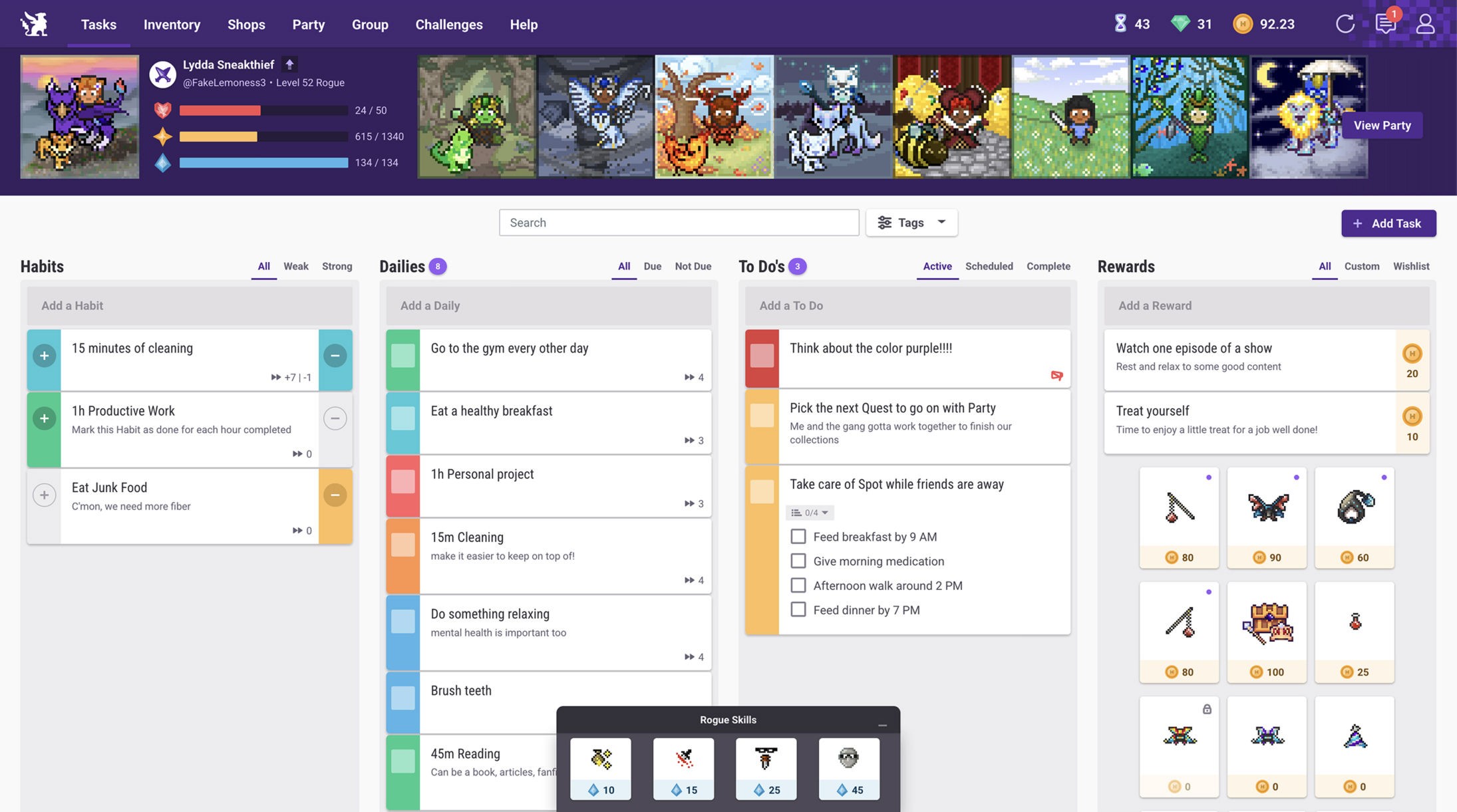
Best for: Rewards and accountability through a game.
Habitica turns your habits, Dailies (daily tasks) and to-dos into a retro role-playing game: finishing them levels up your character, and in a party on a quest, a missed Daily damages every member. All the tracking is free, with an optional subscription for cosmetic and convenience extras. If Marvin's rewards were what kept you going, Habitica is the one app on this list built entirely around rewards, and its parties let friends hold each other to their Dailies.
Strengths:
Habitica's core tracking is free; the subscription only adds perks.
Parties, challenges and guilds add social accountability.
Dailies can repeat weekly, monthly, every few days or on set weekdays.
Limitations:
Habitica has no measurable goals and no in-app progress chart.
No calendar or time blocking, and the game style won't suit everyone.
Pricing: Free; optional subscription $4.99/month or $47.99/year
Platforms: iOS, Android, web
Rating: 4.3 on the App Store (US storefront, about 3,500 ratings, October 2026)
Bottom line: Pick Habitica if game mechanics and a party keep you consistent when nothing else does. If you want measurable goals or a planned day, Habitica has neither.
Things 3
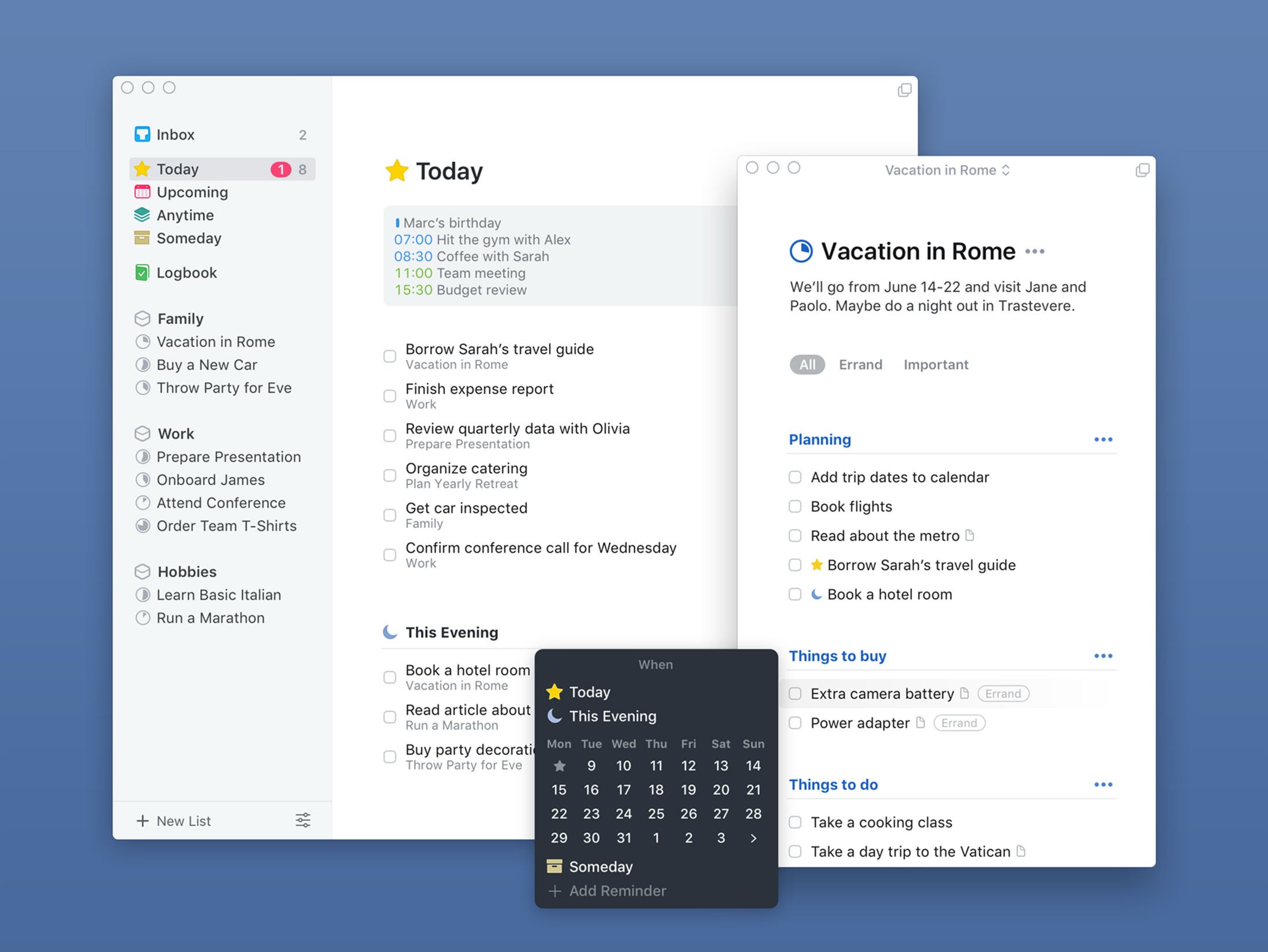
Best for: A polished task manager on Apple devices.
Things 3 is a task manager from Cultured Code with two Apple Design Awards, a Today list, a separate This Evening section, and projects that fill a progress pie as you check off to-dos. It shows your Apple Calendar events above your tasks and reads natural-language dates as you type. You buy the iPhone, iPad and Mac versions once each, with no subscription, and unlike Marvin, Things 3 has a native iPad app.
Strengths:
Things 3 splits Today into a daytime list and a This Evening list.
A one-time purchase per platform, with free updates and sync.
Native apps for iPhone, iPad, Mac, Apple Watch and Vision Pro.
Limitations:
Things 3 is Apple only, with no Android, Windows or web app.
No habit tracker or goals, and to-dos can't go on time slots.
Pricing: One-time purchase per platform: iPhone $9.99, iPad $19.99, Mac $49.99 (15-day Mac trial)
Platforms: iPhone, iPad, Mac
Rating: 4.8 on the App Store (US storefront, about 28,000 ratings, October 2026)
Bottom line: Pick Things 3 if you are all-in on Apple and want a calm list with no subscription. If you need time blocking, habits, goals or a non-Apple device, Things 3 has none of them.
OmniFocus
Best for: Deep GTD-style task management on Apple devices.
OmniFocus is a GTD task manager from The Omni Group for people who like to shape their own views. Its perspectives are saved views built from any combination of criteria, a built-in weekly review takes you through your projects, and the Forecast view lists what is due or planned beside your calendar events. With those custom perspectives, OmniFocus comes closest of these apps to Marvin's depth of customization, and unlike Marvin it has a native iPad app and a one-time license.
Strengths:
OmniFocus perspectives build saved views from any combination of criteria.
A built-in weekly review covers your projects.
Planned, defer and due dates are kept apart for precise scheduling.
Limitations:
OmniFocus has no habit tracker or goals, only repeating actions.
The native apps are Apple only, and the web app needs the subscription.
Pricing: Standard $74.99 or Pro $149.99 one-time, or $99.99/year including the web app (14-day trial)
Platforms: iPhone, iPad, Mac, web
Rating: 4.0 on the App Store (US storefront, 343 ratings, October 2026)
Bottom line: Pick OmniFocus if you loved building your own system in Marvin and you work on Apple devices. If setup was the reason you left Marvin, OmniFocus is built for the opposite kind of user: someone who wants to design their own views.
What you'll miss from Amazing Marvin
Some of Marvin's strengths have no equal among these nine apps, so it is worth knowing what you give up before you switch.
Marvin's strategies are the biggest loss. Marvin lets you switch features on and off as your needs change, from Eat the Frog to Super Focus Mode, and none of these nine apps is as configurable. OmniFocus comes closest with its custom perspectives.
The second is Marvin's procrastination tools. The Procrastination Wizard walks you through questions and tips when you are stuck, the Task Jar picks a random task from your day, and the Accountability Pledge lets you put money on finishing a task. None of the nine apps has a Procrastination Wizard, a Task Jar or a money pledge.
The third is rewards. Marvin awards points for finished tasks, lets you attach rewards to tasks and projects, and levels you up with Marvin Kudos. Habitica is the only one of the nine built around rewards, and Griply has none.
You can keep your goals and habits. Marvin has goals with deadlines and a habit tracker, and Griply has both: each goal gets a progress chart, and habits can link to the goal they feed. TickTick and Habitica keep habits but not goals. To move yours over, our help article on switching from Amazing Marvin maps each part of Marvin to Griply.
Amazing Marvin alternatives for ADHD
Marvin markets itself to people with ADHD. If that is part of why you chose it, the right replacement depends on which part of Marvin was doing the work for you.
If seeing how far you have come keeps you going, Griply is built for that. Each goal shows your progress as a chart, and a habit can link to the bigger goal it feeds, so you can see which goal each linked habit is for.
If you need fewer decisions in the moment, TickTick's focus timer ties one session to one task, and Sunsama has you make the day's decisions once, in a set planning session. Sunsama also runs an ADHD planning page with HowtoADHD. If rewards kept you going, look at Habitica.
For habit trackers specifically, see our answer on the best habit tracker for ADHD.
How to choose
Start from the part of Marvin you rely on most, then pick the app that does that part best.
If you want Marvin's goals and habits in a simpler app, pick Griply. Its structure is ready from the start, and each goal's chart shows your progress against the pace you need.
If you want a free plan, pick TickTick for habits and a focus timer, or Todoist for the simplest list. Both run on every major platform.
If you want help planning each day around your meetings, pick Sunsama for a guided ritual or Akiflow for fast time blocking.
If you want an AI to build your schedule, pick Motion. It re-plans the day when things change.
If Marvin's rewards kept you going, pick Habitica. It turns habits and to-dos into a game.
If you only use Apple devices, pick Things 3 for simplicity or OmniFocus for depth. Both sell a one-time license.
Why people keep switching productivity apps
Many people find Marvin after trying several other apps, and much of what it offers is aimed at that search: it can be configured to work the way you think. The trade-off is upkeep. Each strategy you switch on is another setting to decide on and maintain, and when the upkeep starts taking time from the work, people go looking again.
Most apps on this list are easier to set up than Marvin because they do less. Todoist and Things 3 manage a task list, Sunsama, Akiflow and Motion manage the hours of your day, and TickTick and Habitica track habits. Each does its own part well. What none of them shows is whether this month's work is moving a goal you can measure, and that is the question behind the feeling of being busy without knowing whether it is the right work.
Griply is built around that question. You start from a goal with a number and a deadline, and the tasks and habits you link to it appear on its page next to a chart of your progress against the pace you need. Midweek, you can check whether the plan is working without building a dashboard first. When you try your next app, that is a useful test to run: after a few weeks, can it show you whether your work is paying off?
Switch to a planner that shows your progress
Griply is for Marvin users who want their daily work to add up to goals they chose, without designing the system first. It is free to start, so you can set up one real goal this week and see whether the chart keeps you going.
Start for free, and if you want help moving your setup across, come say hello in the Griply community.
What is the best alternative to Amazing Marvin?
Griply is the best Amazing Marvin alternative if you want a full planning system that is simpler to run: a progress chart for each goal, with habits and tasks in the same app. TickTick is the best low-cost all-in-one, Sunsama the best guided daily planner, and Motion the best if you want an AI to schedule your day.
Is there a free alternative to Amazing Marvin?
Yes. Griply, TickTick, Todoist and Habitica all have free plans, and Marvin has none. Griply's free plan includes 2 goals with progress charts, 2 habits and unlimited tasks. TickTick's free plan includes 9 lists and 5 habits, and Habitica's core tracking is free.
What app is most like Amazing Marvin?
OmniFocus is closest to Marvin's depth of customization, with custom perspectives and a weekly review, but its native apps are Apple only. TickTick is closest in breadth, and Griply is closest on goals and habits. None of them has Marvin's strategies or Procrastination Wizard.
Why do people switch from Amazing Marvin?
Reviewers on AlternativeTo, Product Hunt and the App Store mention Marvin's learning curve and the number of options to set up. Price is a factor too: $96 a year, with no free plan. Older reviews cite the phone app, which Marvin rebuilt in September 2026.
How do I switch from Amazing Marvin?
Start fresh with your current goals, because Griply has no Marvin importer. Match your Categories to life areas, turn each Marvin goal into a goal with a number and a deadline, and link the habits that feed it. Projects, labels and Smart Lists become projects, tags and Smart Lists.
Is Griply a good Amazing Marvin alternative?
Yes, if you want goals to drive your plan without the setup. Griply comes with its goal structure and nine life areas set up, and shows each goal's progress on your phone and desktop. It has no strategies, rewards or Procrastination Wizard, so it won't replace those.
What is the best Amazing Marvin alternative for ADHD?
Griply is the best pick for people with ADHD who need to see how far they have come: each goal's chart shows progress visually, and habits can link to the goal they feed.
Which Amazing Marvin alternative has a habit tracker?
Griply, TickTick and Habitica have real habit trackers. Griply lets you link a habit to a bigger goal, TickTick tracks habits beside its task list, and Habitica turns them into a game. Sunsama, Akiflow, Motion, Todoist, Things 3 and OmniFocus only repeat tasks.
Is there an Amazing Marvin alternative with AI scheduling?
Yes. Motion is built for AI scheduling: it puts your tasks onto your calendar and re-plans the day as things change. Akiflow and Sunsama can auto-schedule tasks when you ask. Griply leaves the planning to you.
Is there an Amazing Marvin alternative for Android?
Yes. Griply, TickTick, Todoist, Akiflow, Sunsama, Motion and Habitica all run on Android. Griply's Android app is the same full app as on iPhone; Sunsama and Motion call their phone apps companions to desktop. Things 3 is Apple only, and OmniFocus reaches Android only through its web app.
Which Amazing Marvin alternative is best for goal tracking?
Griply. It is the only one of these nine Marvin alternatives built around measurable goals: each goal can carry a target and a deadline, its chart shows your progress against the pace you need, and tasks and habits can link to it. Sunsama has weekly objectives only.
Can I move my Amazing Marvin tasks to Griply?
Yes, by pasting. Griply has no Marvin importer, but Marvin can copy selected tasks as text or Markdown, and on desktop Griply turns a pasted list into separate tasks, picking up dates it recognizes. Nested items become separate tasks too. Start with the lists you still use.
