/

Get Started

Create & Plan Your First Goals

Goals in Griply help you stay focused, whether you’re chasing a near-term result or aiming for something bigger.

This guide shows you how to create your first goal, pick the right settings, break it down, and plan it into your week.

The Goals overview in Griply

What is a goal in Griply?

A goal is a measurable outcome you want to reach, one that moves you toward your vision for a life area.

A goal in Griply:

  • Is a measurable outcome you want to reach

  • Has a success metric to track progress

  • Can have a deadline, or run ongoing

  • Breaks down into subgoals, projects, tasks, and habits

  • Moves you toward your vision

Examples:

  • Work & Career → Get promoted to VP, Start my own business

  • Sport & Health → Run a marathon, Lose 5 kg

  • Personal Development → Read 12 books this year, Complete a new AI course

Goals vs Habits

In Griply, goals are measurable outcomes you work toward, while habits are repeated actions you do regularly, often to support your goals.

  • Goals move you toward a bigger result. They can be completed once you reach it.

  • Habits build consistency. They’re actions you repeat daily, weekly, or monthly to get closer to your goal.

Example:

Life area: Sport & Health

  • Goal: Run a marathon in October

    • Habit: Run 4 times per week

    • Habit: Stretch for 10 minutes after every run

Think of it this way: a goal is what you want to achieve, and habits are how you keep moving toward it.

Goals vs Projects

In Griply, a goal is a measurable outcome you work toward, while a project is simply the work: a list of tasks with no metric of its own.

  • Goals track a result you can measure (e.g. “Lose 5kg,” “Save €10,000”).

  • Projects organize a batch of tasks to get done (e.g. “Launch the new website,” “Redo the guest room”).

You can link a project to a goal, or keep it on its own. Learn more in Projects in Griply.

Goal Settings
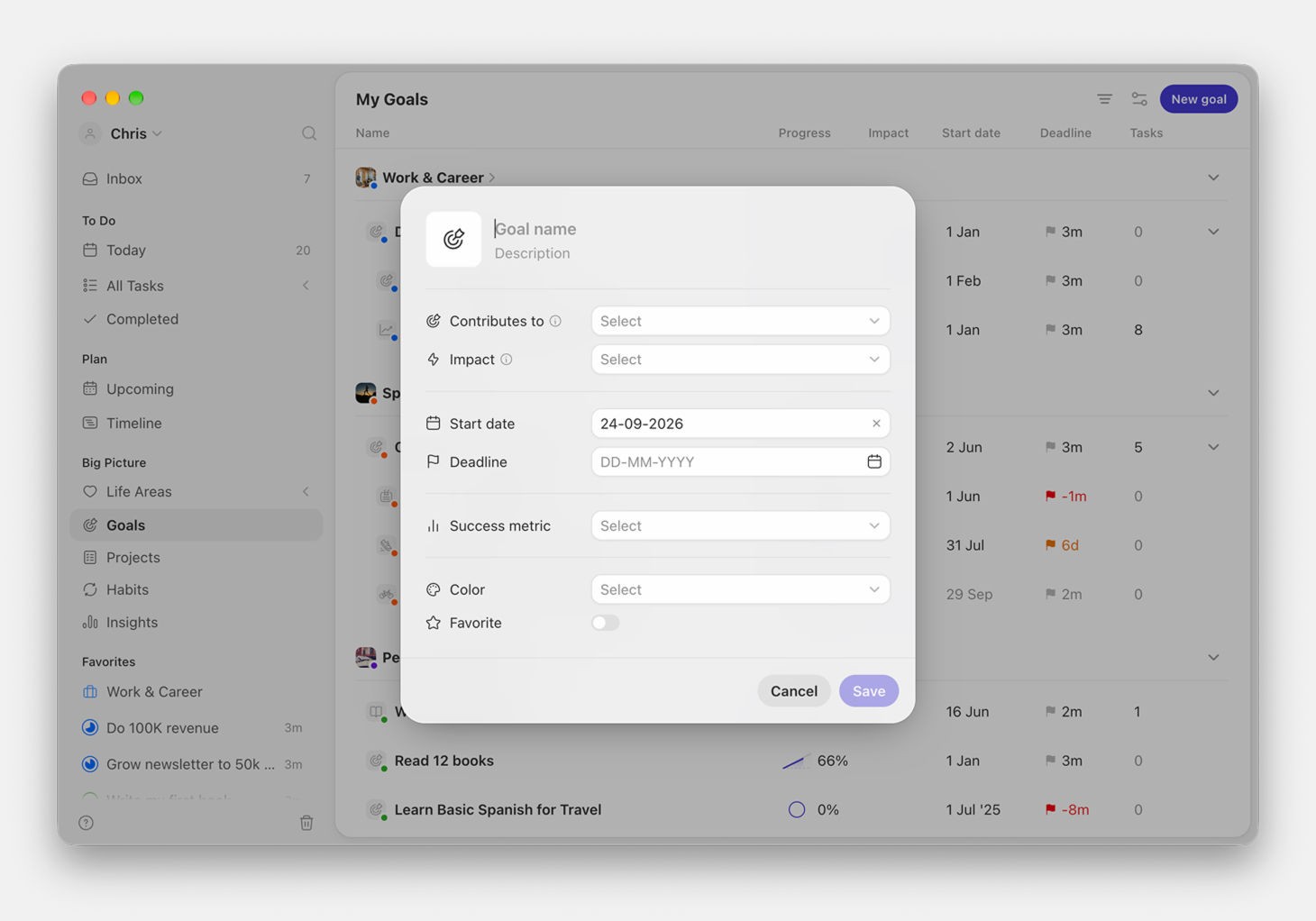
Creating a goal in Griply

When you create a goal, you’ll see a few settings. Here’s how to think about them.

General settings

Setting

What it does

Smart tips

Name & description

What you’re aiming for, and why

Start the name with an action verb (e.g. “Write my first eBook”); use the description to capture why it matters.

Contributes to

Links the goal to a life area or a bigger goal

Pick what it ladders up to, so you always see why the goal matters.

Impact

How much this goal moves what it’s linked to: High, Medium, or Low

Use it to tell your few big goals from the nice-to-haves; you can filter by impact later.

Color

A color for the goal

Override if you want visual separation.

Icon & image

A custom icon or photo for the goal

Set it from the icon in the header; use an icon for speed or a motivating photo for inspiration.

Start date & deadline

A start date sets when the goal begins. A deadline helps you plan realistically and stay accountable.

  • Be ambitious but realistic. It’s demotivating to plan to shortly and not achieve your goal.

  • If your goal is open-ended (e.g. ongoing journaling), you can leave the deadline empty.

  • If it’s tied to a milestone or event (like a trip, event or launch), set a clear deadline.

Success metric
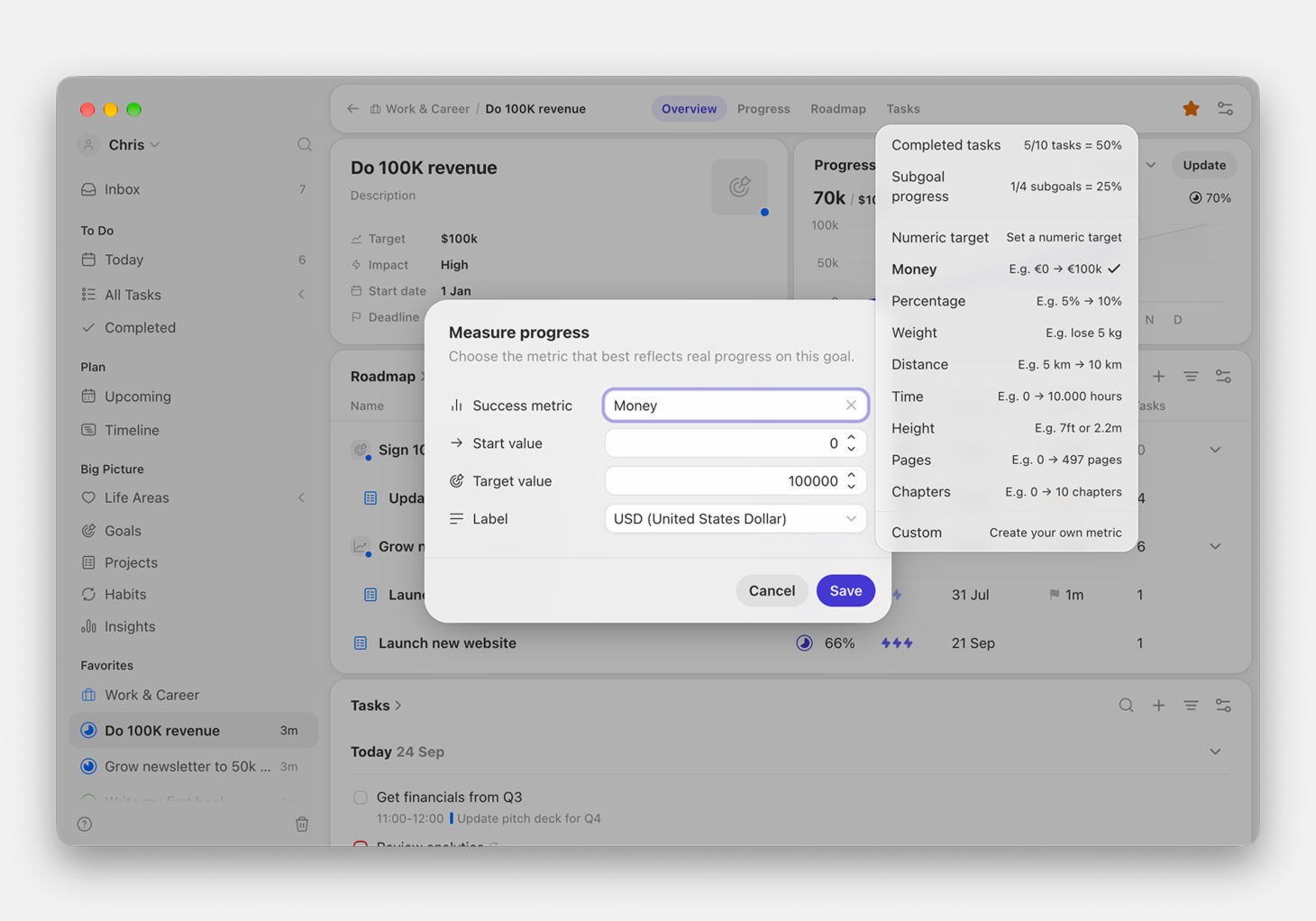
Choosing a success metric for a goal

Choose how you want to measure your progress. Here’s a quick overview with examples:

Metric type

When to use it

Example goals

Completed tasks

You’ll mainly use tasks to reach the goal

Write my thesis, Plan a wedding

Subgoal progress

You’re breaking the goal into smaller goals

Expand into 3 new markets

Numeric target

Count something manually

Meditate 100 times

Money

Financial goals

Save €10,000, Reduce expenses by 20%

Percentage

Track relative improvement

Grow revenue by 15%

Weight

Fitness or health

Lose 5kg, Gain muscle

Distance

Fitness or travel

Run 100km in 3 months

Time

Time spent on something

Study 100 hours for an exam

Height

Specific physical metrics

Reach 2m vertical jump

Pages

Reading or writing goals

Read 20 books

Chapters

Reading/studying from structured material

Finish all 10 chapters of a course

Custom

Anything else

e.g. "3 prototypes built"

Habits are not linked to goal progress (yet). You can track multiple habit charts inside a goal.

Breaking Your Goal Down
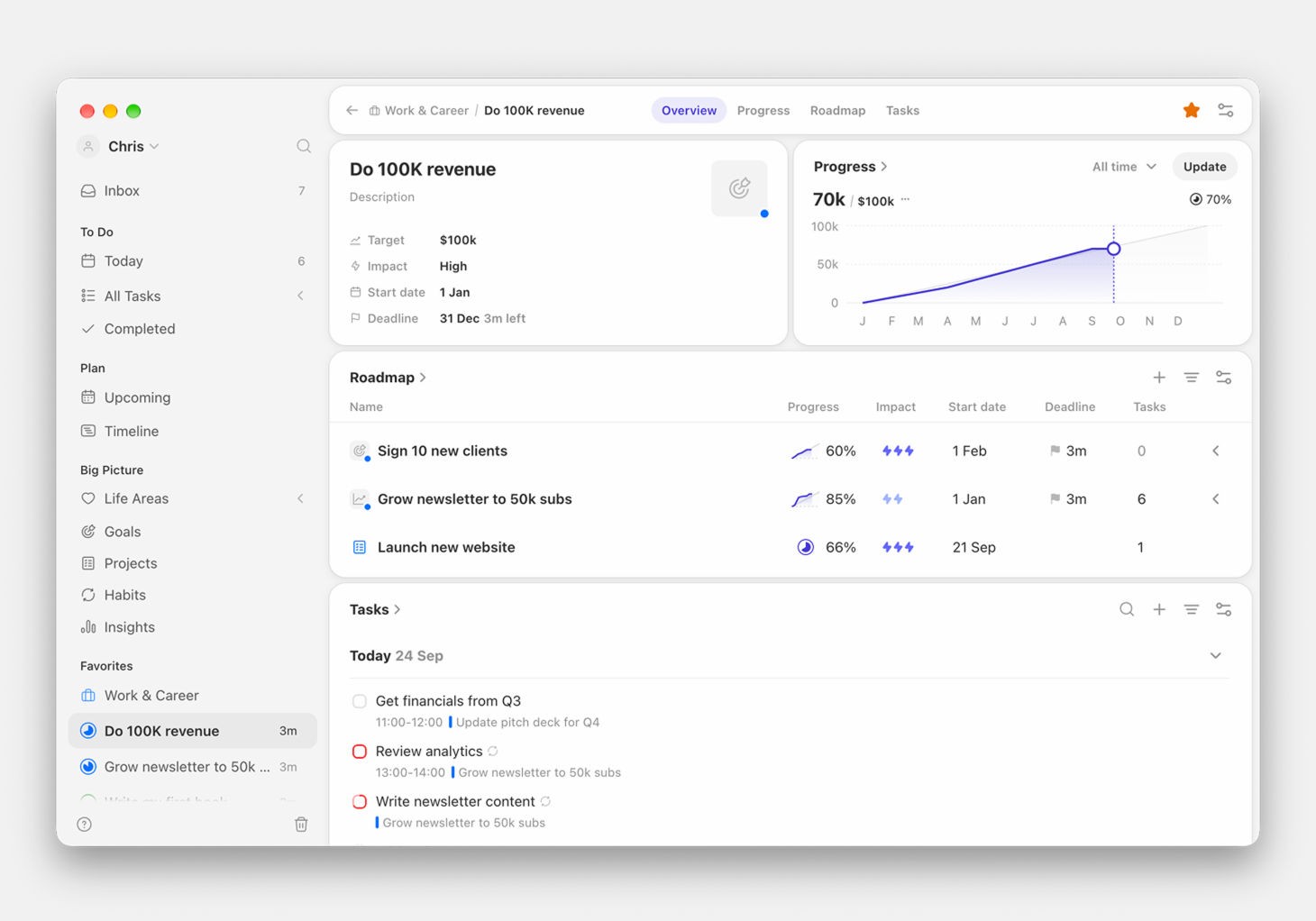
A goal broken down into subgoals, a project, and tasks

Once a goal is set, break it into smaller, trackable pieces. A natural order to work through:

  1. Subgoals (for larger goals) → split a big goal into milestones or phases, each with its own progress. Small goals can skip this.

  2. Projects → group the actual work into a batch of tasks, with no metric of its own.

  3. Tasks → break each project into the individual actions you tick off. Use sections to group tasks when a project gets long.

  4. Habits → add supportive habits to the goal for the recurring actions that keep progress moving.

Not every goal needs all four. A small goal might be just a project and a few tasks; a big one runs subgoals → projects → tasks, with habits alongside.

A goal without breakdown risks becoming a wish. Breaking it down makes progress visible and the next step obvious.

How to Plan Your Goals
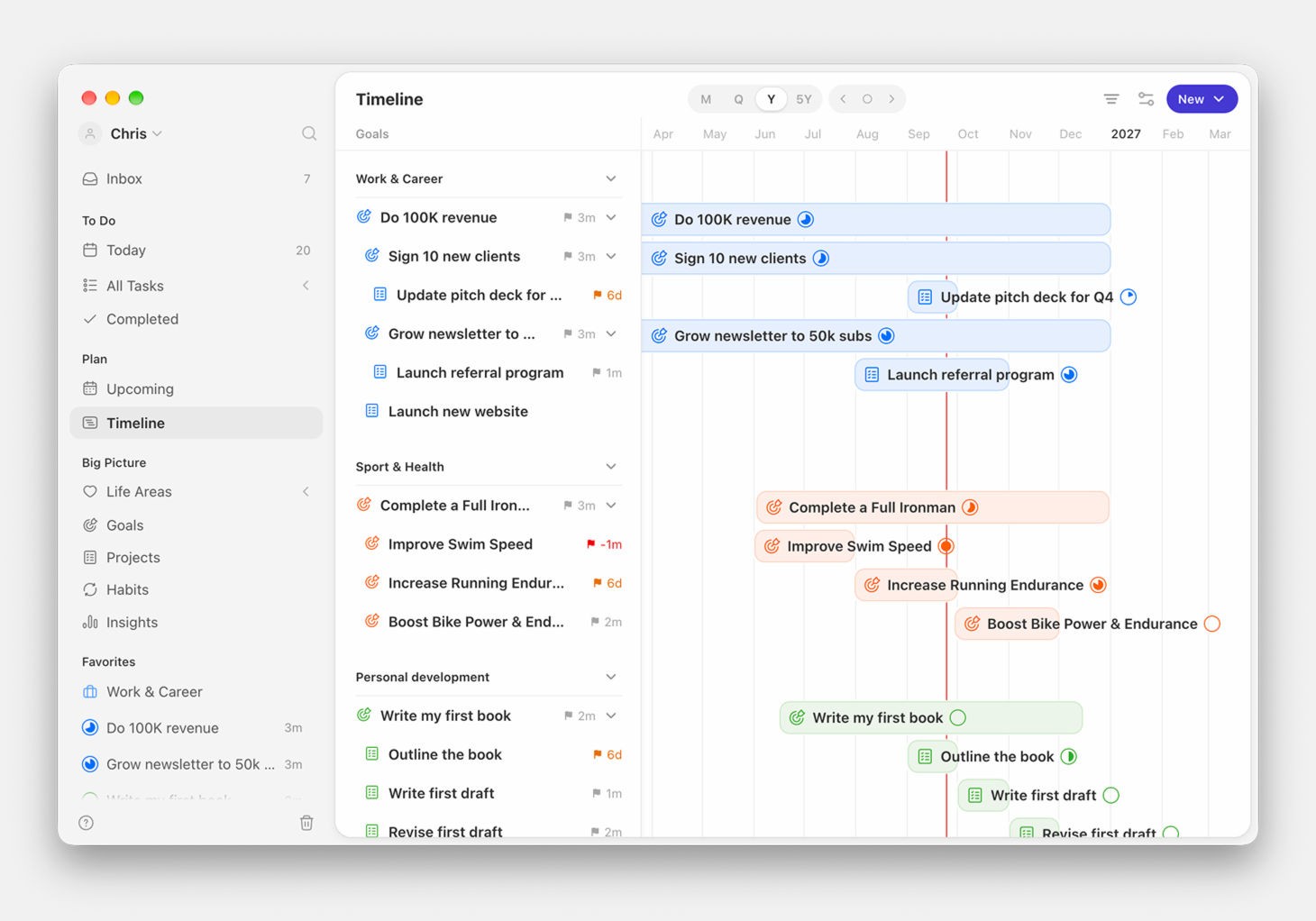
Goals planned out on the timeline

Once your goals are set, planning them is where the magic happens.

  1. Map it out on the Timeline

    • Open Timeline in the sidebar (under Plan). It lays out all your goals, subgoals, and projects on one Gantt-style view.

    • Items without a start or deadline show here too. Hover a row and click the gray placeholder to drop it on the timeline and set when it runs.

    • Zoom between month, quarter, year, and five-year to plan at the right horizon. Timeline is a premium feature. See Timeline.

  2. Move to the Upcoming view for weekly planning

    • See all unplanned tasks for your goals, life areas, and inbox.

    • Drag & drop them into your week.

    • Time block entire goals or life areas for focused work.

  3. Plan your day in Today

    • Start your morning by reviewing your planned tasks and events.

    • If new priorities come up, adjust here without losing sight of the bigger plan.

Tips for Getting the Most Out of Your Goals

  • Link habits to your goals so progress is fueled daily.

  • Review weekly: use your Weekly Review to check goal progress, adjust timelines, and clear bottlenecks.

  • Don’t overload: too many goals at once spreads your attention thin.

  • Celebrate milestones: check off subgoals or sections to keep momentum.

  • Stay flexible: priorities change; goals can be updated or archived anytime.

Didn’t find what you were looking for? We’re here to help! You can contact us anytime or ask your question in one of our communities.

/

Get Started

Create & Plan Your First Goals

Goals in Griply help you stay focused, whether you’re chasing a near-term result or aiming for something bigger.

This guide shows you how to create your first goal, pick the right settings, break it down, and plan it into your week.

The Goals overview in Griply

What is a goal in Griply?

A goal is a measurable outcome you want to reach, one that moves you toward your vision for a life area.

A goal in Griply:

  • Is a measurable outcome you want to reach

  • Has a success metric to track progress

  • Can have a deadline, or run ongoing

  • Breaks down into subgoals, projects, tasks, and habits

  • Moves you toward your vision

Examples:

  • Work & Career → Get promoted to VP, Start my own business

  • Sport & Health → Run a marathon, Lose 5 kg

  • Personal Development → Read 12 books this year, Complete a new AI course

Goals vs Habits

In Griply, goals are measurable outcomes you work toward, while habits are repeated actions you do regularly, often to support your goals.

  • Goals move you toward a bigger result. They can be completed once you reach it.

  • Habits build consistency. They’re actions you repeat daily, weekly, or monthly to get closer to your goal.

Example:

Life area: Sport & Health

  • Goal: Run a marathon in October

    • Habit: Run 4 times per week

    • Habit: Stretch for 10 minutes after every run

Think of it this way: a goal is what you want to achieve, and habits are how you keep moving toward it.

Goals vs Projects

In Griply, a goal is a measurable outcome you work toward, while a project is simply the work: a list of tasks with no metric of its own.

  • Goals track a result you can measure (e.g. “Lose 5kg,” “Save €10,000”).

  • Projects organize a batch of tasks to get done (e.g. “Launch the new website,” “Redo the guest room”).

You can link a project to a goal, or keep it on its own. Learn more in Projects in Griply.

Goal Settings

Creating a goal in Griply

When you create a goal, you’ll see a few settings. Here’s how to think about them.

General settings

Setting

What it does

Smart tips

Name & description

What you’re aiming for, and why

Start the name with an action verb (e.g. “Write my first eBook”); use the description to capture why it matters.

Contributes to

Links the goal to a life area or a bigger goal

Pick what it ladders up to, so you always see why the goal matters.

Impact

How much this goal moves what it’s linked to: High, Medium, or Low

Use it to tell your few big goals from the nice-to-haves; you can filter by impact later.

Color

A color for the goal

Override if you want visual separation.

Icon & image

A custom icon or photo for the goal

Set it from the icon in the header; use an icon for speed or a motivating photo for inspiration.

Start date & deadline

A start date sets when the goal begins. A deadline helps you plan realistically and stay accountable.

  • Be ambitious but realistic. It’s demotivating to plan to shortly and not achieve your goal.

  • If your goal is open-ended (e.g. ongoing journaling), you can leave the deadline empty.

  • If it’s tied to a milestone or event (like a trip, event or launch), set a clear deadline.

Success metric

Choosing a success metric for a goal

Choose how you want to measure your progress. Here’s a quick overview with examples:

Metric type

When to use it

Example goals

Completed tasks

You’ll mainly use tasks to reach the goal

Write my thesis, Plan a wedding

Subgoal progress

You’re breaking the goal into smaller goals

Expand into 3 new markets

Numeric target

Count something manually

Meditate 100 times

Money

Financial goals

Save €10,000, Reduce expenses by 20%

Percentage

Track relative improvement

Grow revenue by 15%

Weight

Fitness or health

Lose 5kg, Gain muscle

Distance

Fitness or travel

Run 100km in 3 months

Time

Time spent on something

Study 100 hours for an exam

Height

Specific physical metrics

Reach 2m vertical jump

Pages

Reading or writing goals

Read 20 books

Chapters

Reading/studying from structured material

Finish all 10 chapters of a course

Custom

Anything else

e.g. "3 prototypes built"

Habits are not linked to goal progress (yet). You can track multiple habit charts inside a goal.

Breaking Your Goal Down

A goal broken down into subgoals, a project, and tasks

Once a goal is set, break it into smaller, trackable pieces. A natural order to work through:

  1. Subgoals (for larger goals) → split a big goal into milestones or phases, each with its own progress. Small goals can skip this.

  2. Projects → group the actual work into a batch of tasks, with no metric of its own.

  3. Tasks → break each project into the individual actions you tick off. Use sections to group tasks when a project gets long.

  4. Habits → add supportive habits to the goal for the recurring actions that keep progress moving.

Not every goal needs all four. A small goal might be just a project and a few tasks; a big one runs subgoals → projects → tasks, with habits alongside.

A goal without breakdown risks becoming a wish. Breaking it down makes progress visible and the next step obvious.

How to Plan Your Goals

Goals planned out on the timeline

Once your goals are set, planning them is where the magic happens.

  1. Map it out on the Timeline

    • Open Timeline in the sidebar (under Plan). It lays out all your goals, subgoals, and projects on one Gantt-style view.

    • Items without a start or deadline show here too. Hover a row and click the gray placeholder to drop it on the timeline and set when it runs.

    • Zoom between month, quarter, year, and five-year to plan at the right horizon. Timeline is a premium feature. See Timeline.

  2. Move to the Upcoming view for weekly planning

    • See all unplanned tasks for your goals, life areas, and inbox.

    • Drag & drop them into your week.

    • Time block entire goals or life areas for focused work.

  3. Plan your day in Today

    • Start your morning by reviewing your planned tasks and events.

    • If new priorities come up, adjust here without losing sight of the bigger plan.

Tips for Getting the Most Out of Your Goals

  • Link habits to your goals so progress is fueled daily.

  • Review weekly: use your Weekly Review to check goal progress, adjust timelines, and clear bottlenecks.

  • Don’t overload: too many goals at once spreads your attention thin.

  • Celebrate milestones: check off subgoals or sections to keep momentum.

  • Stay flexible: priorities change; goals can be updated or archived anytime.

Didn’t find what you were looking for? We’re here to help! You can contact us anytime or ask your question in one of our communities.

/

Get Started

Create & Plan Your First Goals

Goals in Griply help you stay focused, whether you’re chasing a near-term result or aiming for something bigger.

This guide shows you how to create your first goal, pick the right settings, break it down, and plan it into your week.

The Goals overview in Griply

What is a goal in Griply?

A goal is a measurable outcome you want to reach, one that moves you toward your vision for a life area.

A goal in Griply:

  • Is a measurable outcome you want to reach

  • Has a success metric to track progress

  • Can have a deadline, or run ongoing

  • Breaks down into subgoals, projects, tasks, and habits

  • Moves you toward your vision

Examples:

  • Work & Career → Get promoted to VP, Start my own business

  • Sport & Health → Run a marathon, Lose 5 kg

  • Personal Development → Read 12 books this year, Complete a new AI course

Goals vs Habits

In Griply, goals are measurable outcomes you work toward, while habits are repeated actions you do regularly, often to support your goals.

  • Goals move you toward a bigger result. They can be completed once you reach it.

  • Habits build consistency. They’re actions you repeat daily, weekly, or monthly to get closer to your goal.

Example:

Life area: Sport & Health

  • Goal: Run a marathon in October

    • Habit: Run 4 times per week

    • Habit: Stretch for 10 minutes after every run

Think of it this way: a goal is what you want to achieve, and habits are how you keep moving toward it.

Goals vs Projects

In Griply, a goal is a measurable outcome you work toward, while a project is simply the work: a list of tasks with no metric of its own.

  • Goals track a result you can measure (e.g. “Lose 5kg,” “Save €10,000”).

  • Projects organize a batch of tasks to get done (e.g. “Launch the new website,” “Redo the guest room”).

You can link a project to a goal, or keep it on its own. Learn more in Projects in Griply.

Goal Settings

Creating a goal in Griply

When you create a goal, you’ll see a few settings. Here’s how to think about them.

General settings

Setting

What it does

Smart tips

Name & description

What you’re aiming for, and why

Start the name with an action verb (e.g. “Write my first eBook”); use the description to capture why it matters.

Contributes to

Links the goal to a life area or a bigger goal

Pick what it ladders up to, so you always see why the goal matters.

Impact

How much this goal moves what it’s linked to: High, Medium, or Low

Use it to tell your few big goals from the nice-to-haves; you can filter by impact later.

Color

A color for the goal

Override if you want visual separation.

Icon & image

A custom icon or photo for the goal

Set it from the icon in the header; use an icon for speed or a motivating photo for inspiration.

Start date & deadline

A start date sets when the goal begins. A deadline helps you plan realistically and stay accountable.

  • Be ambitious but realistic. It’s demotivating to plan to shortly and not achieve your goal.

  • If your goal is open-ended (e.g. ongoing journaling), you can leave the deadline empty.

  • If it’s tied to a milestone or event (like a trip, event or launch), set a clear deadline.

Success metric

Choosing a success metric for a goal

Choose how you want to measure your progress. Here’s a quick overview with examples:

Metric type

When to use it

Example goals

Completed tasks

You’ll mainly use tasks to reach the goal

Write my thesis, Plan a wedding

Subgoal progress

You’re breaking the goal into smaller goals

Expand into 3 new markets

Numeric target

Count something manually

Meditate 100 times

Money

Financial goals

Save €10,000, Reduce expenses by 20%

Percentage

Track relative improvement

Grow revenue by 15%

Weight

Fitness or health

Lose 5kg, Gain muscle

Distance

Fitness or travel

Run 100km in 3 months

Time

Time spent on something

Study 100 hours for an exam

Height

Specific physical metrics

Reach 2m vertical jump

Pages

Reading or writing goals

Read 20 books

Chapters

Reading/studying from structured material

Finish all 10 chapters of a course

Custom

Anything else

e.g. "3 prototypes built"

Habits are not linked to goal progress (yet). You can track multiple habit charts inside a goal.

Breaking Your Goal Down

A goal broken down into subgoals, a project, and tasks

Once a goal is set, break it into smaller, trackable pieces. A natural order to work through:

  1. Subgoals (for larger goals) → split a big goal into milestones or phases, each with its own progress. Small goals can skip this.

  2. Projects → group the actual work into a batch of tasks, with no metric of its own.

  3. Tasks → break each project into the individual actions you tick off. Use sections to group tasks when a project gets long.

  4. Habits → add supportive habits to the goal for the recurring actions that keep progress moving.

Not every goal needs all four. A small goal might be just a project and a few tasks; a big one runs subgoals → projects → tasks, with habits alongside.

A goal without breakdown risks becoming a wish. Breaking it down makes progress visible and the next step obvious.

How to Plan Your Goals

Goals planned out on the timeline

Once your goals are set, planning them is where the magic happens.

  1. Map it out on the Timeline

    • Open Timeline in the sidebar (under Plan). It lays out all your goals, subgoals, and projects on one Gantt-style view.

    • Items without a start or deadline show here too. Hover a row and click the gray placeholder to drop it on the timeline and set when it runs.

    • Zoom between month, quarter, year, and five-year to plan at the right horizon. Timeline is a premium feature. See Timeline.

  2. Move to the Upcoming view for weekly planning

    • See all unplanned tasks for your goals, life areas, and inbox.

    • Drag & drop them into your week.

    • Time block entire goals or life areas for focused work.

  3. Plan your day in Today

    • Start your morning by reviewing your planned tasks and events.

    • If new priorities come up, adjust here without losing sight of the bigger plan.

Tips for Getting the Most Out of Your Goals

  • Link habits to your goals so progress is fueled daily.

  • Review weekly: use your Weekly Review to check goal progress, adjust timelines, and clear bottlenecks.

  • Don’t overload: too many goals at once spreads your attention thin.

  • Celebrate milestones: check off subgoals or sections to keep momentum.

  • Stay flexible: priorities change; goals can be updated or archived anytime.

Didn’t find what you were looking for? We’re here to help! You can contact us anytime or ask your question in one of our communities.

Table of contents