
Why choose Griply over Apple Reminders?

Why choose Griply over Apple Reminders?

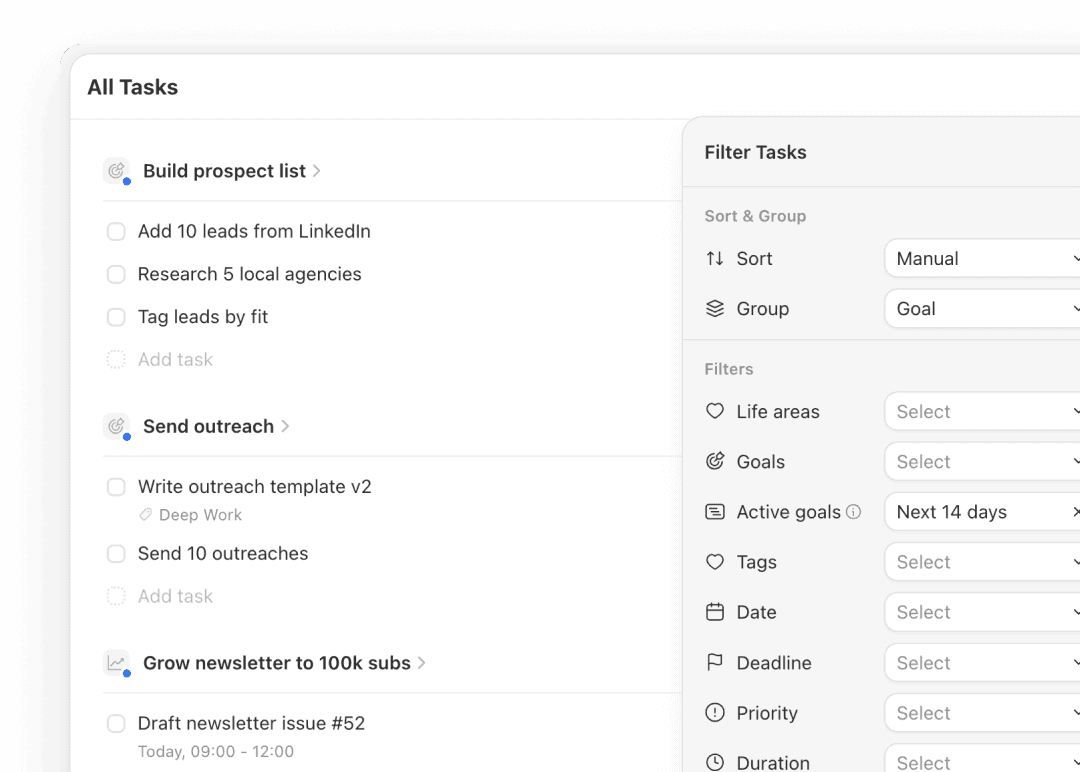
The goal behind every task is always visible

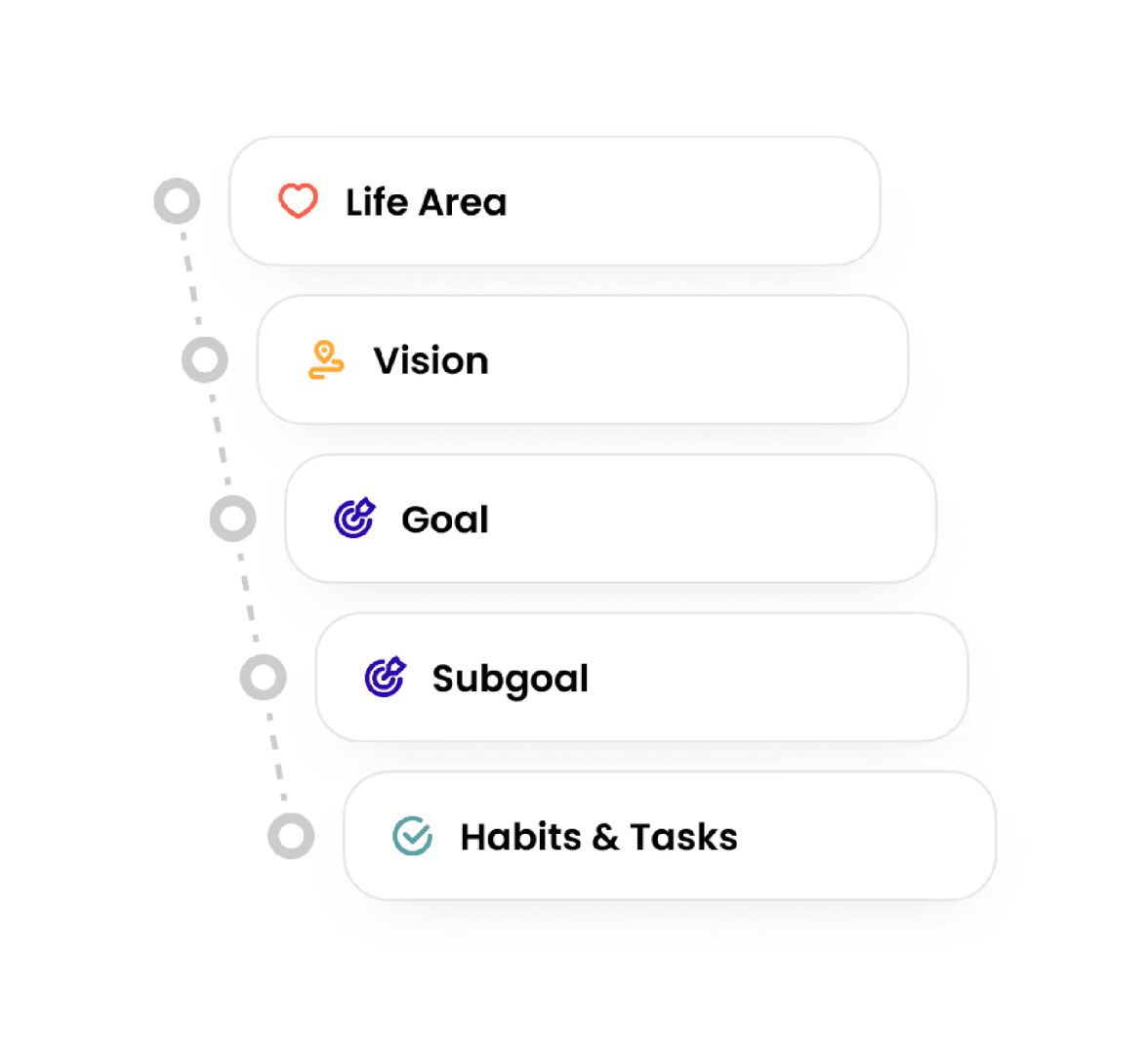
Griply connects tasks to goals, life areas, and the vision behind each area, so you always know why today's work matters.

Griply links every task to a goal and shows that connection in one place.

Apple Reminders stores tasks in flat lists with no link to your goals.

The goal behind every task is always visible

Griply connects tasks to goals, life areas, and the vision behind each area, so you always know why today's work matters.

Griply links every task to a goal and shows that connection in one place.

Apple Reminders stores tasks in flat lists with no link to your goals.

The goal behind every task is always visible

Griply connects tasks to goals, life areas, and the vision behind each area, so you always know why today's work matters.

Griply links every task to a goal and shows that connection in one place.

Apple Reminders stores tasks in flat lists with no link to your goals.

Your whole week planned from a single screen

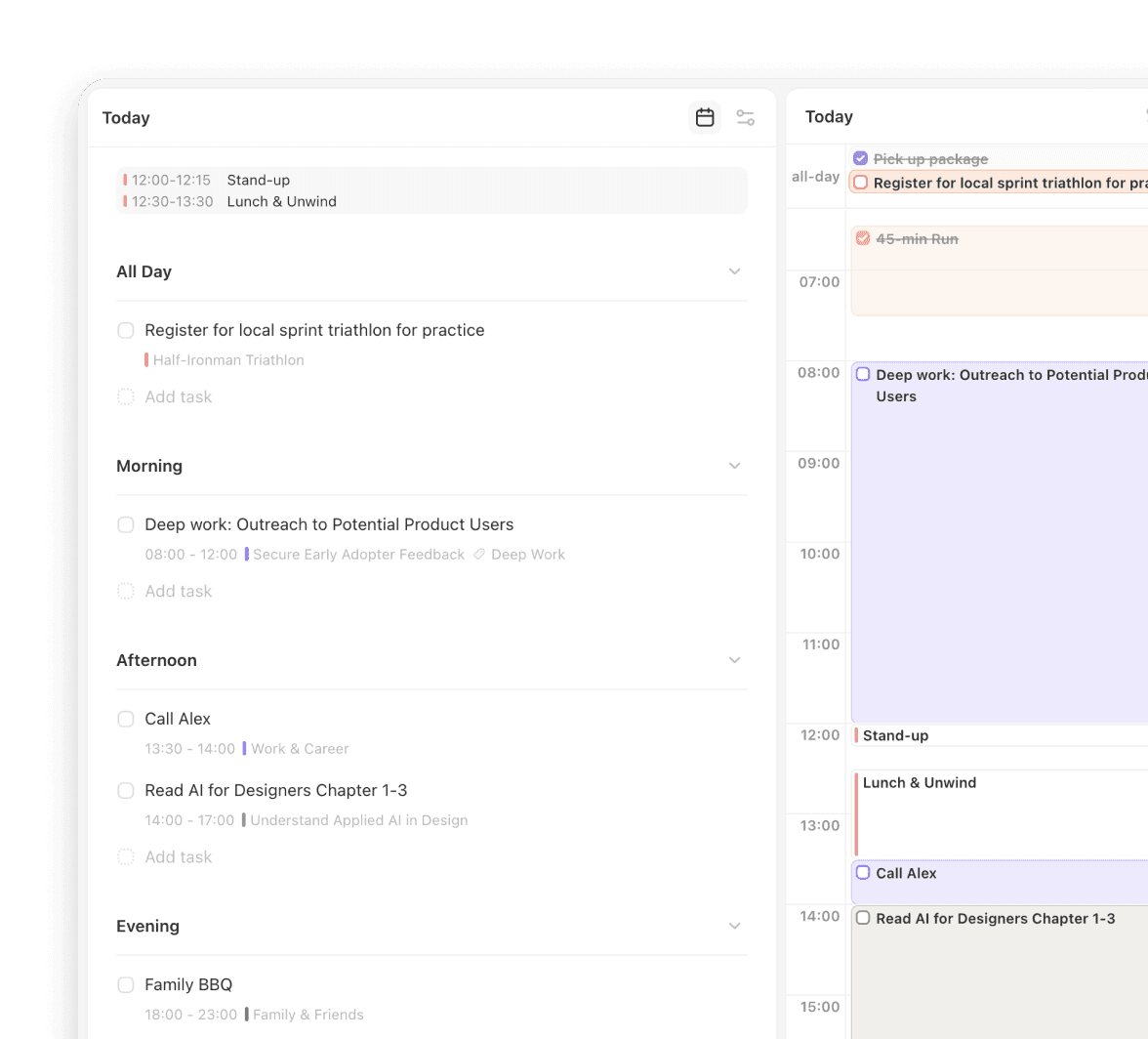
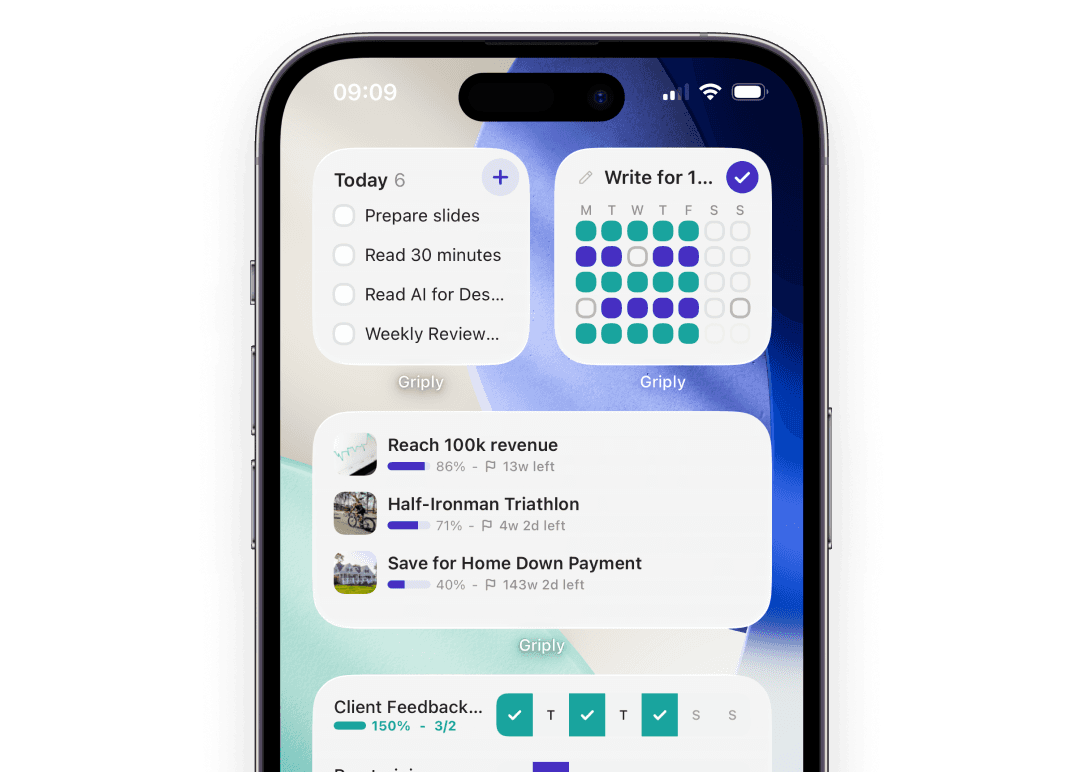
Griply brings goal tracking, task management, habit tracking, and a time-blocked calendar into one stack, so your planning never splits across apps.

Griply gives you goals, tasks, habits, and calendar in a single daily view.

Apple Reminders needs a separate habit app and works alongside Apple Calendar.

Your whole week planned from a single screen

Griply brings goal tracking, task management, habit tracking, and a time-blocked calendar into one stack, so your planning never splits across apps.

Griply gives you goals, tasks, habits, and calendar in a single daily view.

Apple Reminders needs a separate habit app and works alongside Apple Calendar.

Your whole week planned from a single screen

Griply brings goal tracking, task management, habit tracking, and a time-blocked calendar into one stack, so your planning never splits across apps.

Griply gives you goals, tasks, habits, and calendar in a single daily view.

Apple Reminders needs a separate habit app and works alongside Apple Calendar.

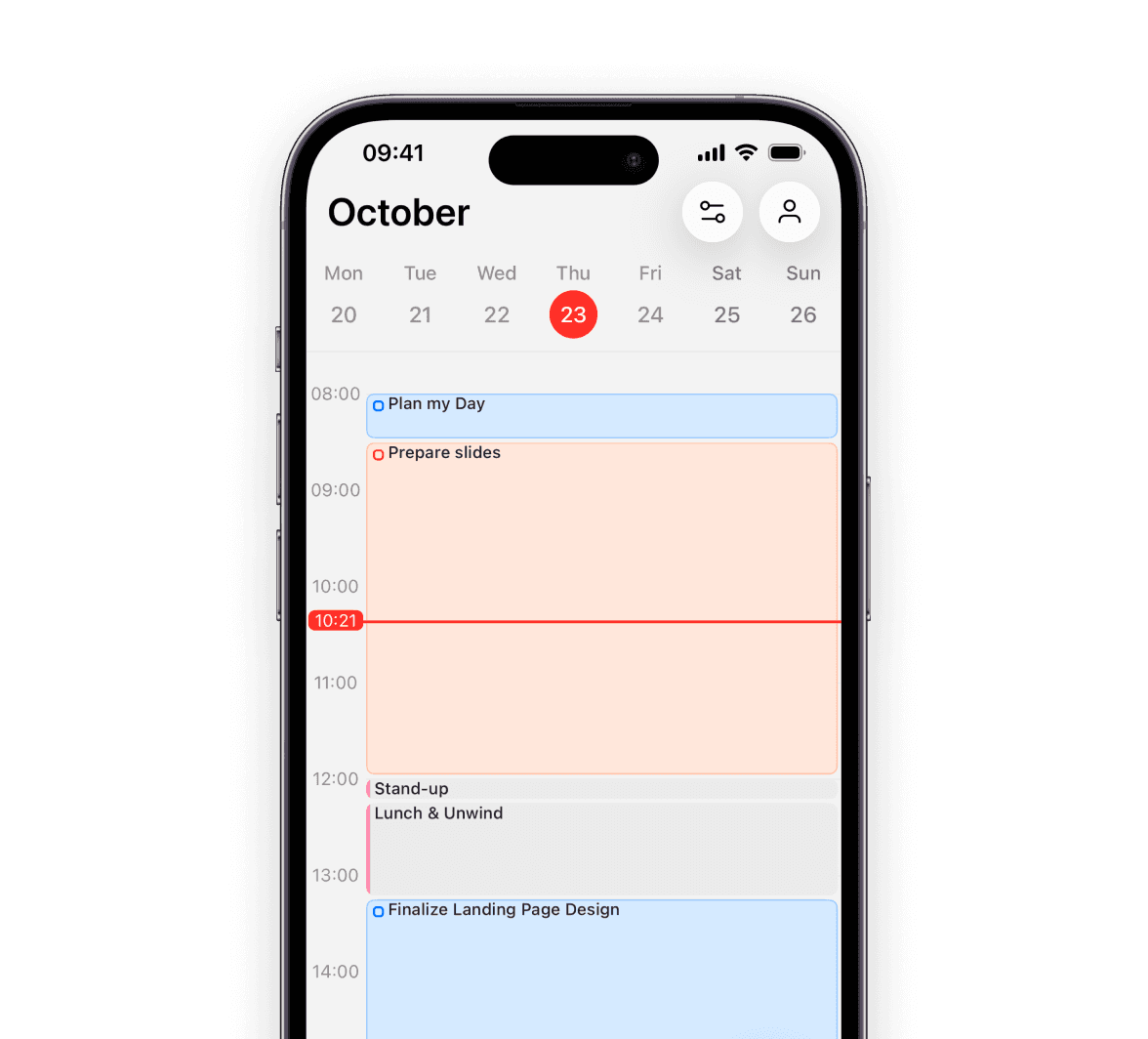
Plan your day with tasks that have actual durations

Griply lets you assign a duration to any task so your calendar shows how long the day actually is.

Griply supports task durations so your time-blocked calendar reflects reality.

Apple Reminders defaults every calendar block to 15 minutes regardless of the task.

Plan your day with tasks that have actual durations

Griply lets you assign a duration to any task so your calendar shows how long the day actually is.

Griply supports task durations so your time-blocked calendar reflects reality.

Apple Reminders defaults every calendar block to 15 minutes regardless of the task.

Plan your day with tasks that have actual durations

Griply lets you assign a duration to any task so your calendar shows how long the day actually is.

Griply supports task durations so your time-blocked calendar reflects reality.

Apple Reminders defaults every calendar block to 15 minutes regardless of the task.

Griply vs Apple Reminders: goals, habits, and platform comparison

Griply vs Apple Reminders: goals, habits, and platform comparison

FeatureGriplyApple RemindersWhat this means for you
Core approachGoal-first hierarchy from life area to daily taskFlat lists of tasks and remindersGriply gives you a why behind everything you do.
Goal trackingBuilt-in goals with progress charts and a roadmapNo goal layerYou can see what you're working toward and how close you are.
Habit trackingHabits connected to goals with completion statsRecurring tasks, no habit layerEvery habit has a purpose and a record to look back on.
Task durationsSet duration per task for real time-blockingFixed 15-minute calendar blocks onlyYour calendar reflects how long things actually take.
Daily planningToday view links tasks to goals in one screenToday list grouped by time of dayGriply shows why each task matters; Reminders shows when.
PlatformiOS, Mac, Windows, WebiPhone, iPad, Mac, Apple Watch onlyGriply works on Windows; Apple Reminders does not.
Goal roadmapGantt timeline of goals and projects across monthsNo long-term planning viewYour whole strategy is visible across months, at a glance.
PricingFree (2 goals / 2 habits); Premium $4.99/moFree for all Apple device ownersBoth have a free option; Apple Reminders costs nothing at all.
SetupGoal hierarchy ready the moment you sign inOpen and go, zero configurationGriply takes a few minutes to set up; Reminders needs none.
Best fitPeople who want goals, tasks, habits, and calendar in one connected systemPeople who want fast Apple-native task captureFor goal-driven execution, Griply is the more purposeful choice.
FeatureGriplyApple RemindersWhat this means for you
Core approachGoal-first hierarchy from life area to daily taskFlat lists of tasks and remindersGriply gives you a why behind everything you do.
Goal trackingBuilt-in goals with progress charts and a roadmapNo goal layerYou can see what you're working toward and how close you are.
Habit trackingHabits connected to goals with completion statsRecurring tasks, no habit layerEvery habit has a purpose and a record to look back on.
Task durationsSet duration per task for real time-blockingFixed 15-minute calendar blocks onlyYour calendar reflects how long things actually take.
Daily planningToday view links tasks to goals in one screenToday list grouped by time of dayGriply shows why each task matters; Reminders shows when.
PlatformiOS, Mac, Windows, WebiPhone, iPad, Mac, Apple Watch onlyGriply works on Windows; Apple Reminders does not.
Goal roadmapGantt timeline of goals and projects across monthsNo long-term planning viewYour whole strategy is visible across months, at a glance.
PricingFree (2 goals / 2 habits); Premium $4.99/moFree for all Apple device ownersBoth have a free option; Apple Reminders costs nothing at all.
SetupGoal hierarchy ready the moment you sign inOpen and go, zero configurationGriply takes a few minutes to set up; Reminders needs none.
Best fitPeople who want goals, tasks, habits, and calendar in one connected systemPeople who want fast Apple-native task captureFor goal-driven execution, Griply is the more purposeful choice.
FeatureGriplyApple RemindersWhat this means for you
Core approachGoal-first hierarchy from life area to daily taskFlat lists of tasks and remindersGriply gives you a why behind everything you do.
Goal trackingBuilt-in goals with progress charts and a roadmapNo goal layerYou can see what you're working toward and how close you are.
Habit trackingHabits connected to goals with completion statsRecurring tasks, no habit layerEvery habit has a purpose and a record to look back on.
Task durationsSet duration per task for real time-blockingFixed 15-minute calendar blocks onlyYour calendar reflects how long things actually take.
Daily planningToday view links tasks to goals in one screenToday list grouped by time of dayGriply shows why each task matters; Reminders shows when.
PlatformiOS, Mac, Windows, WebiPhone, iPad, Mac, Apple Watch onlyGriply works on Windows; Apple Reminders does not.
Goal roadmapGantt timeline of goals and projects across monthsNo long-term planning viewYour whole strategy is visible across months, at a glance.
PricingFree (2 goals / 2 habits); Premium $4.99/moFree for all Apple device ownersBoth have a free option; Apple Reminders costs nothing at all.
SetupGoal hierarchy ready the moment you sign inOpen and go, zero configurationGriply takes a few minutes to set up; Reminders needs none.
Best fitPeople who want goals, tasks, habits, and calendar in one connected systemPeople who want fast Apple-native task captureFor goal-driven execution, Griply is the more purposeful choice.

Why switch from Apple Reminders to Griply?

Why switch from Apple Reminders to Griply?

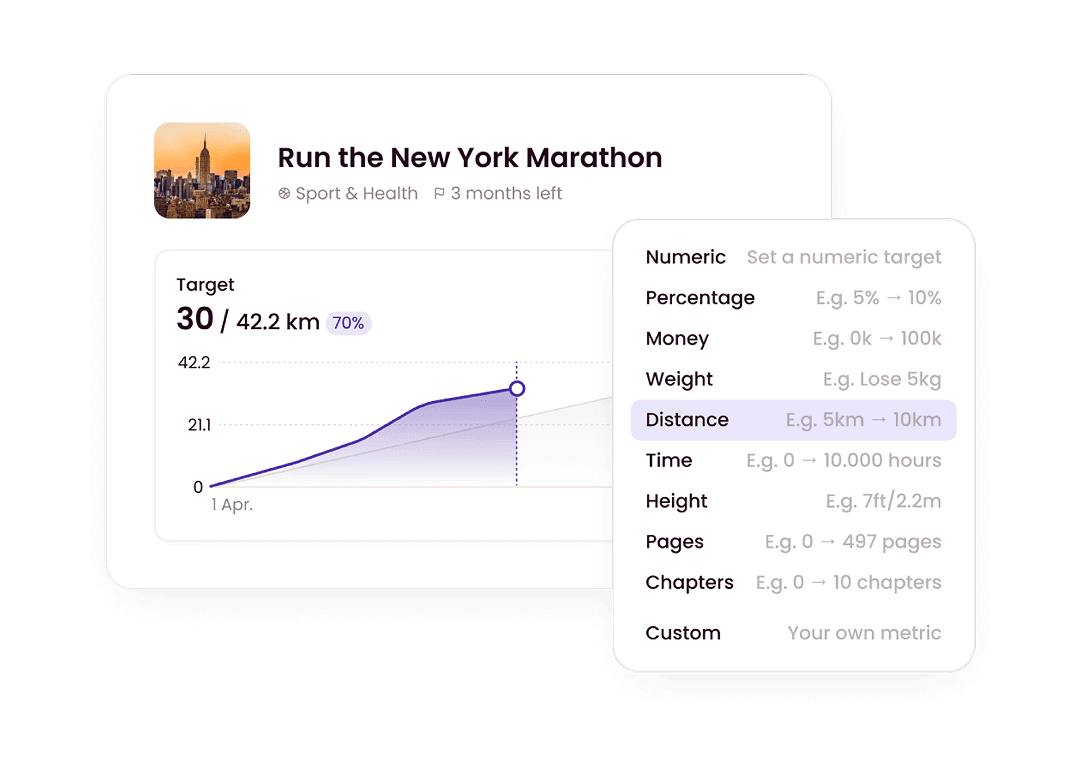
Watch your goals advance in real time

Every goal in Griply has a progress chart that rises as you log entries toward your target. Apple Reminders marks items complete but cannot show real progress.
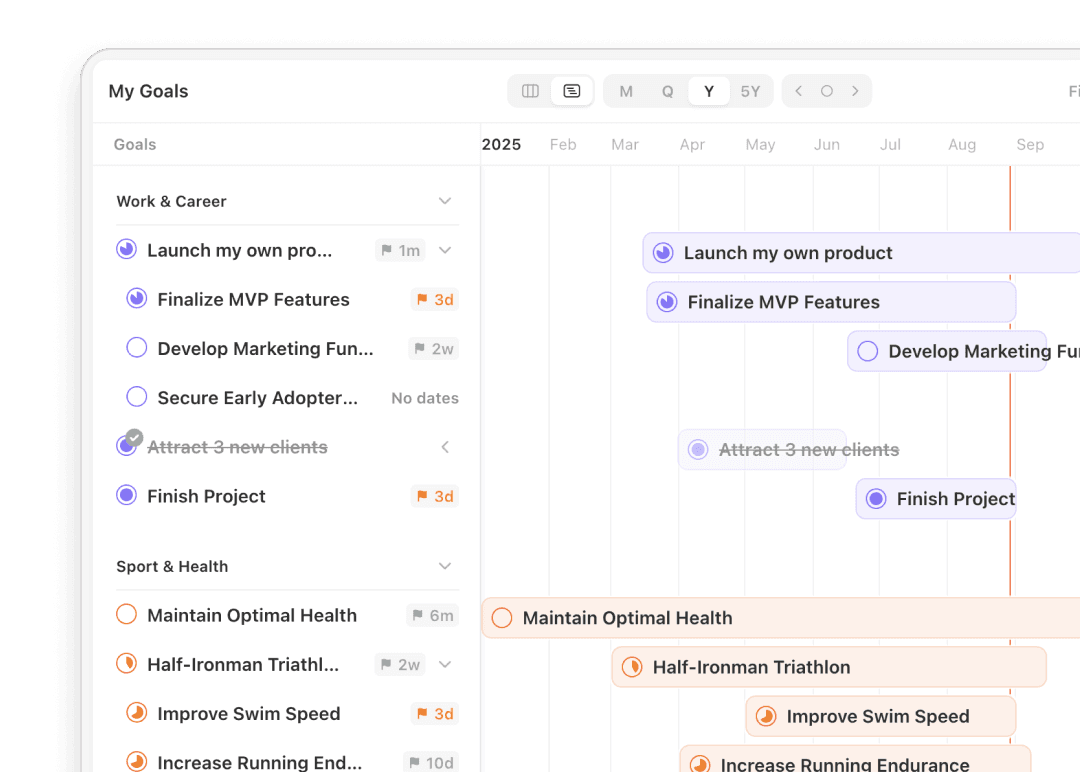
See your entire strategy laid out on a timeline

Griply's roadmap lays out your goals and subgoals across months in a Gantt view. Apple Reminders covers the day and week, with no view for the quarter or year.
Plan from any device, Windows included

Griply is available on iOS, Mac, Windows, and web, so your plan goes wherever you work. Apple Reminders is limited to Apple devices, cutting off anyone on Windows.
Build habits that connect to goals

In Griply, every habit links to a goal and tracks completion rate and perfect weeks. Apple Reminders has recurring tasks but no habit layer with goal connection.
Rated 4.7 across 600+ App Store ratings.

Griply turns your goals into daily action.

Griply keeps your daily work connected to your vision. People come to Griply when a checklist alone is no longer enough and they want certainty that what they do today moves them toward the goals that actually matter.

I've tested so many productivity apps over the years, this is by far the one that best fits my needs. I really like the structure of habits, goals and tasks, and assigning everything to a life area... This app has everything, highly recommend. Wish I would have discovered it sooner.

-  Danielle765

Having worked through loads of habit and to-do apps, alongside a world of different paper planners, I never found one that stuck... I'd tried Notion due to its flexibility, but found myself messing with my system more than using it! A year or so ago I found Griply, an app that finally managed to deliver on all my goal-setting requirements in one neat package... I couldn't recommend it highly enough!

- Tipsy5678

I have been searching Goal planner quite long time. The current market loaded with Task manager or time manager but there is no goal planner... Griply filled all the needs to be a great goal planner and tracker especially its completely aligned with Life OS structure.

- Adhav Mani

Rated 4.7 across 600+ App Store ratings.

Griply turns your goals into daily action.

Griply keeps your daily work connected to your vision. People come to Griply when a checklist alone is no longer enough and they want certainty that what they do today moves them toward the goals that actually matter.

I've tested so many productivity apps over the years, this is by far the one that best fits my needs. I really like the structure of habits, goals and tasks, and assigning everything to a life area... This app has everything, highly recommend. Wish I would have discovered it sooner.

-  Danielle765

Having worked through loads of habit and to-do apps, alongside a world of different paper planners, I never found one that stuck... I'd tried Notion due to its flexibility, but found myself messing with my system more than using it! A year or so ago I found Griply, an app that finally managed to deliver on all my goal-setting requirements in one neat package... I couldn't recommend it highly enough!

- Tipsy5678

I have been searching Goal planner quite long time. The current market loaded with Task manager or time manager but there is no goal planner... Griply filled all the needs to be a great goal planner and tracker especially its completely aligned with Life OS structure.

- Adhav Mani

Rated 4.7 across 600+ App Store ratings.

Griply turns your goals into daily action.

Griply keeps your daily work connected to your vision. People come to Griply when a checklist alone is no longer enough and they want certainty that what they do today moves them toward the goals that actually matter.

I've tested so many productivity apps over the years, this is by far the one that best fits my needs. I really like the structure of habits, goals and tasks, and assigning everything to a life area... This app has everything, highly recommend. Wish I would have discovered it sooner.

-  Danielle765

Having worked through loads of habit and to-do apps, alongside a world of different paper planners, I never found one that stuck... I'd tried Notion due to its flexibility, but found myself messing with my system more than using it! A year or so ago I found Griply, an app that finally managed to deliver on all my goal-setting requirements in one neat package... I couldn't recommend it highly enough!

- Tipsy5678

I have been searching Goal planner quite long time. The current market loaded with Task manager or time manager but there is no goal planner... Griply filled all the needs to be a great goal planner and tracker especially its completely aligned with Life OS structure.

- Adhav Mani

Frequently Asked Questions

Frequently Asked Questions

Frequently Asked Questions

What is better than Apple Reminders?

For quick task capture on Apple devices, very little beats the built-in app. But if you want to connect your daily tasks to bigger goals and track whether you are making progress, Griply is built for that. Griply adds a goal hierarchy, progress charts, habit tracking with statistics, and real time-blocking with task durations.

Is Apple Reminders free?

Yes, Apple Reminders is free for all Apple device owners. Griply also has a free plan that includes 2 goals and 2 habits, so you can build a goal-first system without paying. Griply Premium, which removes those limits and adds the goal roadmap and calendar, is $4.99 a month or $29.99 a year.

Can Griply replace Apple Reminders?

For goals, habits, daily task planning, and weekly reviews, yes. Apple Reminders is handy for quick Siri capture and location-based alerts, which Griply does not do. For turning daily work into progress on the goals that matter, Griply is the system to build on.

Is Apple Reminders good for goal tracking?

No. Apple Reminders is a task and reminder tool: it stores what you need to do but has no concept of goals, life areas, or progress. If you want to know whether your daily tasks are moving you toward a goal by a specific date, a goal-first planner like Griply is built for that.

Does Griply work on Windows?

Yes. Griply is available on iOS, Mac, Windows, and web. Apple Reminders only works on Apple devices, and the iCloud.com web interface is limited. If you work on a Windows machine, Griply keeps your plan accessible.

What is the difference between a reminder app and a goal planner?

A reminder app stores tasks and fires alerts at set times. A goal planner starts with what you want to achieve and works backward to daily action. Apple Reminders does the first very well. Griply does both: it captures and reminds, and it keeps every task connected to the goal it serves.

Griply

Ready to plan your week around what actually matters?

You have two paths. Keep using Apple Reminders for your lists and add separate apps for goals, habits, and a calendar you can actually plan from. Or start with Griply and keep your goals, tasks, habits, and calendar in one place from the moment you sign in.

Still deciding? Join our Community and ask the founders why they built Griply. We’re there every day.