

Table of Contents
The best life planner apps in 2026 are Griply, Timestripe, Notion, ClickUp, TickTick, Sunsama, Todoist, Things 3, Motion, and Any.do. We ranked them first on whether each app connects your daily tasks to the bigger life behind them, then on whether it organizes life into areas, plans across time horizons, and holds everything in one place.
You set up a beautiful system in January, sort every list and note, and by spring you are drifting again, because the app organized your week but never the life underneath it. Most apps that promise to organize your life organize the surface: your lists, your notes, your calendar. Almost none connect that daily activity to the longer-term life you are trying to build.
This page is for anyone who wants their days to add up to a life they chose on purpose. That is where Griply starts, and it is why Griply leads the list.
We make Griply, so it is one of the ten apps on this page. We held it to the same criteria as every other app here, and where a rival does something better, we say so.
The best life planner apps at a glance
Griply: the only planner here that runs on life areas and lets you link your day to the goals behind it; iOS, Android, web, Mac and Windows; free plan (2 goals, 2 habits), Premium $5.99/month or $49.99/year, Lifetime $149.99.
Timestripe: a Horizons system that shows your goals from today out to your lifetime; web, iPhone, iPad, Android, Apple Watch; free tier, Pro from $9.99/month or $49.99/year.
Notion: a build-your-own workspace where you design your life system yourself; iOS, Android, web, Mac, Windows; free for individuals, Plus $12/month or $120/year.
ClickUp: a work platform with goals and docs, doubling as a life OS; web, Mac, Windows, Linux, iOS, Android, Apple Watch; free forever, Unlimited from $7/user/month billed yearly.
TickTick: tasks, habits, a calendar and a focus timer on every device; iOS, Android, Mac, Windows, Linux, web, Apple Watch; free plan (5 habits), Premium $4.99/month or $49.99/year.
Sunsama: a calm guided ritual for planning your days and weeks; iOS, Android, Mac, Windows, Linux, web; no free plan, $22/month or $17/month billed yearly.
Todoist: a fast, clean task manager for capturing and sorting; iOS, Android, Mac, Windows, Linux, web, Apple Watch, Wear OS; free tier, Pro $7/month or $60/year.
Things 3: a polished Apple-only task planner with life Areas; iPhone, iPad, Mac, Apple Watch, Vision Pro; one-time purchase per platform, no subscription.
Motion: an AI that auto-schedules your tasks onto the calendar; iOS, Android, Mac, Windows, web; no free plan, Pro AI from $19/month.
Any.do: a simple, free to-do list, calendar and reminders in one; iOS, Android, Mac, Windows, web, Apple Watch; free plan, Premium from $4.99/month billed yearly.
Comparison
App | Links day to life goals | Organizes by life area | Plans across horizons | All-in-one | Best for |
|---|---|---|---|---|---|
Griply | Yes, tasks can show their goal | Life areas built in | Yes, vision + Timeline (Premium) | Goals, habits, projects, tasks | A life planned around your goals |
Timestripe | Yes, by time horizon | Partly, via boards | Day to lifetime, its core | Goals, notes, calendar | Seeing day-to-lifetime in one view |
Notion | No, you build it yourself | Build your own | Manual | Notes, databases, tasks | Designing your own life system |
ClickUp | Partly, work-shaped goals | No, work spaces | No | Tasks, goals, docs | Running life inside a work tool |
TickTick | No | No, flat lists | No, calendar only | Tasks, habits, calendar | Tasks, habits and a focus timer on every device |
Sunsama | Weekly objectives only | No | Day and week only | Guided daily planner | A calm weekly planning ritual |
Todoist | No, its Goals beta was retired | No, projects | No | Tasks only | A fast, clean task list |
Things 3 | No | Areas, on Apple only | No | Tasks only | A polished Apple task planner |
Motion | No | No, projects | No | AI tasks, calendar, docs | Letting AI schedule your work |
Any.do | No | No, flat lists | No | To-do plus calendar | A simple free organizer |
What makes a good life planner app
It is the same trap each time: these apps organize the surface of your life, your lists, notes and calendar, and leave the life underneath untouched. Four things separate the ones that organize a life from the ones that only tidy a week.
Does it connect your day to your life goals? Without that link, you can run a spotless system and still drift, because nothing tells you whether today served anything you actually want. This is where these ten apps differ most. We checked it by building a real goal in each one, then seeing whether a daily task could point back at it. Griply and Timestripe are the two that close the loop: in Griply your tasks can show the goal and life area they serve, and Timestripe lines your days up under goals that run out to your lifetime. ClickUp has a goals feature shaped for work, Sunsama reaches up to the week, and the rest organize the day on its own.
Does it organize your life into areas? A life is not one flat list; it is health, work, relationships and money pulling at once, and an app that keeps them separate helps you see where you are overinvested. Griply builds life areas in as the top of its structure, and Things 3 has Areas that come close, though only for grouping. Notion and ClickUp let you build areas yourself, and the task managers keep a single project list.
Does it plan across time horizons? A plan that only sees today cannot tell you whether this week is moving a five-year hope. Timestripe is the standout here, with five nested horizons from day to lifetime, and Griply pairs a long-term vision for each life area with a Timeline (Premium) that lays your goals and projects out over months and years. Everyone else is anchored to the next few days.
Is it all-in-one? Juggling a separate app for tasks, habits, notes and goals is its own kind of disorganization. Notion and ClickUp are the widest, holding notes, databases and tasks in one workspace. Griply brings goals, habits, projects and tasks together, and TickTick pairs tasks and habits with a calendar. The dedicated task managers do one thing well and leave the rest to other apps.
How we tested and chose these apps
We started from the independent roundups that rank for organizing your life and kept the apps they most often name. In August 2026 we installed and used all ten ourselves: in each app we set up a real life area or two, tried to connect a daily task up to a longer-term goal, and looked at how far ahead it let us plan. Every price, platform and rating was read from the vendor's own page or the US App Store on 21 August 2026 and checked again on 9 October 2026, and where an app cannot do something, we say so. All prices are in US dollars and can differ per country. We scoped the list to apps that plan and organize your life, so pure calendar apps and paper planners are left out.
The best life planner apps in 2026
Griply
Best for: A life planned around your goals.
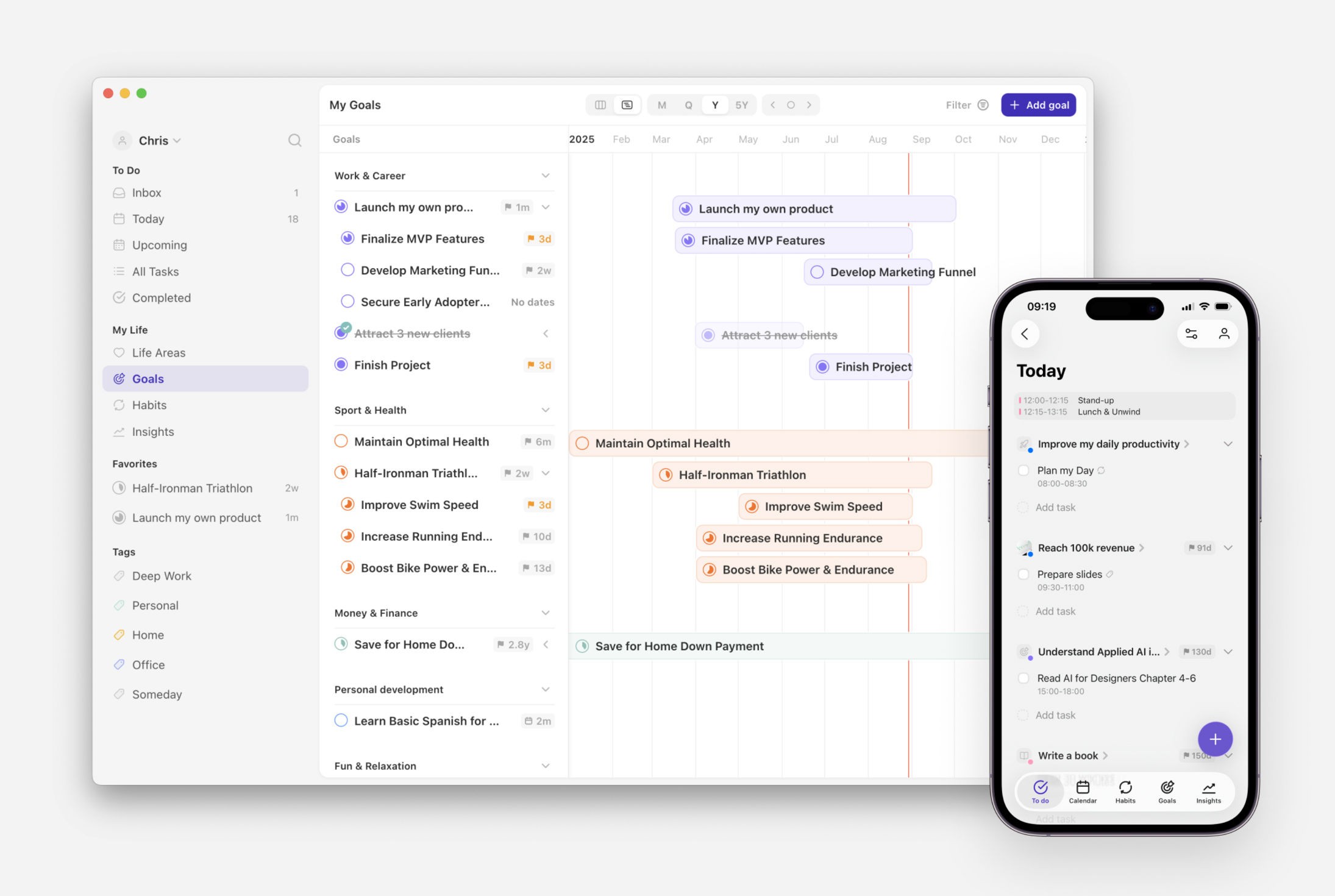
Griply is a goal-first life planner built on a single structure: Life Area → Vision → Goal → Subgoal → Project → Task/Habit. You start from the areas of your life and the vision for each, set goals under them, and link your daily tasks and habits to the goal they serve. A day in Griply then shows you what to do and which goal each linked task is for. It is built for people who want their planning to answer to something bigger than this week.

Strengths:
Griply starts from life areas, so health, work and relationships each get their own place.
Each goal carries a number and a deadline, charted against the pace you need.
Tasks and habits can link to a goal, subgoal, project or life area.
Goals, habits, projects, tasks and a time-blocked Today live in one app.
The Timeline (Premium) lays your goals and projects out over months and years.
Limitations:
Griply has no native iPad app yet, so iPad users run the web app.
The goal-first structure takes more setup than someone who wants a quick list needs.
Pricing: Free (2 goals, 2 habits, 5 projects, unlimited tasks, the 9 preset life areas); Premium $5.99/month or $49.99/year; Lifetime $149.99 one-time
Platforms: iOS, Android, web, Mac, Windows
Rating: 4.7 on the App Store (US storefront, 207 ratings, October 2026)
Bottom line: Pick Griply if you want to organize your life around goals you can measure, from the life area down to today. If you want a notes-and-database canvas to design yourself, Notion fits better.
Timestripe
Best for: Seeing your life from today out to a lifetime.
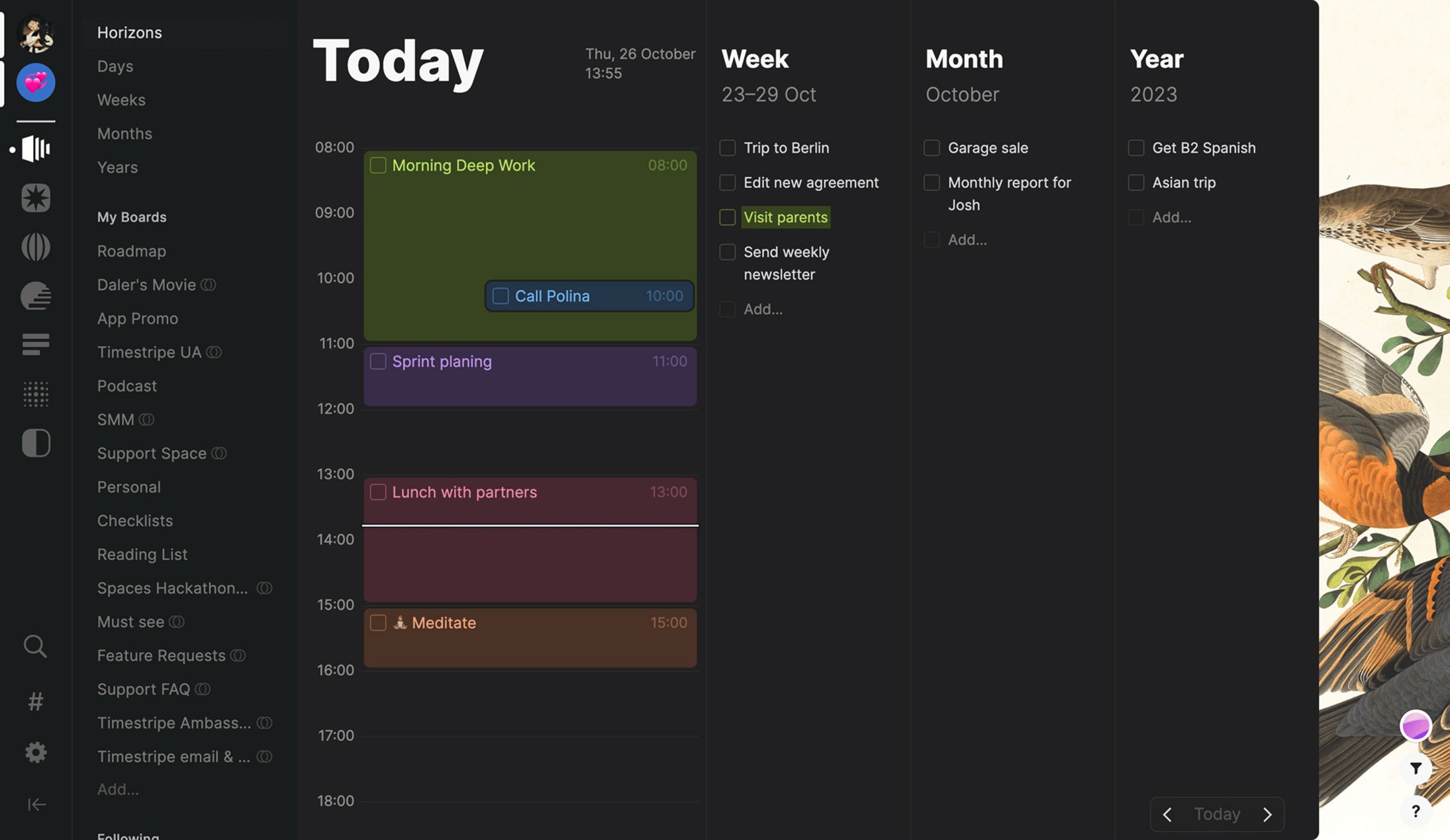
Timestripe is a planner built around Horizons: you set goals at five nested levels, from day and week up to year and lifetime, so a single view shows how today ladders into who you want to become. It adds boards for lists, notes on your goals, a calendar, and guided programs called Climbs that walk you through longer ambitions. It is the pick for people who think in decades.
Strengths:
Timestripe's Horizons view puts five nested levels, from day to lifetime, in one screen.
Goals link between boards and the calendar, so daily items line up under longer-term aims.
Boards, notes, a calendar and guided Climbs sit in one place.
Limitations:
Timestripe has no habit tracker, and its goals carry no measurable target.
Organizing around several horizons plus boards is more to learn than a flat list.
Pricing: Free tier; Pro from $9.99/month or $49.99/year
Platforms: web, iPhone, iPad, Android, Apple Watch
Rating: 4.5 on the App Store (US storefront, 123 ratings, October 2026)
Bottom line: Pick Timestripe if seeing your day sitting under a lifetime goal is what keeps you oriented. If you want measurable goal progress or real habit tracking, it stays a horizons-and-goals canvas.
Notion

Best for: Designing your own life system.
Notion is a page editor with databases underneath, and for organizing your life that means you can model areas, goals, habits and reviews however you like, feeding one set of data into many views. A huge template library means you rarely start from a blank page. It is the choice for people who enjoy building a system exactly to their taste and will keep it running.
Strengths:
Notion gives one person free databases, relations and rollups, enough for a life OS.
A vast template library aimed at personal organization, so you can start from someone else's system.
One workspace holds notes, databases and tasks together.
Limitations:
Nothing in Notion connects your day to a goal; you design and maintain every structure.
The upkeep is yours, and a system left untended quietly falls apart.
Pricing: Free for individuals; Plus $12/month or $120/year
Platforms: iOS, Android, web, Mac, Windows
Rating: 4.8 on the App Store (US storefront, 90,344 ratings, October 2026)
Bottom line: Pick Notion if building and maintaining your own life system is the part you enjoy. If you want the structure to come built in and connect to your goals for you, that is exactly what it leaves to you.
ClickUp
Best for: Running your life inside a work tool.
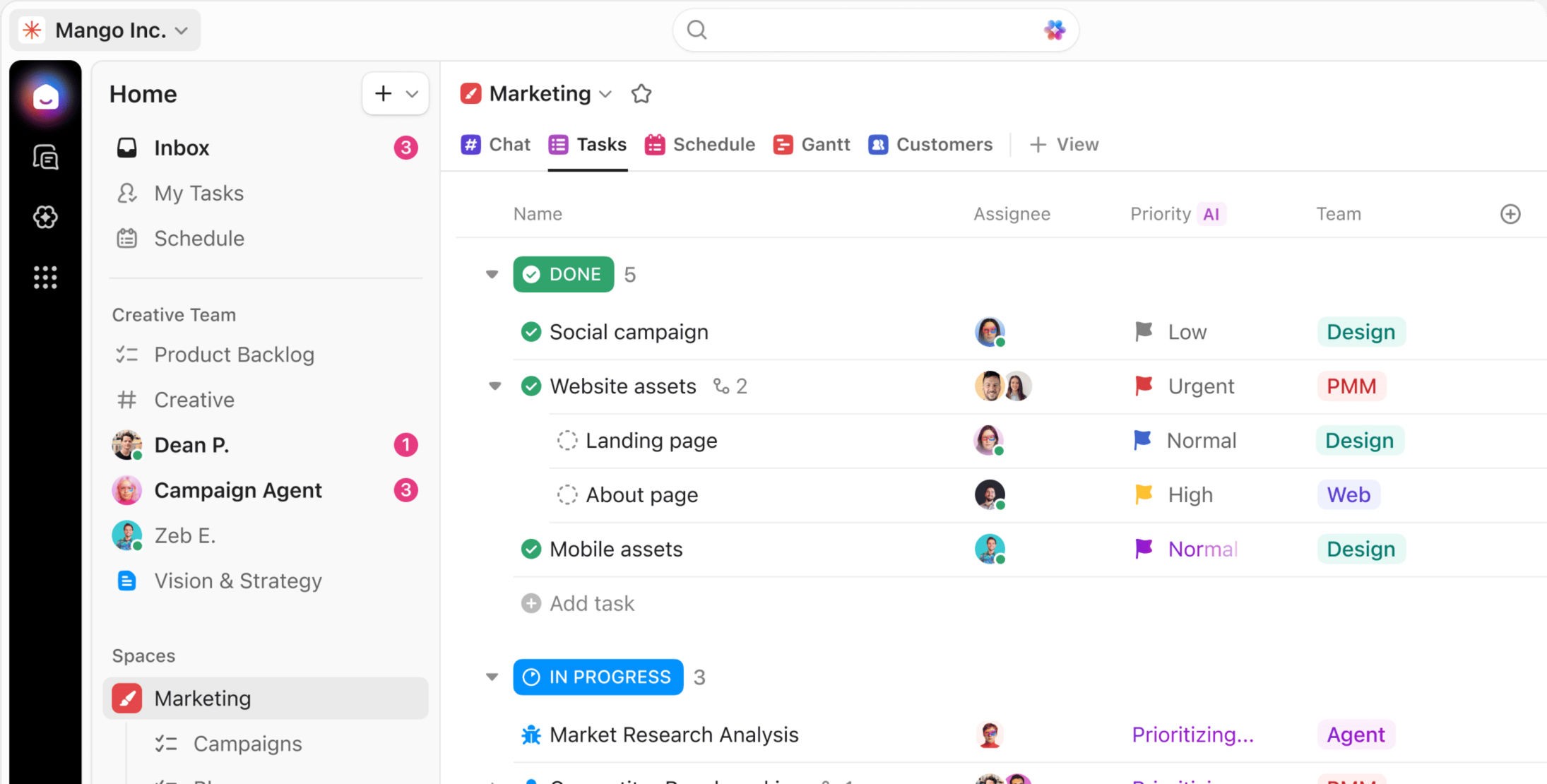
ClickUp is a work platform that replaces a stack of team tools, and personal organization is one thing it can hold. Its Goals feature carries real targets that tasks and lists can feed, and its docs and spaces can double as a life dashboard. It suits people whose work already lives in ClickUp and who would rather not open a second app for the rest.
Strengths:
A ClickUp goal carries number targets, and finished tasks can fill them automatically.
Tasks, goals and docs sit in one platform, so work and life share a workspace.
The free plan includes Goals, capped at 100 uses.
Limitations:
ClickUp has no built-in habit tracker, and its spaces are shaped for work.
It charges per seat, so one person pays a team price to organize their own life.
Pricing: Free forever (Goals limited to 100 uses); Unlimited $10/user/month or $7/user/month billed yearly; Business $19/user/month or $12/user/month billed yearly
Platforms: web, Mac, Windows, Linux, iOS, Android, Apple Watch
Rating: 4.7 on the App Store (US storefront, 9,863 ratings, October 2026)
Bottom line: Pick ClickUp if your work already lives there and you want goals and docs in the same place. If you want a built-in habit tracker or a structure built around your life, it is heavier than it needs to be.
TickTick
Best for: Tasks, habits and a focus timer on every device.
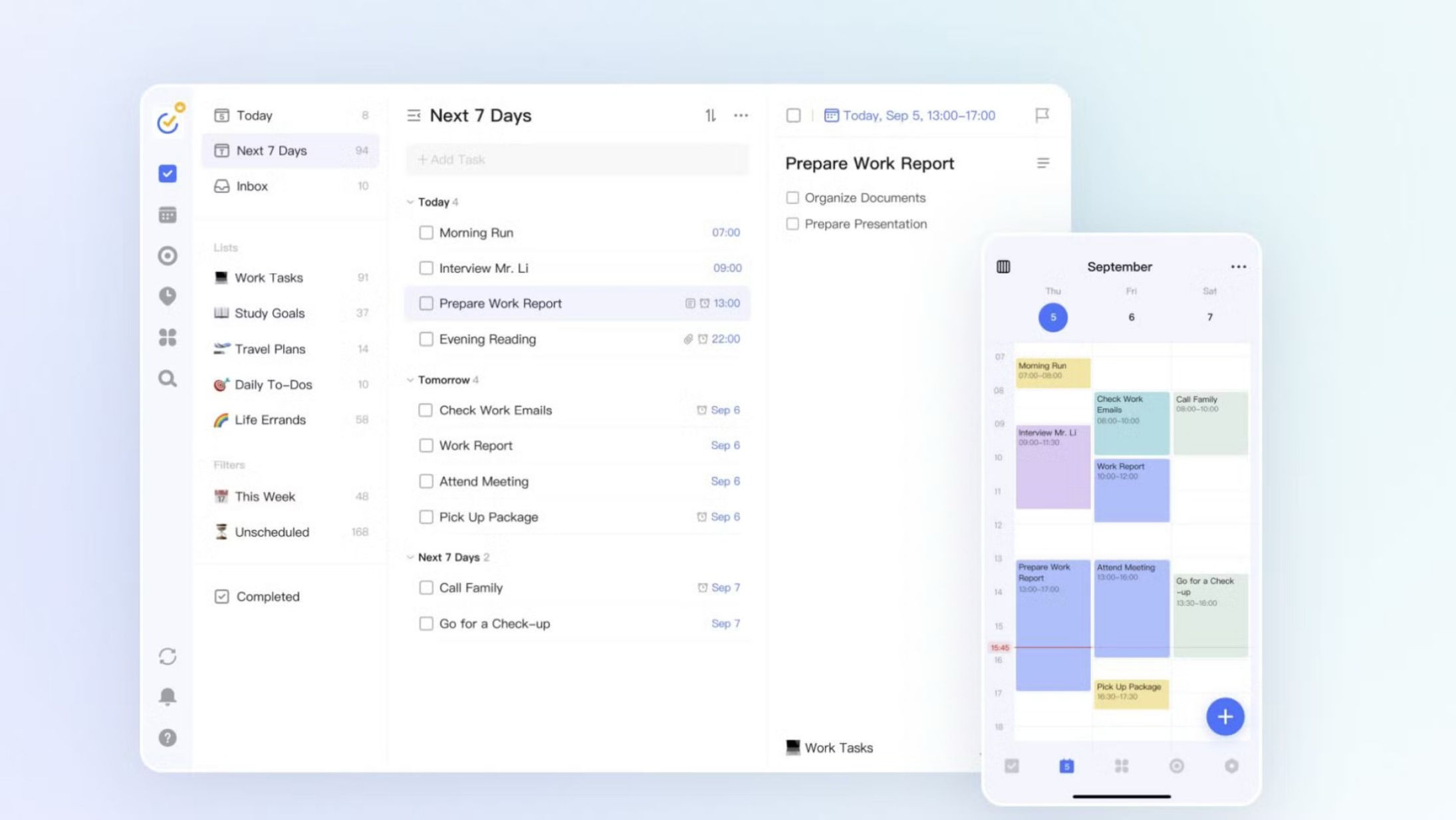
TickTick is a task manager with a calendar and a habit tracker built in, so tasks, routines and your schedule share one low-cost app that runs almost everywhere. It plans the day well and keeps your habits beside your to-dos. It is a lot of organizer for the price, if you do not need a goal layer above it all.
Strengths:
TickTick puts tasks, habits, a calendar and a Pomodoro timer in one app.
TickTick covers more platforms than most apps here, Linux and Apple Watch included.
Real calendar views with time blocks, plus Google Calendar integration.
A useful free plan, with up to 5 habits and 9 lists.
Limitations:
TickTick keeps habits and tasks in separate modules, with no link to a longer-term goal.
It organizes into flat lists, with no areas of your life.
Pricing: Free (9 lists, 99 tasks each, 5 habits); Premium $4.99/month or $49.99/year
Platforms: iOS, Android, Mac, Windows, Linux, web, Apple Watch
Rating: 4.9 on the App Store (US storefront, 46,288 ratings, October 2026)
Bottom line: Pick TickTick if you want tasks, habits and a focus timer in one low-cost app on every device. If you want your lists to answer to a bigger goal, it keeps them flat.
Sunsama
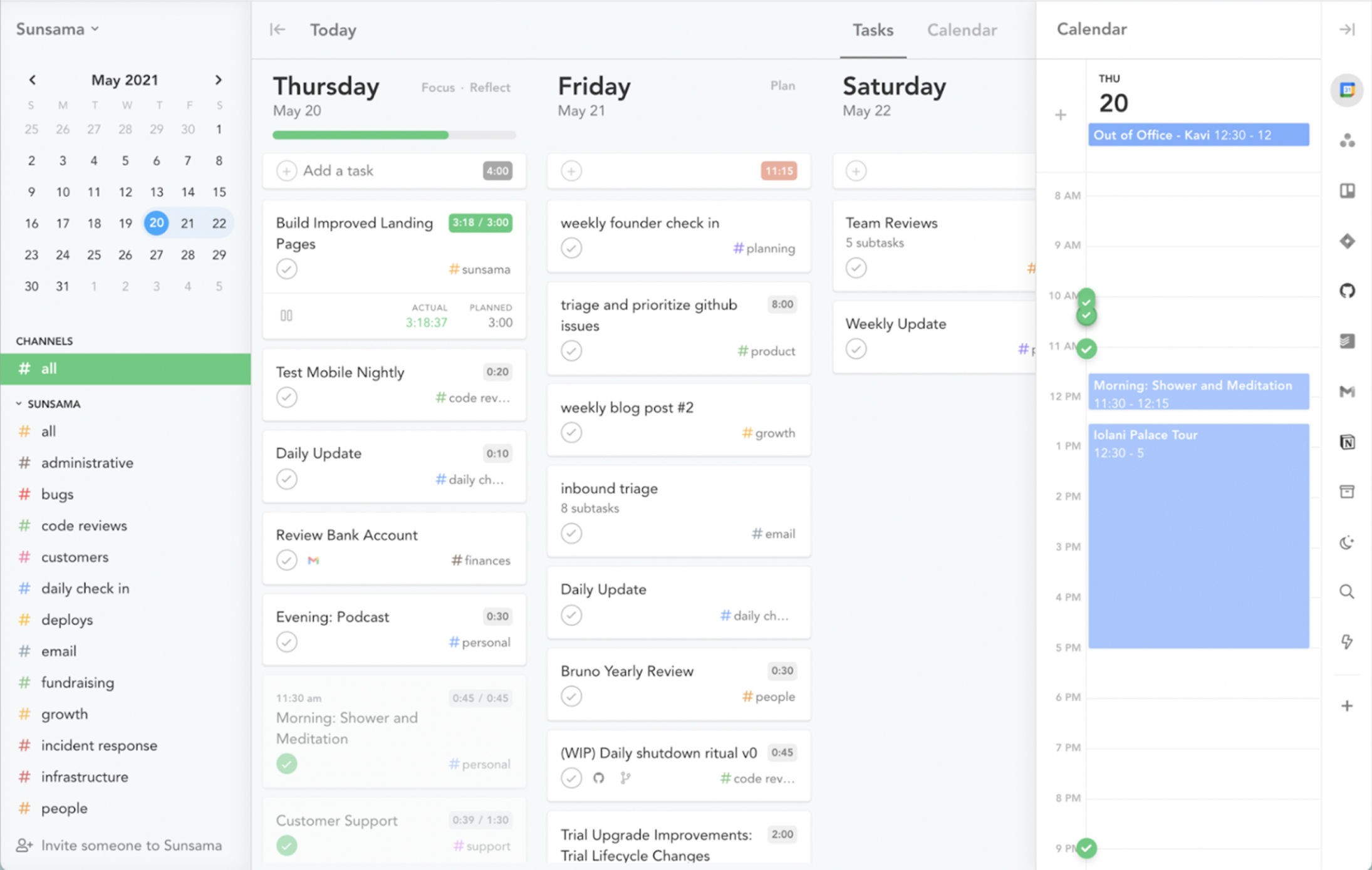
Best for: A calm weekly planning ritual.
Sunsama is a guided planner for people who want to slow down and plan on purpose. Each day you pull tasks from your other tools, time-block them onto a calendar, and set objectives for the week, closing the day with a shutdown and reflection. It organizes the near term beautifully, if the near term is what you want organized.
Strengths:
Sunsama gives you a structured daily and weekly ritual, with an end-of-day shutdown and reflection.
Pulls tasks from many other tools into one place and time-blocks them.
Two-way calendar sync in a single unified view.
Limitations:
Sunsama's longest horizon is weekly objectives, so it never reaches the year.
No free plan, and the price sits at the premium end.
Pricing: No free plan (14-day trial); $22/month or $17/month billed yearly
Platforms: iOS, Android, Mac, Windows, Linux, web
Rating: 4.5 on the App Store (US storefront, 510 ratings, October 2026)
Bottom line: Pick Sunsama if a calm weekly ritual is what keeps you on track. If you want to organize a whole life, not one strong week, it stops short.
Todoist
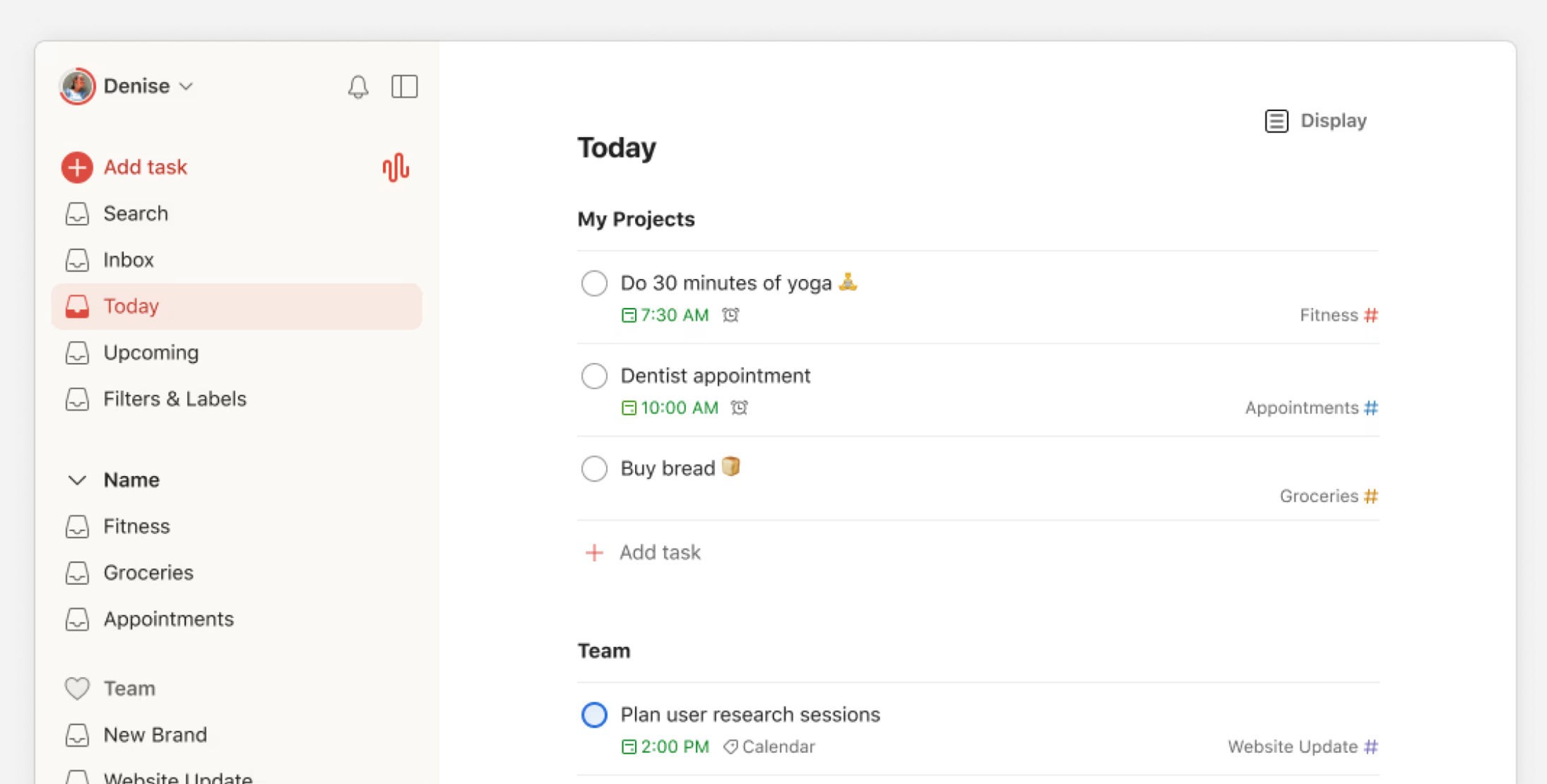
Best for: A fast, clean task list.
Todoist is a fast, well-built task manager for capturing what you need to do and sorting it into projects. Its Today view gathers everything due, and natural-language entry makes adding tasks quick. It is the pick for people who want a reliable list, and who keep their bigger planning somewhere else.
Strengths:
Todoist has quick natural-language capture and a clean Today view for planning the day.
Runs almost everywhere, from Linux and Windows to Apple Watch and Wear OS.
A generous free tier for personal use.
Limitations:
Todoist retired its Goals beta in July 2026, so nothing links tasks to a goal.
It organizes into projects, with no life areas and no habit tracker.
Pricing: Free (5 personal projects); Pro $7/month or $60/year
Platforms: iOS, Android, Mac, Windows, Linux, web, Apple Watch, Wear OS
Rating: 4.8 on the App Store (US storefront, 129,584 ratings, October 2026)
Bottom line: Pick Todoist if you want a fast, dependable list to work from. If you want that list tied to the life behind it, it is built to stop at the task.
Things 3
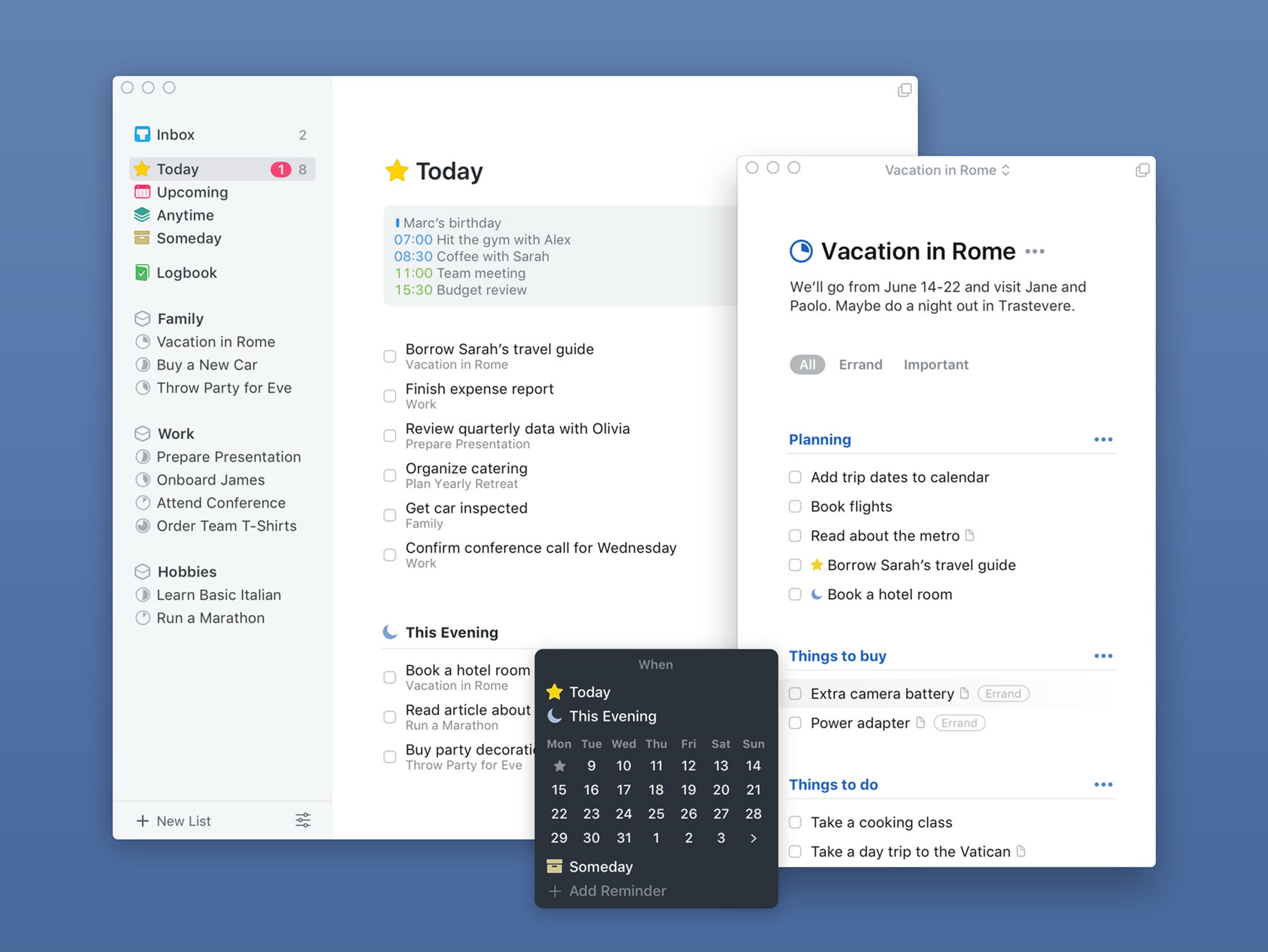
Best for: A polished Apple task planner.
Things 3 is an award-winning, Apple-only task manager with one of the cleanest designs anywhere. It organizes work into Areas, its own take on the spheres of your life, with Projects underneath, and it shows your calendar events above your to-dos. It is a one-time purchase prized for how good it feels to use.
Strengths:
Things 3 groups tasks into Areas, the closest a task manager here gets to life areas.
A clean Today view that shows calendar events above your to-dos.
A one-time purchase with no subscription.
Limitations:
Things 3 is Apple-only, with no Android, Windows or web app.
Areas group but do not connect to a goal, and there are no habits or long-term horizons.
Pricing: One-time purchase, no subscription: iPhone $9.99, iPad $19.99, Mac $49.99
Platforms: iPhone, iPad, Mac, Apple Watch, Vision Pro
Rating: 4.8 on the App Store (US storefront, 27,996 ratings, October 2026)
Bottom line: Pick Things 3 if you are all-in on Apple and want the most polished task planner, with Areas to sort your life. If you want goals, habits or other platforms, it is not built for that.
Motion
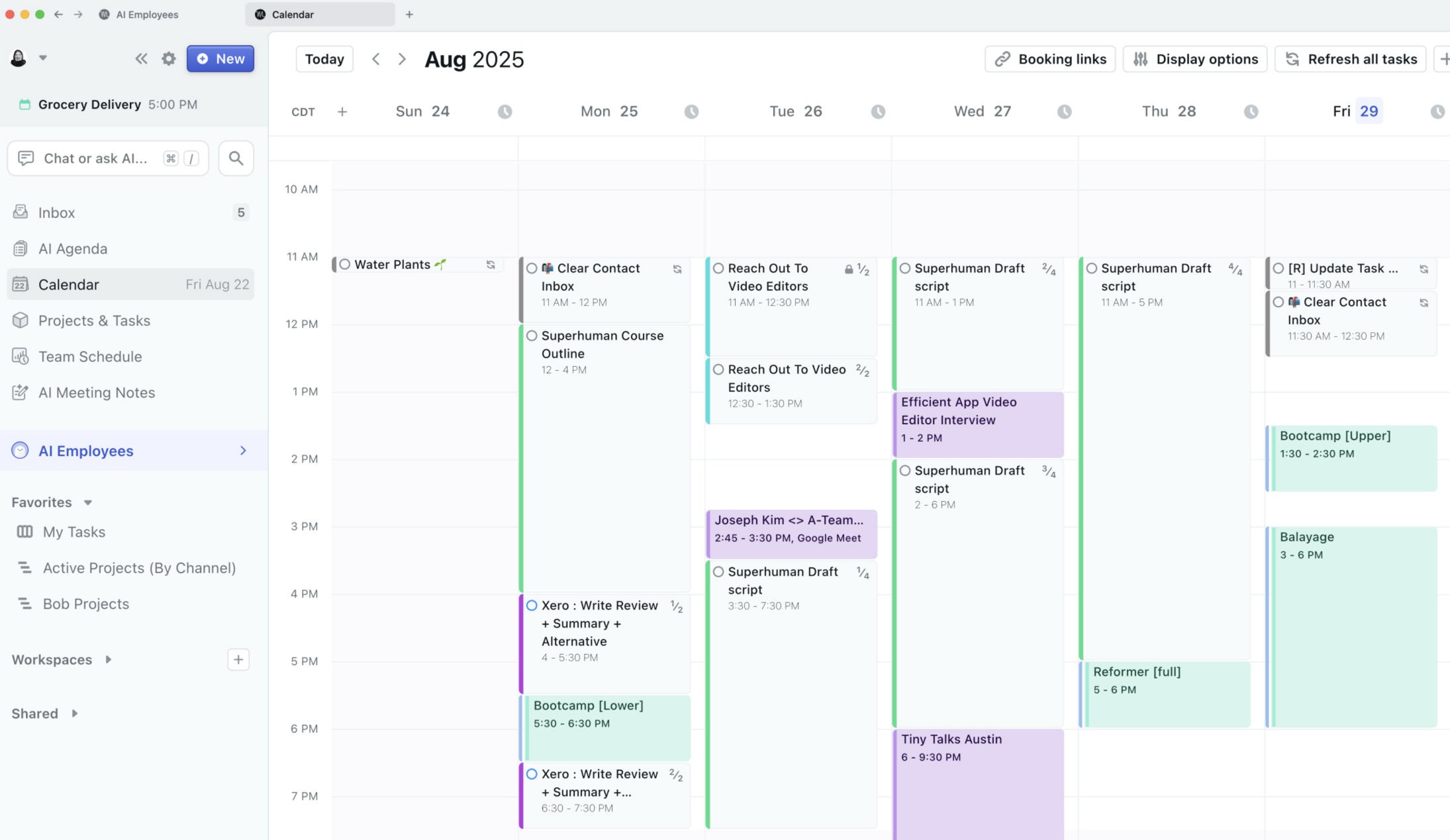
Best for: Letting AI schedule your work.
Motion hands the planning to software: its AI takes your tasks, projects and deadlines and time-blocks them onto your calendar, re-optimizing as the day changes. It is aimed at people who would rather approve a schedule than build one, and who live mostly on a computer. It organizes your working hours well, less so the life around them.
Strengths:
Motion's AI time-blocks your tasks automatically and re-plans the day as it changes.
Combines tasks, projects and calendar into one auto-built view.
Runs on iOS, Android, Mac, Windows and the web.
Limitations:
Motion has no goal, life-area or habit layer; it schedules from priority and deadlines.
No free plan, and the mobile app is a companion to the computer version.
Pricing: No free plan; Pro AI from $19/seat/month on Motion's site, or $44.99/month or $294.99/year through the App Store
Platforms: iOS, Android, Mac, Windows, web
Rating: 4.1 on the App Store (US storefront, 1,856 ratings, October 2026)
Bottom line: Pick Motion if you want an AI to build and defend your working calendar. If you want to organize your whole life, not only the workday, its automation is not aimed there.
Any.do
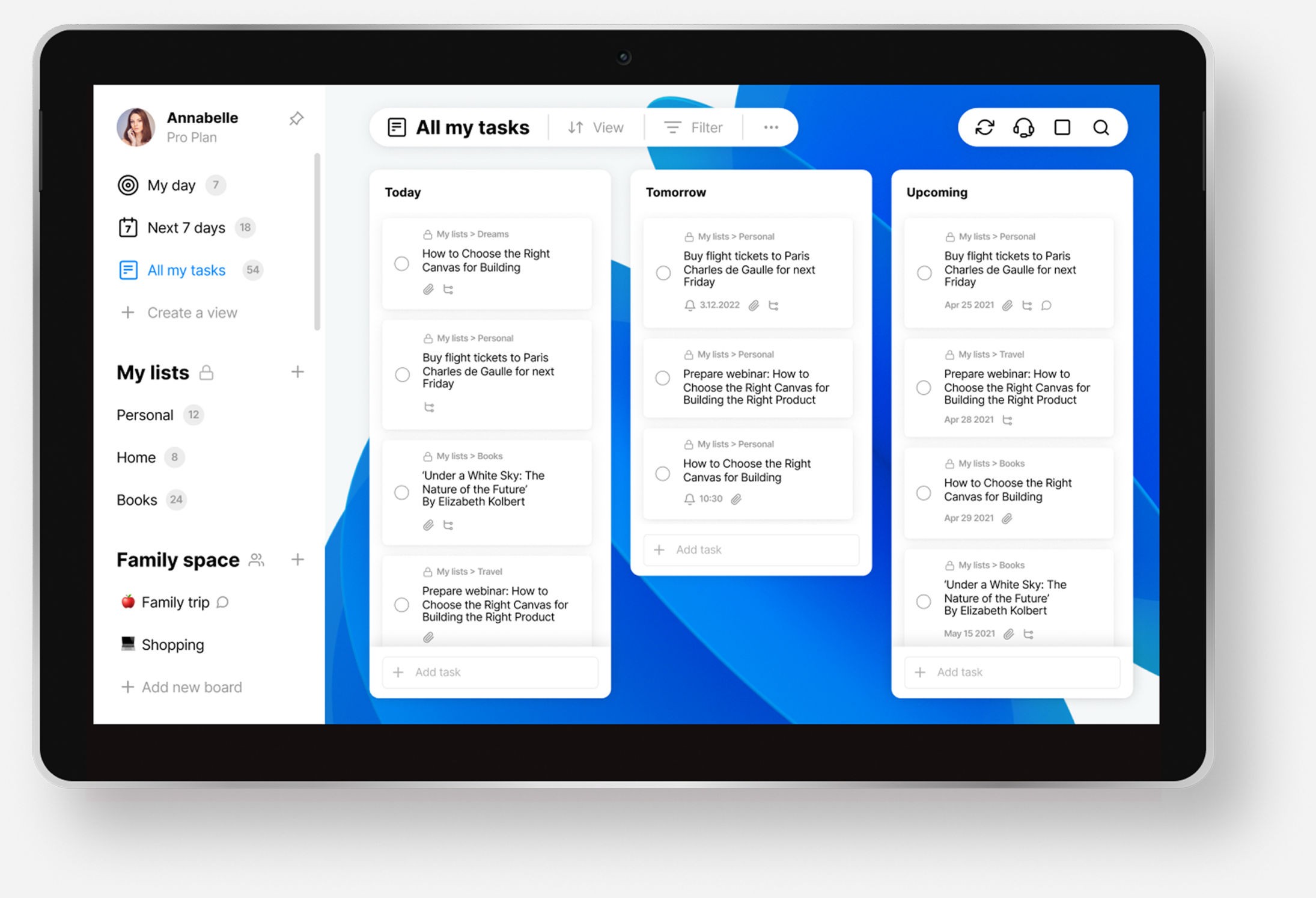
Best for: A simple, free organizer.
Any.do combines a to-do list, calendar and reminders into one clean, free app, with a "My Day" view that asks you to pick today's priorities. It shows your tasks and events together and keeps the essentials on the free plan. It suits people who want a light, no-cost place to keep life in order.
Strengths:
Any.do is a free organizer with tasks, reminders and a calendar in one.
Shows your calendar events and to-dos together.
Broad reach across iOS, Android, Mac, Windows, the web and Apple Watch.
Limitations:
Any.do has no goal or life-area layer to connect the day to a larger life.
Recurring tasks need Premium.
Pricing: Free plan; Premium $7.99/month or $4.99/month billed yearly
Platforms: iOS, Android, Mac, Windows, web, Apple Watch
Rating: 4.6 on the App Store (US storefront, 50,530 ratings, October 2026)
Bottom line: Pick Any.do if you want a free, simple list and calendar to keep life tidy. If you want areas, goals or long-term planning, it stays basic.
How to choose
The right life planner depends on how far ahead you want to plan and how much structure you want built in.
If you want your day tied to measurable life goals, pick Griply. It runs on life areas and lets you link your tasks to the goals behind them.
If you want to plan in nested horizons from today out to your whole life, pick Timestripe for its Horizons view.
If you want to design your own system, pick Notion for its databases and templates, or ClickUp if it doubles as your work tool.
If you want tasks, habits and a Pomodoro timer on every device, Linux and Apple Watch included, pick TickTick.
If you want a calm weekly ritual, pick Sunsama.
If you are all-in on Apple and want a polished task list, pick Things 3 for its Areas and design.
If you want something free and simple, pick Any.do.
Why a tidy system is not an organized life
The strange thing about organizing your life is that you can do it perfectly and still feel lost. You sort every list, label every note, color-code the calendar, and a month later the projects that matter have not moved and the year is drifting. A tidy system is not an organized life. Most of these apps are built to arrange what is in front of you, and they arrange it well, but arranging is not the same as directing, and the life you are actually trying to build stays in your head, disconnected from the app doing the sorting.
Look at what each app connects. Todoist built a way to link tasks to a goal and then retired it. Task managers like Things 3 and Motion organize the surface superbly and stop there. Notion and ClickUp hand you the pieces and ask you to assemble the meaning yourself. Only two apps here start from the life you are planning: Timestripe lines your days up under goals that run to your lifetime, and Griply builds the whole system on life areas, so a task can show the goal and the part of your life it serves. That is the difference between an app that keeps you tidy and one that keeps you pointed somewhere. When the year ends, clean lists won't tell you whether it went well. A life planner should show you whether you moved the life you meant to build.
Organize your life around what matters to you
Griply is for people who want their days to add up to a life they chose, not a tidy set of lists. If that is you, start free and set up one life area around a real goal this week.
Start for free, and if you want ideas or accountability, come say hello in the Griply community.
What is the best app to organize your life?
Griply is the best for organizing life around goals, since it runs on life areas and lets you link your tasks to the goals behind them. Timestripe is best for planning across horizons out to a lifetime, Notion for designing your own system, and TickTick for tasks and habits on every device.
What is a life OS?
A life OS, or life operating system, is a single app or system that holds all the parts of your life, your goals, projects, tasks, habits and notes, in one connected structure. Griply is a goal-first life OS; Notion is a build-your-own one.
What is the best free app to organize your life?
Griply is the best free app to organize your life around measurable goals: its free plan includes the nine preset life areas, 2 goals with progress charts, 2 habits, 5 projects and unlimited tasks. Any.do and Notion have the most generous free plans for lists and notes.
What is the difference between a life planner and a to-do list app?
A to-do list captures what you need to do. A life planner organizes those tasks into the bigger picture, usually by life area and long-term goal, so today connects to the life you are building. Most to-do apps stop at the list.
Can you use Notion as a life planner?
Yes, Notion can model an entire life system with its databases and templates, and many people do. The trade-off is that you design and maintain the structure yourself, and nothing connects your day to a goal unless you build that link.
What is the best life planner for long-term goals?
Griply is the best for long-term goals you can measure: each goal has a target and a deadline, even years out, charted against the pace you need, under a vision for that life area. Timestripe is best for seeing your plans across horizons out to a lifetime.
Is there a life planner app for Android?
Yes. Griply has been on Google Play since September 2026, with the same features as on iPhone, so your life areas, goals and daily plan come with you. Notion, ClickUp, TickTick, Sunsama, Todoist, Timestripe, Motion and Any.do also run on Android; Things 3 is Apple-only.
What is the best life planner for Apple devices?
Griply is the best pick if you want your days tied to your goals: it runs natively on iPhone and Mac, on iPad through the web app, and on Android and Windows. Things 3 is the most polished Apple-only task manager; Timestripe covers iPhone, iPad and Apple Watch.
What is the best app to connect daily tasks to long-term goals?
Griply is built for this: you can link a task to a goal with a number and a deadline, and finished tasks can count toward that number on the goal's progress chart. Timestripe connects them by time horizon instead, from day to lifetime.